Appeals and expungements
Let defendants and counsel appeal a closed case, decide appeals as a judge, and expunge records so they drop out of the CAD while a copy is kept for staff.
Once a court case is closed, it's locked. An appeal is the way to have it heard again: the defendant's player or counsel on the case files one, and a judge grants or denies it. Granting it reopens the case.
Expungement is for records that should no longer count against someone. A judge expunges the record, it disappears from lookups, and a copy is kept in the control panel with the judge's reason.
Before you start#
- Courts needs to be turned on under Modules on the CAD settings page.
- For appeals, Appeals needs to be on in Court settings. It's on to start with.
- Judges need a role with the Sit as a judge: run court cases and expunge records permission.
File an appeal#
Only closed cases can be appealed, and only one appeal can be waiting on a case at a time.
The defendant's player:
- In the Civilian panel, open Court cases.
- Open the closed case.
- Under Grounds for appeal, write why the verdict or sentence was wrong.
- Click File appeal.
The prosecutor or defence on the case:
- Open the case from My cases on your desk.
- Write the Grounds for appeal.
- Click File appeal.
The appeal gets a number like AP-0002. The defendant's player sees A judge will decide it. If Court notices is on, the others on the case are told.
Decide an appeal#
Judges decide appeals on the court docket in the CAD, or on the case page in the control panel.
In the CAD:
- On the Select a panel screen, click Court docket under Desks.
- Waiting appeals are listed under Appeals waiting, oldest first.
- Write your Reasons for the decision in the box.
- Click Grant or Deny and confirm.
In the control panel: open the case from Courts. Under Appeals, type the Reason for the decision and click Grant or Deny.
| Decision | What happens |
|---|---|
| Grant | The case opens again with the status Filed. The verdicts and sentence stay as they were until the judge changes them. |
| Deny | The case stays closed. |
Either way, the decision and reasons are kept on the appeal, and everyone on the case gets a notice if Court notices is on. A granted case is run and closed again like any other. See Run a court case.
Expunge a record#
Judges expunge records from a court case, so the person needs a case on file. The case can be open or closed.
In the CAD:
- Open the case on the court docket.
- Under Defendant's record, type the Reason, needed to expunge.
- Click Expunge next to the record and confirm.
In the control panel:
-
Click Courts under CAD in the left sidebar and open the case.
-
Under Defendant's record, type a Reason next to the record.
-
Click Expunge and confirm.
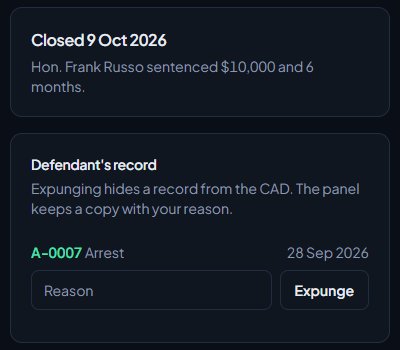
The defendant's record lists every record on file for that person, not just the one the case is about.
What expunging does#
- The record disappears from lookups and from the person's file in the CAD.
- A copy is kept, with the charges, the officer, the date and the judge's reason. You'll find it under Expunged records on the Courts page in the control panel.
- An expunged record can't be sent to court again.
- Every expungement is recorded in your activity log, from the CAD or the control panel.
Undo an expungement#
If a record was expunged by mistake, open Courts in the control panel. Under Expunged records, click Undo next to it and confirm. The record shows on lookups again, the kept copy is removed, and the undo is recorded in your activity log.
Something not working?#
There's no File appeal box. The case isn't closed yet, Appeals is off in Court settings, or an appeal on the case is already waiting.
It says "Give the grounds for the appeal." Write the grounds before clicking File appeal.
It says "An appeal on this case is already waiting for a judge." Wait for the judge to decide the first one.
It says "Give the reason for the decision." Judges need to write their reasons before granting or denying.
It says "Give the reason for the expungement." Type a reason next to the record first.
It says "That record is already expunged." Someone has already expunged it. It's listed under Expunged records on the Courts page.
I want to expunge a record but the person has no court case. Expunging is done from a case. File a case for the person first, for example from the arrest or citation, then expunge from there.
See also
Run a court case
Set up courts for your community, send arrests, citations and warrants to court, and run a case as a judge: hearing, plea, verdicts, sentence and fines.
Prosecution, defence and plea bargains
Give members the prosecutor and defence desks, take cases, make and answer plea offers, have a judge approve them, and let prosecutors apply for warrants.
See who changed what in the activity log
The activity log records changes made in your community, who made them and when. Here's how to read it and who can see it.
Can't find what you need?
Open a ticket in our Discord and someone from the team will help. Found a bug, or missing a feature? Tell us on the feedback board.