Run a court case
Set up courts for your community, send arrests, citations and warrants to court, and run a case as a judge: hearing, plea, verdicts, sentence and fines.
Courts turn an arrest, citation or warrant into a case that a judge hears. Officers send the paperwork to court, the judge sets a hearing, records the plea and a verdict on each charge, and passes a sentence. Prosecutors and defence lawyers can take the case too, and the defendant's player can follow it from their Civilian panel.
Judges work cases from the court docket in the CAD or from the Courts page in the control panel. It's a civilian job, so judges don't need to be in a department or on duty.
Before you start#
- Courts needs to be turned on under Modules on the CAD settings page. It's on to start with.
- Judges need a role with the Sit as a judge: run court cases and expunge records permission.
- To change court settings, you need the Set up the CAD: call types, statuses, penal code, designs and AOP permission.
Set up your courts#
-
Open your control panel and click CAD settings in the left sidebar.
-
Click Records & courts along the top, then Court settings.
-
Set what your court roles are called: Judges are called, Prosecutors are called and Defence is called. For example, "District Attorney" and "Public Defender". These names are used across the CAD.
-
Turn on the features you want. See the table below.
-
Click Save settings.
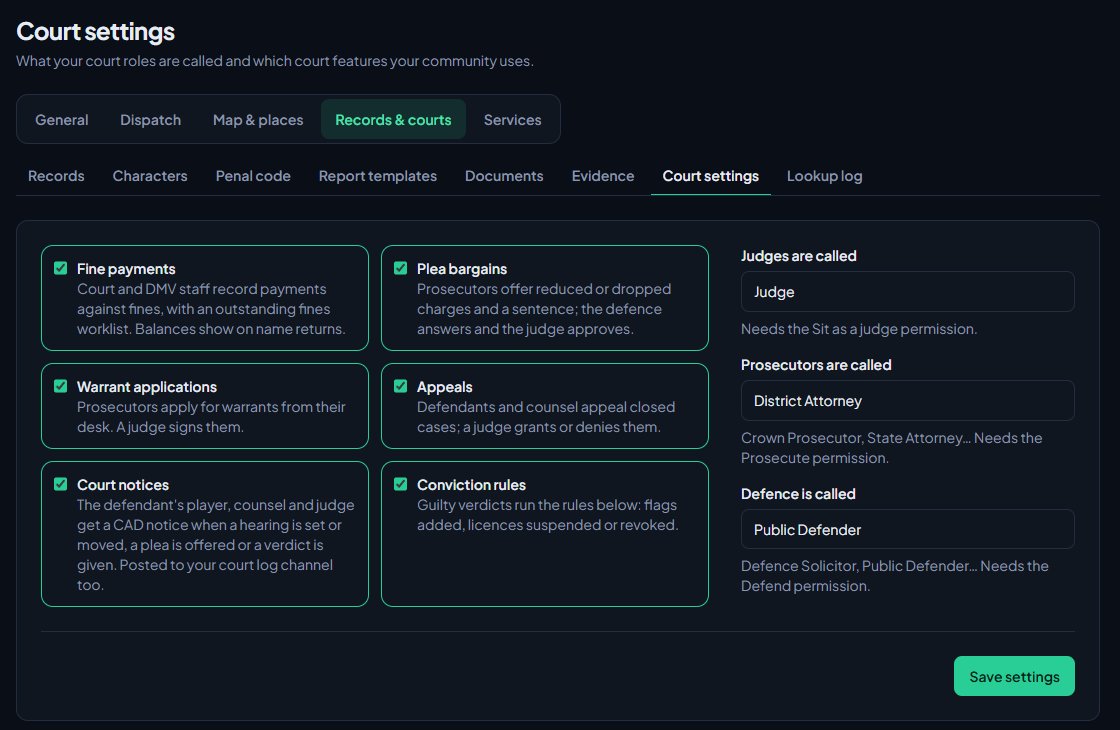
| Switch | What it does |
|---|---|
| Fine payments | Court and DMV staff record payments against fines, with an outstanding fines worklist. |
| Plea bargains | Prosecutors offer reduced or dropped charges and a sentence, the defence answers and the judge approves. |
| Warrant applications | Prosecutors apply for warrants from their desk, and a judge signs them. |
| Appeals | Defendants and counsel appeal closed cases, and a judge grants or denies them. |
| Court notices | The defendant's player, counsel and judge get a CAD notice when a hearing is set or moved, a plea is offered or a verdict is given. Also posted to your Court cases log channel. |
| Conviction rules | Guilty verdicts run the rules on this page: flags added, licences suspended or revoked. Off to start with. |
Conviction rules#
Under the switches is a list of conviction rules. Each one matches a charge class (infraction, misdemeanor or felony) or a penal code like VC 23152, and then adds a person flag, suspends a licence for a number of days, or revokes a licence. They only run when Conviction rules is on.
Send a case to court#
Officers in the CAD: open the person's file from a name search. Under their court cases, arrests, citations and warrants that can go to court have a Send to court button. Click it, and you'll see a message with the case number, like CR-0005.
Judges: type the paperwork number, like A-0012, C-0040 or WR-0003, into the box on the docket and click File case. In the control panel, use File a case on the Courts page.
Only arrests and citations can go to court, plus warrants that are active or served. A record waiting for approval, or one that's been expunged, can't be filed. Each piece of paperwork can only have one open case at a time.
Open the docket#
In the CAD: on the Select a panel screen, click Court docket under Desks. You can also open it from the sections along the top of the Civilian panel.
In the control panel: click Courts under CAD in the left sidebar.
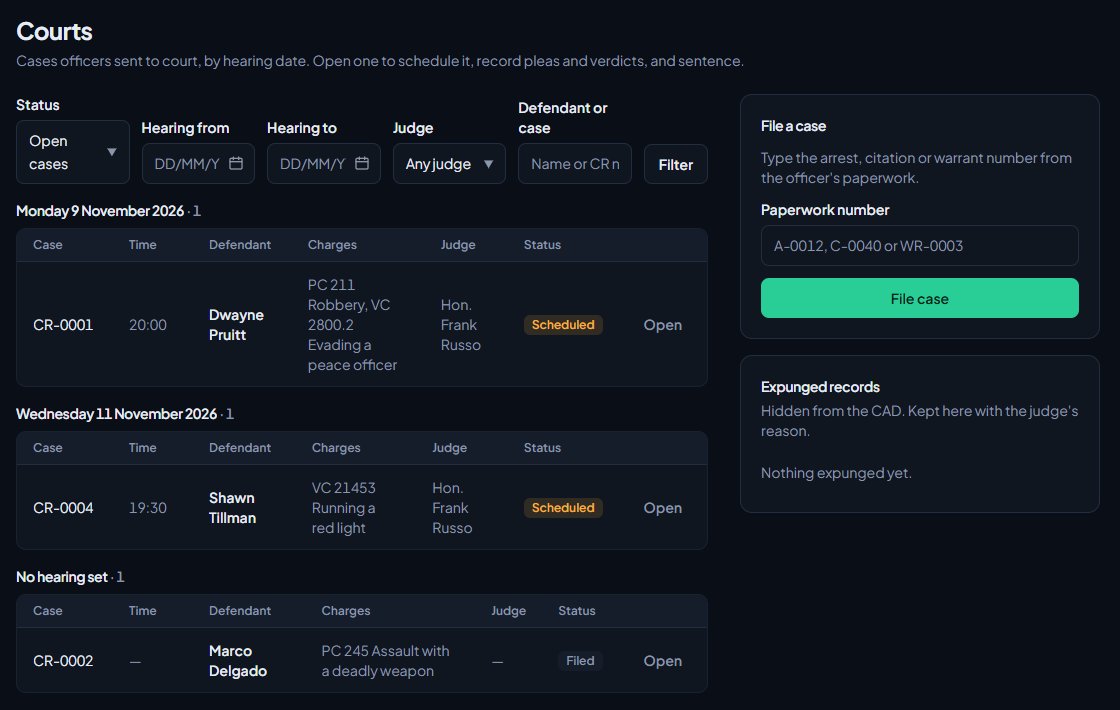
The docket lists cases by hearing date, with unscheduled cases last. In the CAD, switch between Open, Closed and All, or pick a date. In the control panel you can filter by status, hearing dates, My cases, or search by defendant or CR number.
Run a case#
-
Open the case.
-
Set the Status: Filed, Scheduled, In session or Closed.
-
Set the Hearing date and time. You need one to set the status to Scheduled.
-
Pick the prosecutor and defence lawyer from the lists, or type a name underneath. See Prosecution, defence and plea bargains.
-
Record the Plea: Guilty, Not guilty or No contest.
-
Under Charges and verdicts, pick a verdict for each charge: Guilty, Not guilty or Dismissed.
-
Fill in the sentence: Fine, Jail (months) and Sentence notes. In the CAD, click Add up guilty charges to fill the fine and jail time from the charges marked guilty.
-
Add any Case notes.
-
Click Save case.
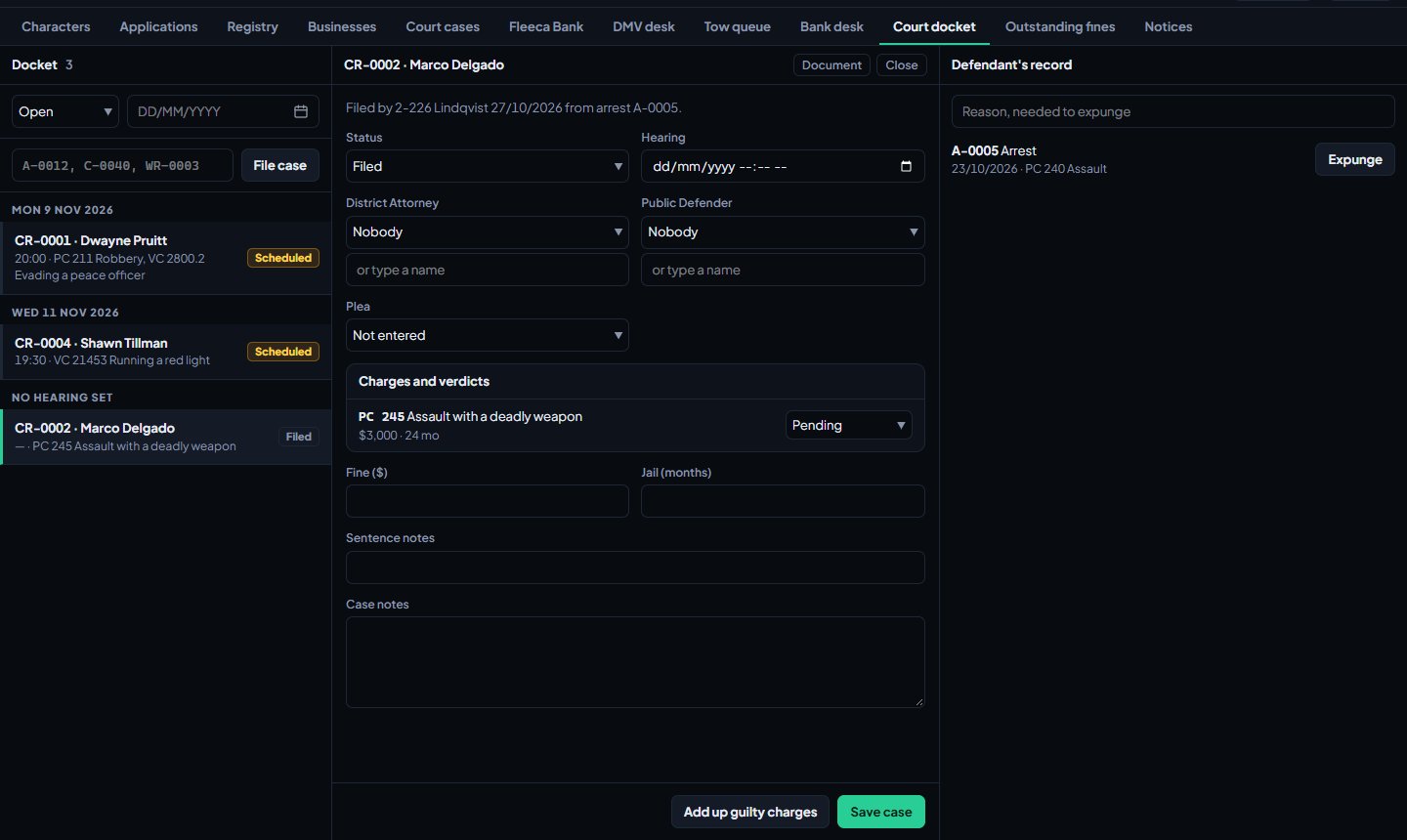
To finish, set the status to Closed and save. Every charge needs a verdict first.
A closed case can't be changed. The only way to open it again is an appeal that a judge grants. See Appeals and expungements.
What happens when a case closes#
- If Conviction rules is on, the rules run against the guilty charges. What they did is listed on the case under Applied at verdict.
- If Court notices is on, the defendant's player, the prosecutor, the defence and the judge get a notice with the verdict, except whoever closed it.
- The verdict is posted to Discord if you've picked a channel for Court verdicts. See Post logs to Discord channels.
Sign warrants#
The CAD docket also lists Warrants waiting: warrants officers asked for and applications from prosecutors. Click Sign to make one active, or Deny. Click Document to read it first.
Take fine payments#
If Fine payments is on, judges and DMV staff see Outstanding fines in the Civilian panel. It lists everything still owed, with a running total. Search by name or reference, click Take payment, fill in the amount, Paid by (for example cash or card) and a note, then click Record payment.
What the defendant sees#
The defendant's player sees the case under Court cases in their Civilian panel: the hearing, the plea, the charges, the sentence, and a Document button for the paperwork. If Court notices is on, updates arrive under Notices.
Something not working?#
Courts doesn't show in the sidebar, or Court docket doesn't show under Desks. Courts is turned off under Modules in CAD settings, or the person's role doesn't have the judge permission.
It says "No arrest, citation or warrant has that number." Check the reference. Use the letters from the paperwork: A for arrests, C for citations and WR for warrants.
It says "That already has an open case." The paperwork is already in court. The message gives the case number.
It says "That record is still waiting for approval." Your community reviews records before they're filed. A reviewer needs to approve it first.
It says "Set the hearing date and time." A case can only be Scheduled with a hearing date.
It says "Give a verdict on every charge before closing the case." One or more charges are still Pending. Pick a verdict for each.
It says "This case is closed." Closed cases are locked. File an appeal if the case needs another look.
See also
Prosecution, defence and plea bargains
Give members the prosecutor and defence desks, take cases, make and answer plea offers, have a judge approve them, and let prosecutors apply for warrants.
Appeals and expungements
Let defendants and counsel appeal a closed case, decide appeals as a judge, and expunge records so they drop out of the CAD while a copy is kept for staff.
Request, approve and serve warrants
Police request arrest and search warrants from the CAD, approvers sign or deny them in the control panel or the court docket, and officers serve them with an arrest.
Build your penal code
Set up the charges officers pick on citations, arrests and warrants, with fines, jail time and licence points. Load the starter penal code, add your own charges or import them from a spreadsheet.
Can't find what you need?
Open a ticket in our Discord and someone from the team will help. Found a bug, or missing a feature? Tell us on the feedback board.