Build your penal code
Set up the charges officers pick on citations, arrests and warrants, with fines, jail time and licence points. Load the starter penal code, add your own charges or import them from a spreadsheet.
The penal code is the list of charges officers pick from when they write a citation, file an arrest or request a warrant. Each charge has a fine, an optional jail term and optional licence points, so the CAD can add up the totals for the officer.
A new CAD's penal code is empty. You can load a starter set of 33 common San Andreas charges and edit it to fit, write your own from scratch, or import one from a spreadsheet.
Before you start#
You need the Set up the CAD: call types, statuses, penal code, designs and AOP permission.
Open the penal code#
- Open your control panel and click CAD settings in the sidebar.
- Click Records & courts along the top, then Penal code.
Charges are grouped by category, like Vehicle code or Crimes against the person. Once you have charges, you can search them by code, name or category.
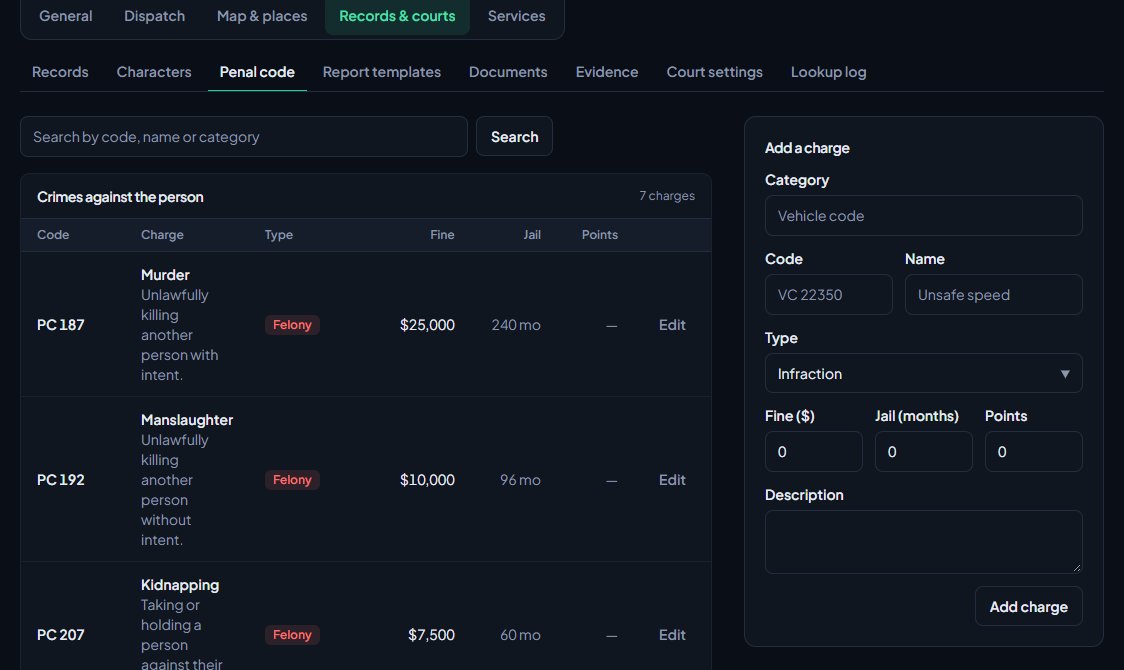
Load the starter penal code#
- On an empty penal code, find the Starter penal code box on the right.
- Click Load starter penal code.
You'll see Loaded 33 starter charges. They're spread across Crimes against the person, Crimes against property, Public order, Weapons, Drugs and Vehicle code. Edit or delete any of them afterwards.
The starter set only loads into an empty penal code, so it can't be added on top of your own charges.
Add a charge#
- In the Add a charge box on the right, type a Category. Start typing and your existing categories are suggested, or type a new one to start a new group.
- Type the Code, like VC 22350. It shows first on paperwork, so keep it short.
- Type the Name, like Unsafe speed.
- Pick the Type: Infraction, Misdemeanor or Felony.
- Fill in the Fine, Jail (months) and Points. Leave any of them at 0 if they don't apply.
- Add a Description if you like, such as what the offence covers.
- Click Add charge.
How the numbers are used#
| Field | What it does |
|---|---|
| Fine | Added up on citations and arrests (written warnings carry no fine). Shown in your community's currency symbol, which you can change under Symbol on the Banking page. |
| Jail (months) | Added up on arrests. |
| Points | Added up on citations and arrests and counted against the character's driver licence. |
| Type | Used by conviction rules (for example "felons lose their firearms licence") and shown as a coloured tag. |
Licence points#
Points only do something if you set a limit. On the Settings page, under Licence points, type a number in Suspend at (points). When a character reaches it, their driver licence is suspended and only the police can lift it. Leave it blank to never suspend.
Only licence types with Points suspend it ticked carry points. You'll find those on the Records page. See Edit the lists officers and civilians pick from.
Edit or delete a charge#
- Click Edit next to the charge.
- Change what you need and click Save charge.
To delete it, click Delete charge on the same page and confirm.
Citations, arrests and warrants keep a copy of each charge as it was when it was filed. Changing a fine or deleting a charge doesn't change old paperwork.
Import a penal code from a spreadsheet#
Click Import CSV at the top of the Penal code page. Your sheet needs a code, a name and a class (infraction, misdemeanor or felony). It can also have a category, fine, jail months, points and a description. Charges with a code you already have are skipped. See Import records into the CAD.
Rules and limits#
- Every charge code must be different.
- Points go from 0 to 50 per charge.
- Charges are listed in the order they were added. Use the up and down arrows next to a charge to move it within its category. The arrows are hidden while you're searching.
Something not working?#
It says "Another charge already uses that code." Codes have to be different. Change the code, or edit the charge that already uses it.
It says "Your penal code already has charges. The starter set only loads into an empty one." The starter set can't be mixed with your own charges. If you want it, delete your charges first, or reset the penal code from the Config page. See Copy your CAD setup to another community.
Licences aren't being suspended for points. Check Suspend at (points) is filled in on the Settings page, and that the driver licence type has Points suspend it ticked on the Records page.
The fines show the wrong currency. The symbol comes from the Banking page under Services. Change it there.
See also
Set up the CAD for your community
Install the CAD, set up the departments that sign on to it, give your staff access, and work through the CAD settings in the order that gets you running fastest.
Import records into the CAD
Bring characters, vehicles, firearms, charges, flags, call types and statuses in from a spreadsheet, or move a whole LonexCAD v3 community across. Check every row before it's saved, and undo an import for 24 hours.
Turn CAD features on and off
Switch off the parts of the CAD your community doesn't use, from the DMV and courts to ride-alongs and Signal 100, and set the options that go with them, like quiet call closing, warrant approval and alert tones.
Run a court case
Set up courts for your community, send arrests, citations and warrants to court, and run a case as a judge: hearing, plea, verdicts, sentence and fines.
Can't find what you need?
Open a ticket in our Discord and someone from the team will help. Found a bug, or missing a feature? Tell us on the feedback board.