Turn CAD features on and off
Switch off the parts of the CAD your community doesn't use, from the DMV and courts to ride-alongs and Signal 100, and set the options that go with them, like quiet call closing, warrant approval and alert tones.
Almost every part of the CAD can be switched off. If your community doesn't run a DMV or a court system, switch them off and their screens and buttons disappear from every design, so nobody is confused by features you don't use. Nothing already on file is deleted, so you can switch a feature back on later and pick up where you left off.
The switches live on two pages: Settings for the bigger parts of the CAD, and Dispatch for the tools units and dispatchers use on duty.
Before you start#
You need the Set up the CAD: call types, statuses, penal code, designs and AOP permission.
Switch modules on or off#
- Open your control panel and click CAD settings in the sidebar.
- On the Settings page, find Modules.
- Tick the modules you want and untick the ones you don't.
- Click Save settings at the bottom.
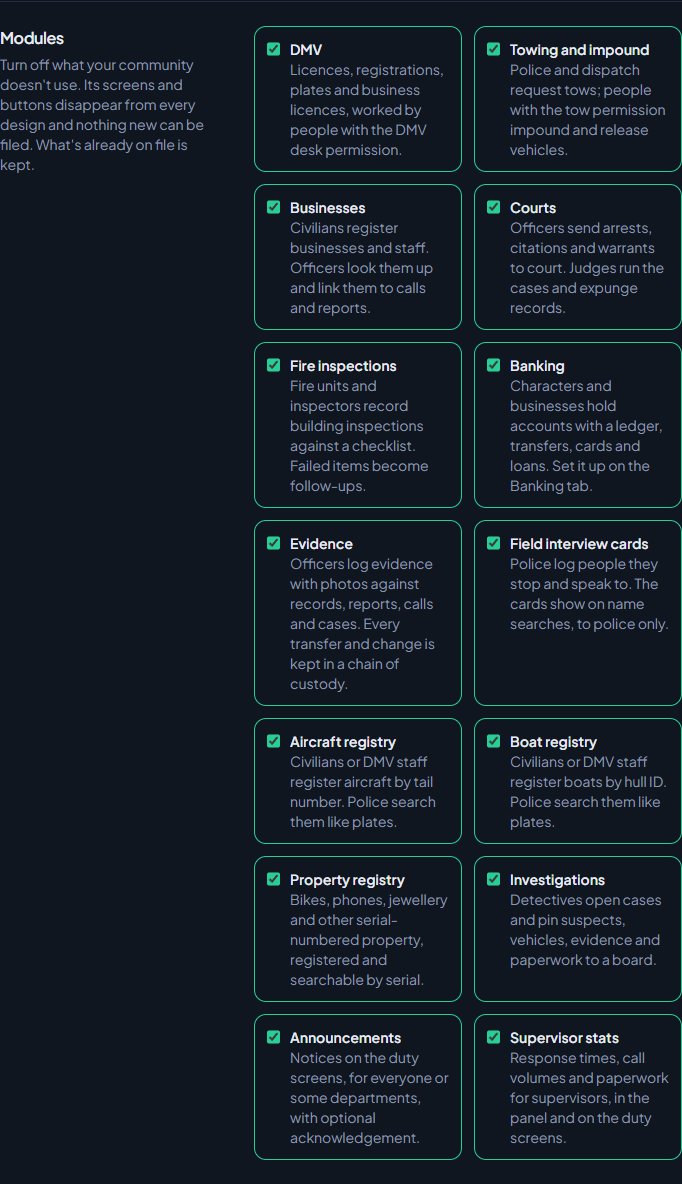
| Module | What it is | Starts |
|---|---|---|
| DMV | Licences, registrations, plates and business licences, worked by people with the DMV desk permission. | On |
| Towing and impound | Police and dispatch request tows. People with the tow permission impound and release vehicles. | On |
| Businesses | Civilians register businesses and staff. Officers look them up and link them to calls and reports. | On |
| Courts | Officers send arrests, citations and warrants to court. Judges run the cases and expunge records. | On |
| Fire inspections | Fire units and inspectors record building inspections against a checklist. | On |
| Banking | Accounts, transfers, cards and loans. Set it up on the Banking page. | Off |
| Evidence | Evidence with photos and a chain of custody. | On |
| Field interview cards | Police log people they stop and speak to. | On |
| Aircraft registry | Aircraft registered by tail number and searchable like plates. | On |
| Boat registry | Boats registered by hull ID and searchable like plates. | On |
| Property registry | Bikes, phones, jewellery and other serial-numbered property. | On |
| Commercial contracts | Contracts for carriers, written by police or issued by the DMV. Police check them on plates and by number. | Off |
| Investigations | Detectives' case boards. | On |
| Announcements | Notices on the duty screens. | On |
| Supervisor stats | Response times, call volumes and paperwork for supervisors. | On |
Switching off Courts, Fire inspections, Evidence, Investigations, Supervisor stats or Announcements also removes its page from the control panel sidebar.
Other options on the Settings page#
| Option | What it does |
|---|---|
| Area of patrol | Shown at the top of every CAD screen and on the in-game HUD. Staff with the Change the AOP and peacetime from the game, with /aop and /peacetime, and from the top of the CAD permission can also change it in game with /aop, on the HUD page, or by clicking it at the top of the CAD. See Change the AOP and peacetime. |
| Close after (minutes) | Under Quiet calls. Open calls with no notes or changes for this long are closed automatically. 15 to 1440, or blank to keep calls open. Starts at 120. |
| Characters per member | How many civilian characters each member can keep, from 1 to 20. Starts at 3. |
| Civilians manage their own licences and registration (no DMV) | On, civilians set their own. Off, they apply and DMV staff issue, renew and re-plate. Only matters while the DMV is on. |
| DMV issues last (days) | How long a licence or registration the DMV issues lasts. Blank means they never expire. |
| Warrants need approval | On, warrants stay pending until someone with the Approve or deny warrants officers request permission signs them off. Off, a warrant is active as soon as it's requested. |
| Reviewers can approve their own reports | Off means someone else has to review a reviewer's report. |
| Reviewers only review reports from their own departments | On, an EMS report needs a reviewer in that EMS department. |
| Suspend at (points) | Under Licence points. Blank means licences are never suspended for points. |
| Post CAD events to Discord | Off means nothing from the CAD is posted, whatever log channels are set. |
Switch dispatch tools on or off#
-
Click Dispatch along the top, then Dispatch underneath.
-
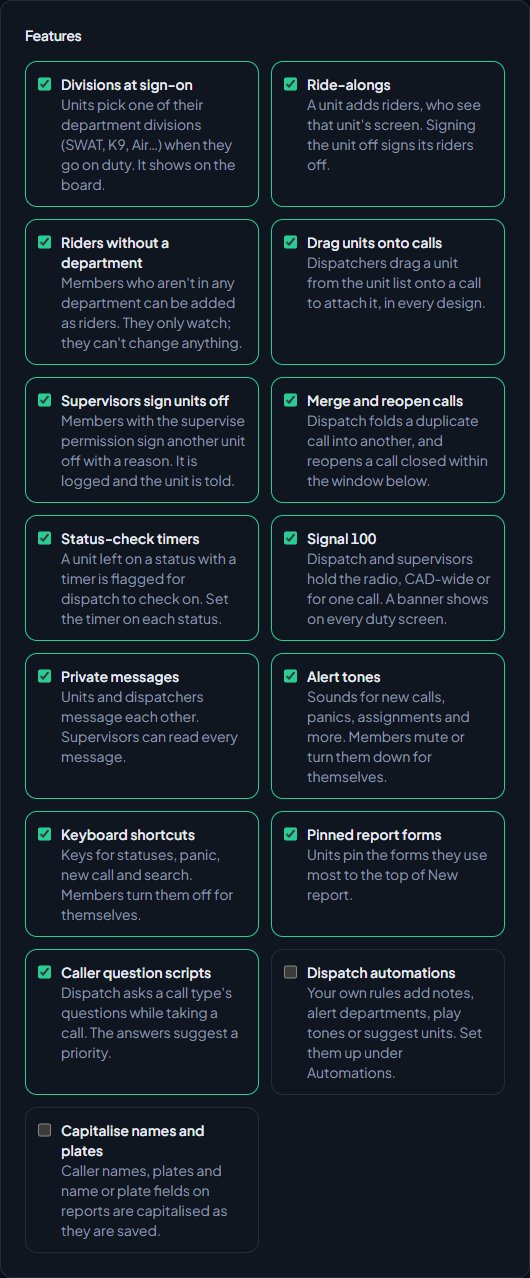
Under Features, tick or untick each tool.
-
Click Save settings.
| Tool | What it does |
|---|---|
| Divisions at sign-on | Units pick one of their department's divisions (SWAT, K9, Air and so on) when they go on duty. |
| Ride-alongs | A unit adds riders, who see that unit's screen. |
| Riders without a department | Members not in any department can be added as riders. They only watch. Starts off. |
| Drag units onto calls | Dispatchers drag a unit onto a call to attach it. |
| Supervisors sign units off | People with the supervise permission sign another unit off with a reason. |
| Merge and reopen calls | Dispatch folds a duplicate call into another, and reopens recently closed calls. |
| Status-check timers | Units left on a status with a timer are flagged for dispatch to check on. |
| Signal 100 | Dispatch and supervisors hold the radio, CAD-wide or for one call. |
| Private messages | Units and dispatchers message each other. Supervisors can read every message. |
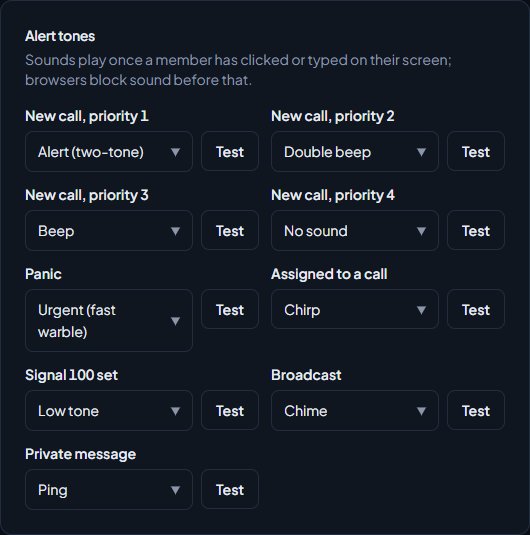
| Alert tones | Sounds for new calls, panics, assignments and more. |
| Keyboard shortcuts | Keys for statuses, panic, new call and search. |
| Pinned report forms | Units pin the forms they use most to the top of New report. |
| Caller question scripts | Dispatch asks a call type's questions while taking a call. See Write caller scripts for your dispatchers. |
| Dispatch automations | Your own rules add notes, alert departments, play tones or suggest units. Starts off. See Set up dispatch automations. |
| Capitalise names and plates | Caller names, plates and name or plate fields on reports are saved in capitals. Starts off. |
Options on the Dispatch page#
- Reopen calls closed within: how long after closing a call can be reopened. Starts at 60 minutes.
- Highlight calls open longer than: open calls older than this are highlighted. Starts at 20 minutes. Leave blank to turn it off.
- Riders: whether riders only see the unit's screen, or can use it fully.
- Units start as: out of service until they go in service themselves, or in service straight away.
- Signal 100: what it's Called (Signal 100, Code 33, Radio hold) and its Banner colour.
- Alert tones: the sound for each event, with a Test button. Members can still mute or turn down tones for themselves.
- Keyboard shortcuts: the default key for each action. Use Alt, Ctrl and Shift with a letter, digit or /, or F1 to F12. Leave one blank to turn it off.
Switches on other pages#
- Records: ID numbers, out-of-state people and vehicles, photo uploads, medical profiles, firearm licences, record approval and the extra character and vehicle details. See Edit the lists officers and civilians pick from.
- Report templates: the Diagrams field. See Build report templates for your units.
- Live map and Postals & streets: the live map and postals. See Choose a map and postal set for the live map.
- Court settings, Evidence and Banking have their own switches for those modules.
- In-game options, like /911 calls and signing units off when they leave the server, are on the Game resource page of Status & servers. See Connect your game server.
Something not working?#
A page like Courts or Evidence has gone from the control panel sidebar. That module is switched off under Modules on the Settings page. Tick it again and save, and the page comes back with everything still on file.
It says "Use at least 15 minutes, or leave it blank to keep calls open." The quiet call timer can't be shorter than 15 minutes. Use a bigger number, or clear the box.
It says a key "isn't a key the CAD can use. Try Alt+1, Ctrl+Shift+K or F2." That shortcut isn't allowed. Use Alt, Ctrl or Shift with a letter, digit or /, or a function key.
It says a key "is already used by another shortcut." Two actions have the same key. Change one of them, or leave one blank.
It says "Name it, like Signal 100 or Radio hold." The Signal 100 name can't be empty. Type what your community calls it.
See also
Set up the CAD for your community
Install the CAD, set up the departments that sign on to it, give your staff access, and work through the CAD settings in the order that gets you running fastest.
Set up unit statuses and 10-codes
Choose the statuses police, fire and EMS units set themselves to, with your own 10-codes, colours and status-check timers, and learn what each status meaning does.
Edit the lists officers and civilians pick from
Change the caution flags, vehicle flags, licence types, restrictions, field interview reasons, registry types, evidence types and detail suggestions used across the CAD, plus the ID number and region settings on the Records page.
Write caller scripts for your dispatchers
Give dispatchers a list of questions to ask a caller for each call type. Each answer scores points, the score suggests a priority, and the questions and answers are added to the call for you.
Set up dispatch automations
Make simple when-this-then-that rules for the CAD. When a call is created or a panic is raised, add a note, alert a department, play a tone for dispatch or suggest free units.
Can't find what you need?
Open a ticket in our Discord and someone from the team will help. Found a bug, or missing a feature? Tell us on the feedback board.