Write caller scripts for your dispatchers
Give dispatchers a list of questions to ask a caller for each call type. Each answer scores points, the score suggests a priority, and the questions and answers are added to the call for you.
A caller script is a short list of questions a dispatcher asks when a call comes in, like "Is the patient breathing normally?" Each answer is worth a number of points. The CAD adds them up as the dispatcher goes and suggests a priority, so a call where the patient isn't breathing goes out as an emergency without anyone having to think about it. When the call is created, the questions and answers are written into its description.
Scripts are a good way to keep newer dispatchers consistent, and they make sure the right questions get asked.
Before you start#
- You need the Set up the CAD: call types, statuses, penal code, designs and AOP permission.
- Caller question scripts must be switched on under Dispatch settings. It's on to start with. If it's off, the Caller scripts page tells you, and dispatchers won't see any scripts.
Open the caller scripts#
- Open your control panel and click CAD settings in the sidebar.
- Click Dispatch along the top, then Caller scripts.
Load the starter scripts#
If you have no scripts, click Load starter in the empty list. You get four: Medical emergency, Structure fire, Domestic disturbance and Traffic collision. Each one is tied to the call type with the same name, if you have one. The starters only load when you have no scripts.
Create a script#
-
Click New script at the top right.
-
Type a Name, like Medical emergency.
-
Pick the Call type it goes with. When a dispatcher picks that call type on a new call, the script opens by itself. Choose Any (dispatch picks it by hand) if it shouldn't be tied to one.
-
Under Questions, type your first question.
-
In the box under it, type each answer on its own line with its score after an equals sign, like this:
Yes = 0 No = 5 Unsure = 2 -
Repeat for each question. Leave a question blank to drop it.
-
Under Suggest a priority at a score of, type the score for P1, P2 and P3.
-
Leave Dispatch can use it ticked.
-
Click Create script.
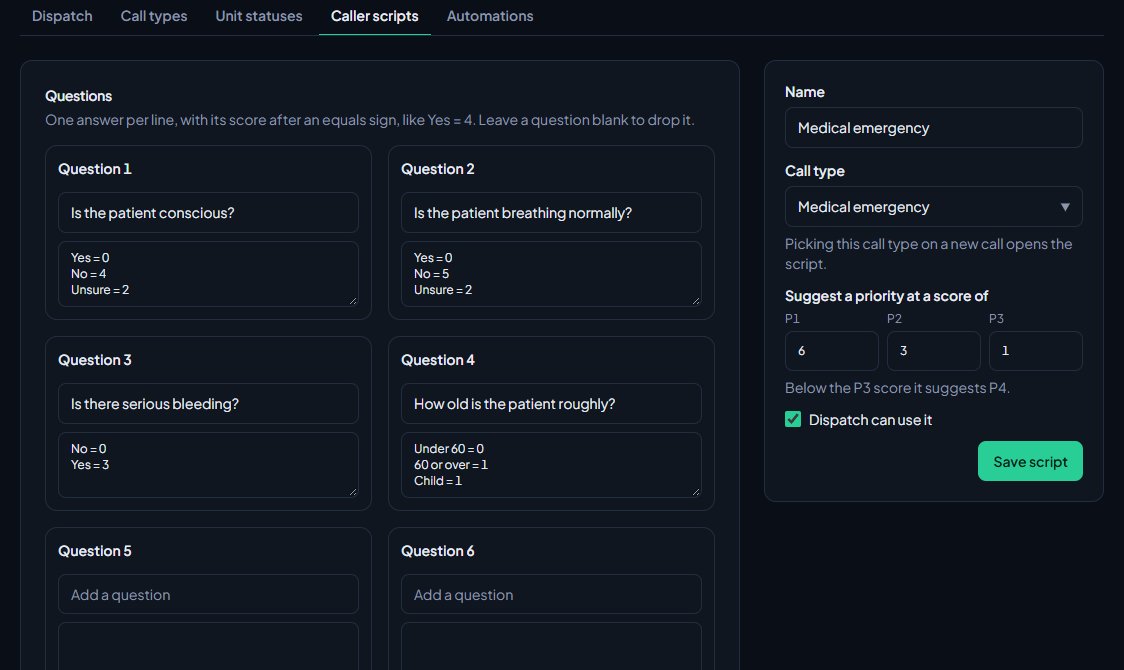
The form gives you a few blank questions to fill in. Save the script and edit it again if you need more spaces.
How the score picks a priority#
The CAD suggests the most urgent priority whose score has been reached. Anything below the P3 score suggests P4.
With the starter Medical emergency script, the scores are P1 at 6, P2 at 3 and P3 at 1. A patient who is unconscious (4) and not breathing normally (5) scores 9, so the CAD suggests P1.
Scores can be negative, so an answer can also lower the priority.
What dispatchers see#
On the new call form, dispatchers get a Caller questions box. In Realistic it's called Caller Script. They can pick a script by hand, or it opens on its own when they pick a call type that has one.
Each question has a drop-down of your answers, starting empty (Not asked in Modern and Classic). As they answer, the score and suggested priority update. A tick box, Use the suggested priority (or Use this priority in Classic), decides whether the call takes the suggested priority. They can untick it and keep their own.
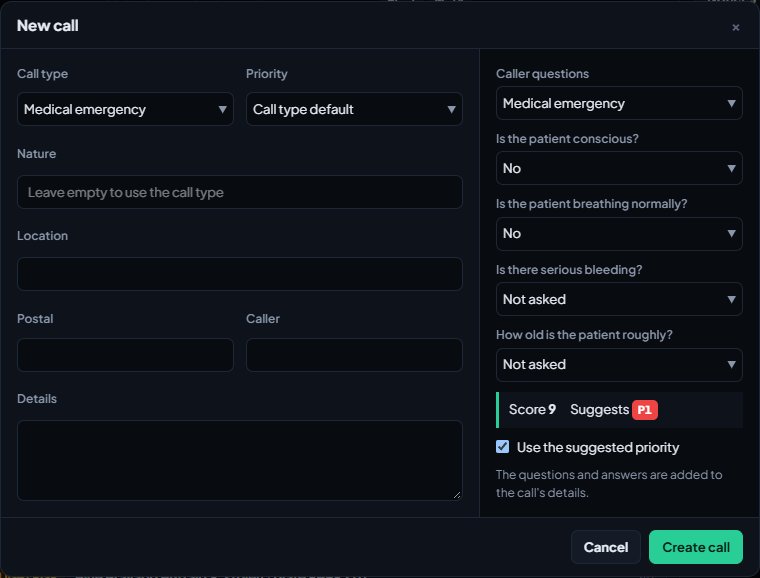
When the call is created, a block like this is added to the description:
Medical emergency (score 9, suggested P1)
Q: Is the patient conscious? A: No
Q: Is the patient breathing normally? A: No
Only questions that were answered are written in. Scripts are only offered on the dispatch console, to people signed on as dispatchers.
Edit, switch off or delete a script#
- Click Edit next to the script.
- Make your changes and click Save script.
Use the up and down arrows next to a script to change the order dispatchers see them in.
To stop dispatchers using a script without losing it, untick Dispatch can use it and save. To remove it for good, click Delete script at the bottom of the edit page and confirm.
Rules and limits#
- Up to 15 questions per script.
- At least two answers per question, and up to 8.
- Each answer scores between -99 and 99. A line with no score scores 0.
- Each call type can have one script.
Something not working?#
It says something like: Give "Is anyone injured?" at least two answers, one per line, like Yes = 3. That question has fewer than two answers. Add another line.
It says "Add at least one question." Every question box is empty. Type at least one question with its answers.
Dispatchers don't see the script. Check Caller question scripts is ticked on the Dispatch settings page, Dispatch can use it is ticked on the script, and the dispatcher is signed on as a dispatcher.
The script doesn't open when the call type is picked. Edit the script and check its Call type, and that Dispatch can use it is ticked.
It says something like: "Is anyone injured?" has more than 8 answers. Keep it to 8. A question can have up to 8 answers. Split long lists into two questions.
It says another script already opens for that call type. Each call type can have one script. Pick a different call type, or change the other script first.
See also
Add your own call types
Set up the call types dispatchers and units pick from, with an optional code and a starting priority. Rename the starter set, add your own, change the order and delete what you don't use.
Set up dispatch automations
Make simple when-this-then-that rules for the CAD. When a call is created or a panic is raised, add a note, alert a department, play a tone for dispatch or suggest free units.
Turn CAD features on and off
Switch off the parts of the CAD your community doesn't use, from the DMV and courts to ride-alongs and Signal 100, and set the options that go with them, like quiet call closing, warrant approval and alert tones.
Create calls and dispatch units to them
Open a call, attach units, change priority and details, then clear it with a disposition. Also covers merging duplicates and reopening a call that closed too early.
Can't find what you need?
Open a ticket in our Discord and someone from the team will help. Found a bug, or missing a feature? Tell us on the feedback board.