Set up dispatch automations
Make simple when-this-then-that rules for the CAD. When a call is created or a panic is raised, add a note, alert a department, play a tone for dispatch or suggest free units.
Automations are small rules that run by themselves when something happens in the CAD. For example: when a structure fire call is created, add a note listing the fire units that are free. Or when a panic is raised, send a message to the police department.
Each rule does one safe thing. Rules never attach units to a call or change the call itself, so dispatch stays in control.
Before you start#
- You need the Set up the CAD: call types, statuses, penal code, designs and AOP permission.
- Automations are switched off for every community to start with. You'll turn them on in the last step.
Open the automations#
- Open your control panel and click CAD settings in the sidebar.
- Click Dispatch along the top, then Automations.
Load the starter rules#
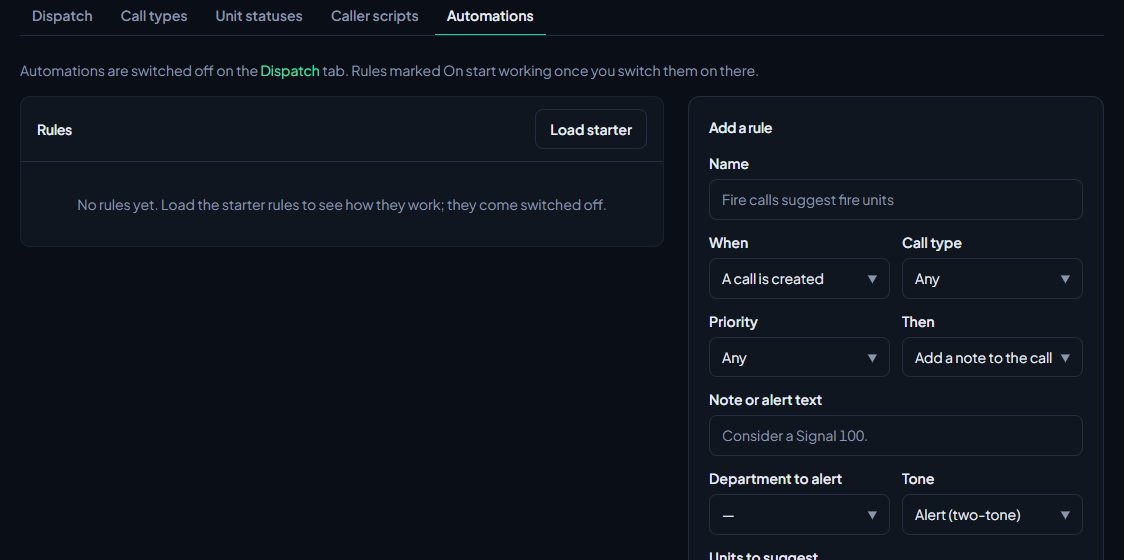
If you have no rules, click Load starter at the top of the Rules list. The starter rules come switched off, so nothing happens until you turn them on.
| Rule | When | Then |
|---|---|---|
| Priority 1 tone | A call is created at P1 | Play the Alert tone for dispatch. |
| Fire calls suggest fire units | A Structure fire call is created | Suggest available Fire units. |
| Medical calls suggest EMS | A Medical emergency call is created | Suggest available EMS units. |
| Shots fired reminder | A Shots fired call is created | Add the note "Consider a Signal 100 and a perimeter." |
| Panic alerts police | A panic is raised | Alert your first law enforcement department. |
A starter rule is left out if you don't have the call type it needs, or, for the panic rule, a law enforcement department.
Add a rule#
- In the Add a rule box, type a Name so you can recognise it, like Fire calls suggest fire units.
- Pick When: A call is created or A panic is raised.
- Pick a Call type to only run for that type, or leave it on Any.
- Pick a Priority to only run for urgent calls, or leave it on Any. P2 or higher means P1 and P2 calls.
- Pick what happens under Then (see the table below) and fill in the box that goes with it.
- Tick On.
- Click Add rule.
| Then | What to fill in | What happens |
|---|---|---|
| Add a note to the call | Note or alert text | The note is added to the call, written by AUTO. |
| Alert a department | Department to alert, and optionally Note or alert text | A broadcast goes to that department with the call number, what it is and where, followed by your text. |
| Play a tone for dispatch | Tone | Dispatch hears that tone when the call comes in. |
| Suggest available units | Units to suggest | A note is added listing up to six units of that kind who are free right now, for example "Suggested Fire units: E1, M2". |
A unit counts as free when it's on duty, not attached to a call, and on a status with the meaning Available.
Turn automations on#
Rules marked On only run once automations are switched on for the whole CAD.
- Click Dispatch along the top, then Dispatch underneath.
- Tick Dispatch automations.
- Click Save settings.
While it's off, the Automations page says so at the top.
Edit or delete a rule#
- Click Edit next to the rule.
- Change what you need and click Save, or click Delete and confirm.
To pause a rule without deleting it, untick On and save.
Rules and limits#
- Rules run in the order they were added.
- A panic opens its own priority 1 call. A panic rule with a Call type runs when the unit was on a call of that type when they raised the panic, for example a panic during a Traffic stop. Leave it on Any to run for every panic.
- Panic calls don't run A call is created rules.
- 911 calls and /quickcad calls from the game run A call is created rules too. They come in with the Ungraded call type, so a rule with Call type on Ungraded runs only for them. You can pick a different type, or none, with Call type for game calls on the Game resource tab under Status & servers.
- A panic rule with Call type on Ungraded runs when a unit raises a panic while on a 911 call from the game.
Something not working?#
My rules don't do anything. Check Dispatch automations is ticked on the Dispatch settings page, and that the rule shows On in the list.
It says "Write the note to add." You picked Add a note to the call with no text. Fill in Note or alert text.
It says "Pick the department to alert." You picked Alert a department but left Department to alert empty.
A suggest rule says "No Fire units free to suggest." (or another kind) Nobody of that kind was on duty, free and on an Available status when the call came in.
A panic rule never runs. If the rule has a Call type, it only runs when the unit was on a call of that type. Set Call type to Any to run it for every panic.
See also
Add your own call types
Set up the call types dispatchers and units pick from, with an optional code and a starting priority. Rename the starter set, add your own, change the order and delete what you don't use.
Write caller scripts for your dispatchers
Give dispatchers a list of questions to ask a caller for each call type. Each answer scores points, the score suggests a priority, and the questions and answers are added to the call for you.
Turn CAD features on and off
Switch off the parts of the CAD your community doesn't use, from the DMV and courts to ride-alongs and Signal 100, and set the options that go with them, like quiet call closing, warrant approval and alert tones.
Use the panic button and Signal 100
Raise a panic when you need help now, acknowledge one as dispatch, and hold the radio with a Signal 100 for every unit or for one call.
Can't find what you need?
Open a ticket in our Discord and someone from the team will help. Found a bug, or missing a feature? Tell us on the feedback board.