Use the panic button and Signal 100
Raise a panic when you need help now, acknowledge one as dispatch, and hold the radio with a Signal 100 for every unit or for one call.
The panic button is for when a unit needs help immediately. It alerts every screen on duty and opens an emergency call for you. A Signal 100 is the opposite tool: dispatch or a supervisor uses it to hold the radio, so units keep the channel clear for something serious.
Your community may call the Signal 100 something else, like Code 33 or Radio hold. The button uses whatever name they've chosen.
Raise a panic#
You need to be on duty as a police, fire or EMS unit.
- Modern: click PANIC at the right end of the top bar.
- Classic: click Panic in the bar along the top.
- Realistic: click Panic on the toolbar, choose File then Panic (F12), or press F12.
- Keyboard shortcut: press Alt+P in any design, if keyboard shortcuts are on. Your community can change the key.
- In game: use /panic, or your community's panic key if they've set one.

Every panic button and key on screen asks you to confirm, with Raise panic already picked. Press Enter, click Raise panic, or press the panic key a second time to send it. Press Esc or click Cancel if you pressed it by mistake. /panic in game doesn't ask.
What happens#
- A priority 1 call opens called PANIC with your callsign, for example "PANIC - 1A-12", and if you weren't on a call, you're attached to it as the primary unit. If you were on a call, you stay on it, and both calls get a note pointing to the other, so dispatch sends help to the panic call while still seeing what you were working.
- The call's location is your 10-20 or your current call's location. From the game, it's exactly where you're standing, with the nearest postal.
- A red PANIC banner appears on every duty screen with your callsign, the location and how long ago it was raised.
- Everyone on duty hears the panic tone.
- If your community posts CAD events to Discord, the panic goes to their chosen channel too.
Acknowledge a panic#
Any dispatcher or unit on duty can acknowledge a panic. Acknowledging takes the banner off every screen. It doesn't close the panic call.
- Find the PANIC banner at the top of your screen.
- Click Acknowledge. In Realistic, Open call takes you to the panic call first.
In Classic, unit screens also list open panics under the bell icon. Click one to open its call.
The panic call stays on the board like any other call, so dispatch can attach more units and clear it when it's over.
Set a Signal 100#
You can set a Signal 100 if you're signed on as a dispatcher, or you're on duty with the Supervise on duty: sign units off, set a Signal 100 and read private messages permission. Your community also needs Signal 100 switched on in its dispatch settings.
A Signal 100 can cover every unit, or just one call.
For every unit#
-
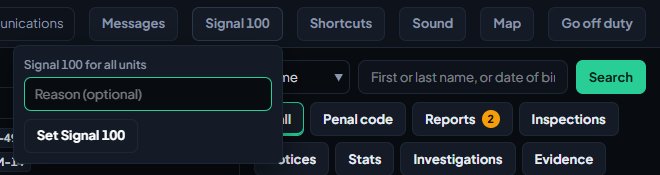
Open the Signal 100 form:
- Modern: click the Signal 100 button in the top bar.
- Classic: click the Signal 100 button in the top bar.
- Realistic: click the Signal 100 button on the quick bar, or open Tools and pick it.
-
Type a reason if you want one, for example "Pursuit on Route 68".
-
Click Set Signal 100. On Classic unit screens the button is Set, and in Realistic it's Set for all units.
For one call#
- Open the call.
- Click the Signal 100 button in the call's actions.
- Confirm when asked.
A call can only have one Signal 100 at a time. Setting one adds a line to the call's timeline.
What everyone sees#
A banner in your community's Signal 100 colour shows on every duty screen until it's cleared. It says whether it's for all units or for one call, the reason, who set it and how long ago. Everyone on duty hears the Signal 100 tone.
Clear a Signal 100#
- Find the banner at the top of your screen.
- Click Clear, and confirm if asked.
In Modern, a call with a Signal 100 also shows Clear Signal 100 in its actions. A Signal 100 on a call ends by itself when the call is cleared.
Something not working?#
I don't see the Signal 100 button. Only dispatchers and supervisors can set one, and only while on duty. If you're a supervisor, ask your community to check your role has the supervise permission. If nobody sees it, Signal 100 is switched off in the dispatch settings.
I don't see the panic button. Panic is for police, fire and EMS units. Dispatchers don't have one. If you're riding along in read-only mode, the button is hidden too.
The panic tone didn't play. Browsers only play sound after you've clicked or typed on the page. Check you haven't muted tones for yourself. See CAD keyboard shortcuts and sounds.
/panic says "You aren't on duty in the CAD. Use /onduty first." Panic from the game needs you signed on as a unit. Sign on with /onduty or on the website, then try again.
See also
Work a call as a police, fire or EMS unit
Set your status, attach yourself to calls, add notes, link people and vehicles, open your own calls and clear them when you're done.
Create calls and dispatch units to them
Open a call, attach units, change priority and details, then clear it with a disposition. Also covers merging duplicates and reopening a call that closed too early.
Supervise units on duty and sign them off
The tools supervisors get on duty: signing another unit off with a reason, checking on units whose status timer has run out, and reading every private message.
CAD keyboard shortcuts and alert sounds
Every keyboard shortcut on the duty screens, the tones that play for calls, panics and messages, and how to mute or turn them down for yourself.
Can't find what you need?
Open a ticket in our Discord and someone from the team will help. Found a bug, or missing a feature? Tell us on the feedback board.