CAD keyboard shortcuts and alert sounds
Every keyboard shortcut on the duty screens, the tones that play for calls, panics and messages, and how to mute or turn them down for yourself.
Shortcuts save you reaching for the mouse in a busy shift, and alert tones tell you something has happened even when you're looking at the game. Your community sets which keys and sounds the CAD uses. You choose whether to use the shortcuts, and how loud the tones are, for yourself.
See your shortcuts#
- Modern: click Shortcuts in the top bar.
- Classic: click the sliders icon in the top bar (Shortcuts and tones).
- Realistic: open Help and choose Keyboard & Sound.
- Any design: press Alt+/.
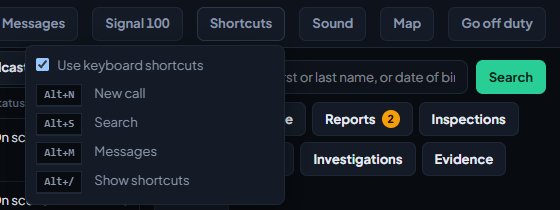
The list only shows keys that do something on your screen. For example, there's no panic key on a dispatcher's screen.
The shortcuts#
These are the standard keys. Your community can change any of them or switch them off, so your list may differ.
| Key | What it does |
|---|---|
| Alt+1 to Alt+9 | Sets your status. Alt+1 is the first status in your list, Alt+2 the second, and so on |
| Alt+P | Raises a panic, after asking you to confirm |
| Alt+N | Opens a new call |
| Alt+S | Jumps to the search box |
| Alt+M | Opens your messages |
| Alt+/ | Shows the shortcut list |
While you're typing in a box, plain letters and numbers type as normal. Shortcuts that use Alt, Ctrl or a function key still work.
Extra keys in Realistic#
The Realistic design always answers to these, whatever your shortcut settings:
| Key | What it does |
|---|---|
| F1 | New call |
| F5 | Refreshes the board |
| F12 | Raises a panic, after asking you to confirm |
| Esc | Closes whatever is open at the side |
Turn shortcuts off for yourself#
- Open your shortcuts list as above.
- Untick Use keyboard shortcuts (Use the shortcuts on my screen in Realistic).
This is saved for you in this community, in every design, until you tick it again. It doesn't affect the extra Realistic keys.
Alert tones#
| Tone | Who hears it | Standard sound |
|---|---|---|
| New call, priority 1 | Everyone on duty | Alert (two-tone) |
| New call, priority 2 | Everyone on duty | Double beep |
| New call, priority 3 | Everyone on duty | Beep |
| New call, priority 4 | Everyone on duty | No sound |
| Panic | Everyone on duty | Urgent (fast warble) |
| Assigned to a call | Only the unit that was attached | Chirp |
| Signal 100 set | Everyone on duty | Low tone |
| Broadcast | Everyone it was sent to | Chime |
| Private message | Only the person it was sent to | Ping |
Your community can pick a different sound for each one, or switch any of them off. Dispatchers may also hear tones from your community's automations.
Mute or turn tones down#
- Modern: click Sound in the top bar. Tick Mute alert tones or drag Volume. Click Test to hear it.
- Classic: click the sliders icon, then tick Mute or drag the volume slider under Alert tones.
- Realistic: click the speaker icon on the quick bar to mute or unmute, or open Help then Keyboard & Sound for the volume and a Test button.
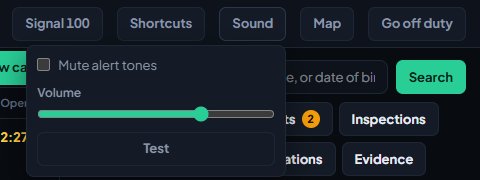
Your choice is saved for you in this community and applies in every design.
Browsers only play sound after you've clicked or typed on the page. If you've just opened the CAD, click anywhere once and tones will play from then on.
Something not working?#
I don't see Shortcuts or Sound. Your community has switched off keyboard shortcuts or alert tones in its dispatch settings.
A shortcut does nothing. Check the shortcut list: your community may use a different key, or have switched that one off. Status keys only go as high as the number of statuses you have.
No sound plays. Click once on the CAD page so your browser allows sound, check you haven't muted tones, and check the volume isn't at zero. Then use Test to hear a tone.
A shortcut clashes with my browser or game. Untick Use keyboard shortcuts for yourself, or ask your CAD admins to pick different keys.
See also
Use the panic button and Signal 100
Raise a panic when you need help now, acknowledge one as dispatch, and hold the radio with a Signal 100 for every unit or for one call.
Send private messages and broadcasts in the CAD
Message another unit or a dispatcher privately, send a broadcast to every screen on duty or one department as dispatch, and know who can read what.
Create calls and dispatch units to them
Open a call, attach units, change priority and details, then clear it with a disposition. Also covers merging duplicates and reopening a call that closed too early.
Turn CAD features on and off
Switch off the parts of the CAD your community doesn't use, from the DMV and courts to ride-alongs and Signal 100, and set the options that go with them, like quiet call closing, warrant approval and alert tones.
Can't find what you need?
Open a ticket in our Discord and someone from the team will help. Found a bug, or missing a feature? Tell us on the feedback board.