Send private messages and broadcasts in the CAD
Message another unit or a dispatcher privately, send a broadcast to every screen on duty or one department as dispatch, and know who can read what.
The CAD has two ways to get a message across without using the radio. Private messages go from one person on duty to another, like a quiet text. Broadcasts go from dispatch to every screen on duty at once, or to one department, for things everyone needs to know.
Private messages#
You can message anyone who's on duty: units and dispatchers alike. Your community needs Private messages switched on in its dispatch settings.
Send a message#
-
Open your messages:
- Modern: click Messages in the top bar.
- Classic: click Messages in the top bar.
- Realistic: click Messages on the toolbar, or choose View then Messages.
-
Click the person you want to message. Dispatchers are listed first, and anyone with unread messages for you goes to the top.
-
Type your message and click Send.
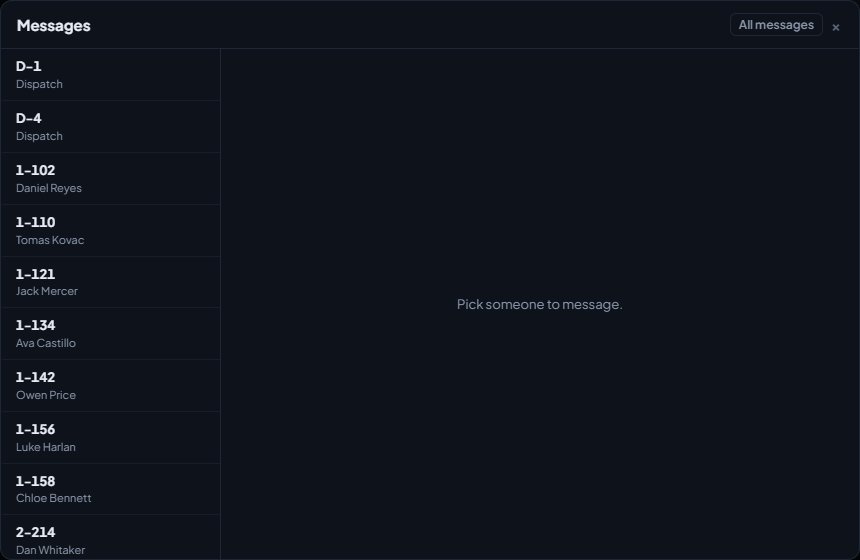
Dispatchers can also start a conversation from the unit list. In Modern and Classic, click a unit's status and choose Message followed by their callsign, for example Message 1A-12. On Classic unit screens, open the menu next to an officer and choose Message.
The keyboard shortcut Alt+M opens your messages, if shortcuts are on.
Reading messages#
The Messages button shows a number when you have unread messages, and you'll hear the message tone. Opening the conversation marks them as read.
Messages are tied to your sign-on, so each shift starts with an empty inbox. If you message someone who then goes off duty, they stay in your list for the rest of your shift, but you can't send them anything new.
Messages can be up to 1,000 characters.
Riding along, you message as yourself, not as the unit you ride with. Your name shows as the unit's callsign followed by "rider", for example "1A-12 rider". You only see messages sent to you, never the unit's own private messages.
Private messages aren't completely private. Supervisors with the supervise permission can read every message from the last day. See Supervise units and sign them off.
Broadcasts#
Only dispatchers can send broadcasts. A broadcast shows at the top of every duty screen it's for, for 30 minutes, whichever design people use, and they hear the broadcast tone.
Send a broadcast#
-
Open the broadcast form:
- Modern: click Broadcast above the calls list.
- Classic: click Broadcast in the top bar.
- Realistic: click Broadcast on the quick bar.
-
Under Send to, leave Every unit on duty, or pick one department.
-
Type your message, for example "All units, AOP is now Sandy Shores". Keep it under 500 characters.
-
Click Send.
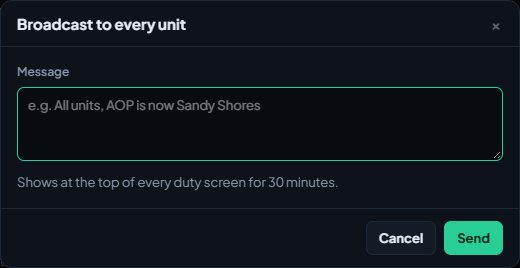
You'll see "Broadcast sent to every unit on duty." when it's gone out, or the department's name if you picked one.
What units see#
A Broadcast strip appears at the top of their screen with your callsign, the message and the time. Up to three of the latest broadcasts show at once. Anyone can click Dismiss to put one away on their own screen.
A broadcast aimed at one department only shows to that department, and to dispatchers, who see every broadcast. Your community's automations and cameras can send these too.
Broadcasts or announcements?#
Broadcasts are short and live for 30 minutes. For a notice that needs to stay up longer, be aimed at certain departments or be acknowledged, use an announcement instead. See Post CAD announcements.
Something not working?#
I don't see a Messages button. Private messages are switched off for your community, or you're not on duty. Ask your CAD admins about Private messages in the dispatch settings.
It says "1A-12 has gone off duty." The person you're messaging has signed off. You can still read your conversation, but you can't send anything new.
It says "Write a message." or "Keep it under 1000 characters." The message is empty or too long. Shorten it and send again.
I'm riding along and can't see the unit's messages. Riders have their own messages. You can message anyone on duty, even on a read-only ride-along, but the unit's private messages stay with the unit. See Ride along with another unit.
I don't see a Broadcast button. Only dispatchers can broadcast. Sign on as a dispatcher, or ask dispatch to send it for you.
It says "Write the message to send." or "Keep it under 500 characters." The broadcast is empty or too long. A broadcast needs at least two characters and fewer than 500.
See also
Supervise units on duty and sign them off
The tools supervisors get on duty: signing another unit off with a reason, checking on units whose status timer has run out, and reading every private message.
Post CAD announcements to the duty screens
Put a notice on the duty screens for everyone or chosen departments, make people acknowledge it, schedule it, and see who has read it.
CAD keyboard shortcuts and alert sounds
Every keyboard shortcut on the duty screens, the tones that play for calls, panics and messages, and how to mute or turn them down for yourself.
Go on duty in the CAD
Sign on with your department and callsign, skip the panel screen with a default, go off duty, and fix the messages that stop you signing on.
Can't find what you need?
Open a ticket in our Discord and someone from the team will help. Found a bug, or missing a feature? Tell us on the feedback board.