Ride along with another unit
Add a rider to your unit, what the rider sees and can do, and how the ride ends for both of you.
A ride-along puts a second person in your unit. They see your unit's screen on their own computer, so a trainee can follow along or a partner can work the same calls without a separate unit on the board. On the board, the rider shows with your unit instead of as a unit of their own.
The unit takes the rider on. If you want to ride with someone, ask them to add you.
Before you start#
- Your community needs Ride-alongs switched on in its dispatch settings.
- You need to be on duty as a police, fire or EMS unit, and not riding with someone else yourself.
- Dispatchers can't take riders, and can't ride along while dispatching.
Add a rider#
-
Find the riders list on your screen:
- Modern: Riders, under My status.
- Classic: the Riders card on the right.
- Realistic: click Riders on the quick bar, or open Tools and choose Ride-alongs.
-
Pick the person from Add a rider….
-
Click Add.
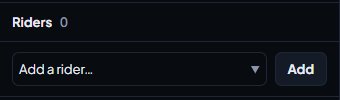
You'll see a message saying they're riding with you. The list includes anyone in a department who can go on duty, except people who are dispatching, already riding, or carrying riders of their own.
If your community allows riders without a department, those members are in the list too, marked No department.
What happens to the rider#
It depends on whether the rider was already on duty:
| Rider was | What happens when added | What happens when the ride ends |
|---|---|---|
| On duty as their own unit | Their unit folds into yours and leaves any call it was on | They go back to being their own unit |
| Off duty | They're signed on just for the ride, with your callsign, and their shift starts | They go off duty and their shift ends |
| A member with no department | They're added to watch only, with no shift | They go off duty |
When the rider opens the CAD, they see your unit's screen with a Ride-along or Riding with banner at the top.
What the rider can do#
Your community picks one of two modes:
- See the unit's screen, read-only. The rider can watch the board, open calls, read BOLOs and notices, and send and read their own private messages. They can't change anything, add notes or run searches.
- Use the unit's screen fully. The rider can do everything the driver can: change the status, work calls and run searches.
Riders with no department are always read-only, whatever the mode, and can't run searches.
Riders have their own messages, shown as the unit's callsign followed by "rider". They never see the private messages sent to the unit they ride with.
End a ride#
As the driver, click the × next to the rider in your riders list (Remove in Realistic), and confirm if asked.
As the rider, click Leave ride:
- Modern: in the top bar, where Go off duty normally is.
- Classic: on the Riding with banner.
- Realistic: on the riding banner, or choose File then Leave Ride.
If the driver goes off duty, every rider goes off duty with them.
Something not working?#
The person isn't in Add a rider. They might be dispatching, already riding with someone, have riders of their own, or not be able to go on duty in their department. If they have no department at all, your community needs Riders without a department switched on.
It says "They are already riding with another unit." They need to leave that ride first.
It says "You can't ride with yourself." Pick someone else. You can't add your own account.
The rider says "Riders can only watch this unit's screen." Your community uses read-only ride-alongs, so the rider can't make changes. Ask your CAD admins if you want riders to have full use of the screen.
I don't see Riders at all. Ride-alongs are switched off for your community, or you're riding along yourself.
See also
Go on duty in the CAD
Sign on with your department and callsign, skip the panel screen with a default, go off duty, and fix the messages that stop you signing on.
Work a call as a police, fire or EMS unit
Set your status, attach yourself to calls, add notes, link people and vehicles, open your own calls and clear them when you're done.
Send private messages and broadcasts in the CAD
Message another unit or a dispatcher privately, send a broadcast to every screen on duty or one department as dispatch, and know who can read what.
Can't find what you need?
Open a ticket in our Discord and someone from the team will help. Found a bug, or missing a feature? Tell us on the feedback board.