Supervise units on duty and sign them off
The tools supervisors get on duty: signing another unit off with a reason, checking on units whose status timer has run out, and reading every private message.
Supervisors keep the board honest. If someone has left the server but is still showing as on duty, a supervisor can sign them off. If a unit has been on a traffic stop for too long, dispatch or a supervisor can check on them. And if there's a problem in private messages, a supervisor can read them.
Supervisors can also set a Signal 100, post announcements and see shift stats. Those have their own articles, linked at the end.
Before you start#
You need to be on duty, as a unit or a dispatcher, with a role that has the Supervise on duty: sign units off, set a Signal 100 and read private messages permission. Your community owner or an admin gives it under Roles & permissions in the control panel.
Each tool also has its own switch in your community's dispatch settings, listed below. If a button is missing, check that first.
Sign a unit off#
Needs Supervisors sign units off switched on.
-
Find the unit:
- Modern: on the dispatch screen, click the unit's status code and choose Sign off 1A-12… (with their callsign). On a unit screen, find them under Units on duty, below the BOLOs, and click Sign off.
- Classic: on the dispatch screen, click the unit's status and choose Sign off.... On a unit screen, open the menu next to the officer and choose Sign off....
- Realistic: right-click the unit in the units grid and choose Sign unit off…. On the dispatch screen, clicking the unit opens the same menu.
-
Type the reason, for example "Left the server without signing off".
-
Click Sign off.
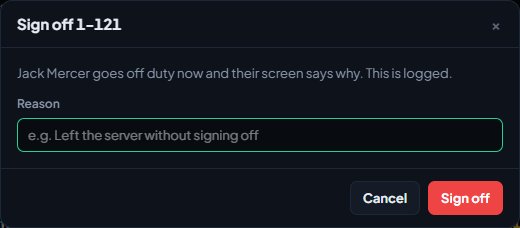
The unit goes off duty straight away. They're taken off their call, their shift ends, and any riders go off duty with them. Their screen goes back to the panel list and tells them: You were signed off by a supervisor: followed by your reason.
The sign-off, who did it and why are saved in your community's activity log. See See who changed what in the activity log.
You can't sign yourself off this way. Use Go off duty instead.
Check on a unit#
Needs Status-check timers switched on, and a timer set on the status the unit is using. Dispatchers can do this as well as supervisors.
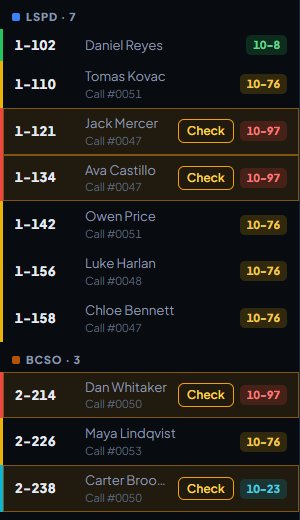
Some statuses, like a traffic stop, have a check timer. When a unit stays on that status longer than the timer, the CAD flags them so someone checks they're all right.
-
Look for the flagged unit. In Modern and Classic, units with a timer show a Check button, which stands out once the time is up. In Realistic, the unit's status is highlighted in the units grid once the time is up.
-
Check on the unit, over the radio or by message.
-
Click Check (Modern and Classic), or right-click the unit and choose Status check done (Realistic).
The timer starts again from now. If the unit is on a call, "Status check" with their callsign is added to the call's timeline. The timer also restarts by itself whenever the unit changes status.
Read every private message#
Needs Private messages switched on.
- Open Messages.
- Click All messages (All in Realistic).
You'll see every private message sent in the last day, newest first, with who sent it to whom. Click All messages again to go back to your own conversations.
Other supervisor tools#
- Signal 100: hold the radio for every unit or one call. See Use the panic button and Signal 100.
- Announcements: post notices to the duty screens. See Post CAD announcements.
- Shift stats: open calls, units by status and today's response times. See Supervisor stats.
Something not working?#
I don't see Sign off or All messages. Your role doesn't have the supervise permission, the switch for that tool is off, or you're riding along read-only. Supervisor tools only work while you're on duty.
It says "Say why they are being signed off." A reason is required. Type one and click Sign off again.
It says "1A-12 is already off duty." They signed off, or someone else signed them off, before you did.
A unit never shows Check. Their status has no check timer. Your CAD admins set timers on each status under Unit statuses in the CAD settings. See Set up unit statuses and 10-codes.
See also
Use the panic button and Signal 100
Raise a panic when you need help now, acknowledge one as dispatch, and hold the radio with a Signal 100 for every unit or for one call.
Send private messages and broadcasts in the CAD
Message another unit or a dispatcher privately, send a broadcast to every screen on duty or one department as dispatch, and know who can read what.
Post CAD announcements to the duty screens
Put a notice on the duty screens for everyone or chosen departments, make people acknowledge it, schedule it, and see who has read it.
See supervisor stats for the CAD
Check open calls, units by status and today's response times on duty, and look back over up to 90 days of calls, response times and paperwork in the control panel.
Can't find what you need?
Open a ticket in our Discord and someone from the team will help. Found a bug, or missing a feature? Tell us on the feedback board.