See who changed what in the activity log
The activity log records changes made in your community, who made them and when. Here's how to read it and who can see it.
When something changes and nobody remembers doing it, the activity log has the answer. It records changes made in your community: who made them, what they did and when. Use it to check on new staff, find out when a setting changed, or settle a "who did this?" in your staff chat.
Open the activity log#
- Open your control panel.
- Click Activity log in the sidebar, under Core.
You can also click All activity on the Recent activity card on your Overview page.
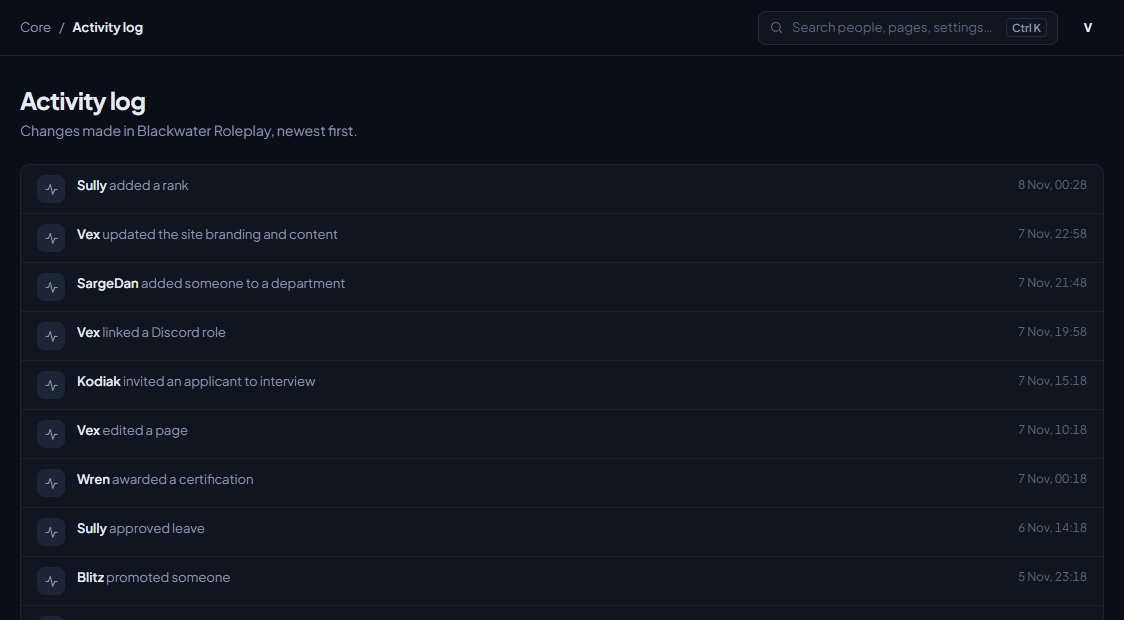
Reading an entry#
Each line shows:
- Who made the change. Changes LonexOne makes by itself, like a scheduled job, show as System.
- What they did, in plain words, like "changed which modules are installed" or "edited a page". If it was about a page on your website, the page's address is shown too.
- When it happened. Move your mouse over the time to see the full date.
The newest changes are at the top. There are 50 to a page. Click Older at the bottom to go further back, and Newer to come forward again.
Who can see it#
The owner and administrators can always see the activity log. To let someone else see it, give them a role with the View the activity log permission under Roles & permissions.
Anyone who can see the activity log also sees the Recent activity card on the Overview page.
The activity log is for changes to your community's setup and records. Some modules keep their own, more detailed history as well. For example, the Staff Panel has its own moderation log.
Something not working?#
I can't see Activity log in the sidebar. Your role doesn't have the View the activity log permission. Ask your owner or an administrator.
A change I made isn't in the log. Not every small action is logged. Things like viewing a page or searching aren't recorded, only changes.
See also
Find your way around the control panel
A tour of the control panel: the Overview page, the sidebar, the community switcher, search and your account menu, and why staff see different pages.
Add or remove modules for your community
Install the CAD, Training, the Staff Panel and the rest from your control panel, and what happens to your data when you remove one.
Can't find what you need?
Open a ticket in our Discord and someone from the team will help. Found a bug, or missing a feature? Tell us on the feedback board.