Find your way around the control panel
A tour of the control panel: the Overview page, the sidebar, the community switcher, search and your account menu, and why staff see different pages.
The control panel is where you and your staff run your community. Everything is set up here, from departments and Discord roles to the CAD and your website. Your members never see it. They use your community's website instead.
This article gives you a tour of the control panel, so you know where everything lives before you start setting things up.
Opening the control panel#
Go to lonexone.com, click Sign in and sign in with Discord. Then open your control panel in one of these ways:
- Go to lonexone.com/panel. It opens your community straight away.
- On your community's website, open your account menu at the top right and click Control panel. It's only there for people who help run the community.
If you run more than one community, see Switch between communities.
The Overview page#
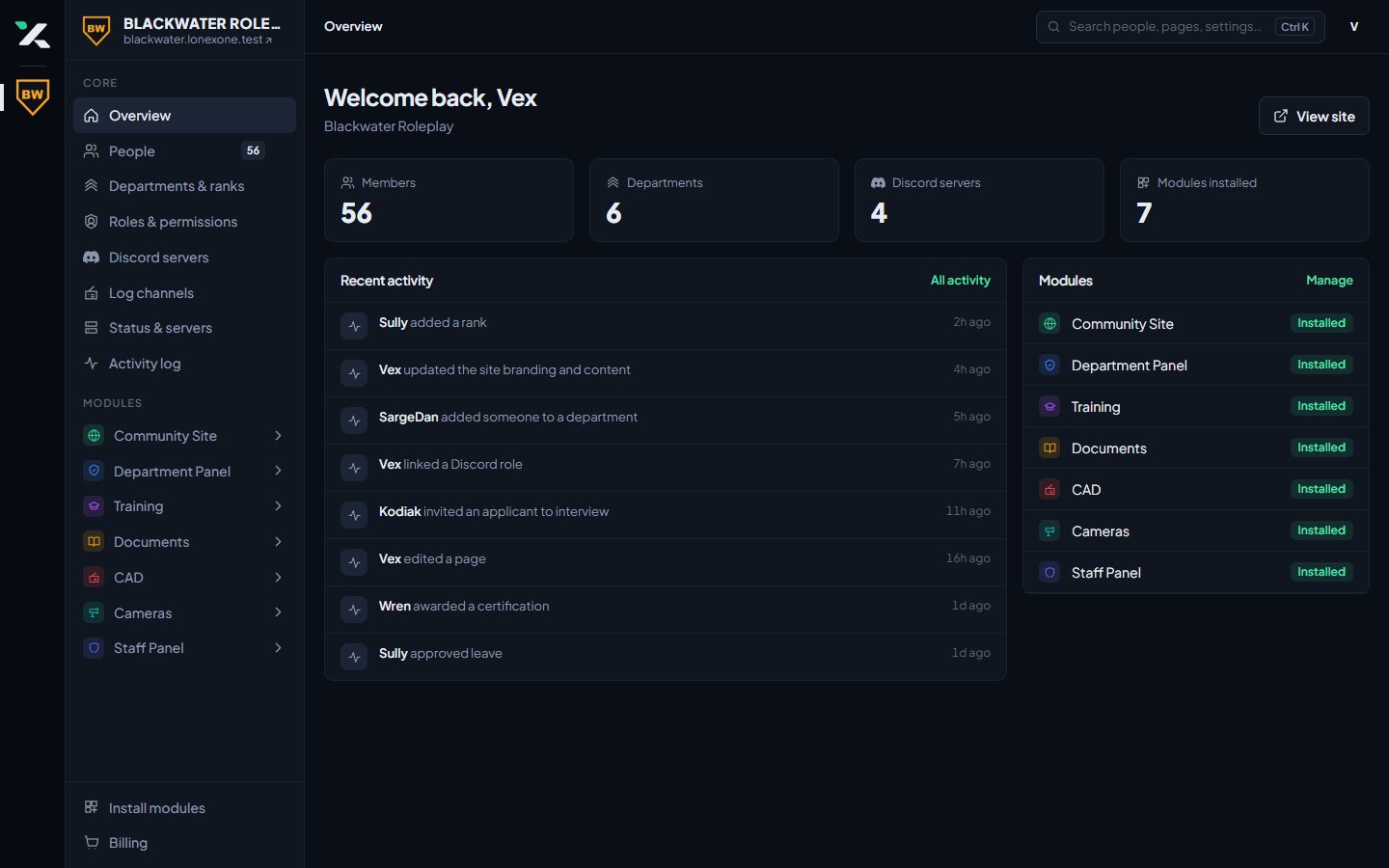
The Overview page is the first thing you see. It has:
- Counts across the top for your members, departments, Discord servers and installed modules. Click one to go to that page.
- Finish setting up, a checklist of the first things to do. It disappears once everything on it is done.
- Recent activity, the last few changes made in your community. Click All activity to see the full log.
- Modules, showing which modules are installed.
- View site at the top right, which opens your community's website in a new tab.
The sidebar#
The sidebar on the left is split into sections.
Core holds the pages every community has:
| Page | What it's for |
|---|---|
| Overview | The page described above. |
| People | Everyone in your community. The number next to it is how many members you have. |
| Departments & ranks | Your departments, their ranks and their divisions. |
| Roster | Each department's members, one department at a time. |
| Certifications | The qualifications people can hold, like pursuit driving. |
| Roles & permissions | Who can do what, and who your administrators are. |
| Discord servers | Connecting Discord, and syncing roles and nicknames. |
| Log channels | Which Discord channels LonexOne posts logs to. |
| Status & servers | Your game servers and your status page. |
| Activity log | Every change made in your community. |
Modules lists each module you've installed. Click a module's name to open it and see its pages. For example, clicking CAD shows CAD settings, Warrants, Reports and the rest.
At the bottom of the sidebar you'll find Install modules, and Billing if you're the owner.
The community switcher#
The thin bar on the far left shows the LonexOne logo and an icon for each community you help run. Click an icon to jump to that community. The one you're in is highlighted.
The top bar#
- Search in the middle of the top bar finds people, pages and settings. You can also press Ctrl K from anywhere in the control panel. See Search the control panel and pin favourites.
- Your picture on the right opens your account menu, where you can view your community's website, go to your account settings or sign out.
On a phone, the sidebar is hidden to save space. Tap the menu button at the top left to open it.
Why staff see different pages#
The owner sees every page. Administrators see every page except Billing, which is only for the owner. Everyone else only sees the pages they have permission for. Someone who can review applications sees Applications, but not CAD settings or Billing.
People get permissions in two ways:
- From a role you give them, under Roles & permissions.
- From their rank, if you've given that rank permissions in Departments & ranks.
If someone has no permissions at all, they can't open the control panel. Only the owner can see Billing.
If a staff member says a page is missing, check their roles and rank first. It's almost always a permission they don't have yet.
Something not working?#
It says "No communities yet". Your Discord account doesn't own or help run a community. If you were sent a claim link, open it to set up your community. If you're staff, ask your community's owner to give you a role.
It says the community "is unavailable". The community is suspended or not active right now. If you run it, contact us in the LonexLabs Discord.
A page I need isn't in the sidebar. Either the module isn't installed, or you don't have permission for that page. Ask your owner or an administrator.
See also
Search the control panel and pin favourites
Jump to any person, department, page, setting or help article with Ctrl K, search your community site, and pin the pages you use most to the top of your sidebar.
Switch between communities
Run more than one community from the same account, and move between their control panels in one click.
Add or remove modules for your community
Install the CAD, Training, the Staff Panel and the rest from your control panel, and what happens to your data when you remove one.
See who changed what in the activity log
The activity log records changes made in your community, who made them and when. Here's how to read it and who can see it.
Can't find what you need?
Open a ticket in our Discord and someone from the team will help. Found a bug, or missing a feature? Tell us on the feedback board.