Switch between communities
Run more than one community from the same account, and move between their control panels in one click.
If you own or help run more than one community, they all sit under the same LonexOne account. You don't need a second login. Each community keeps its own members, settings and data, and you switch between them in one click.
Switch from the control panel#
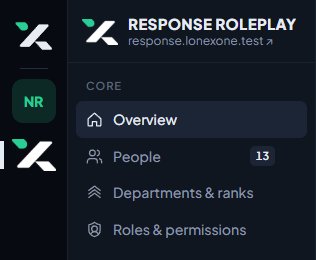
The thin bar on the far left of the control panel shows an icon for each community you help run. It uses the community's icon if it has one, or its initials in its colour.
- Move your mouse over an icon to see the community's name.
- Click it to open that community's Overview page.
The community you're in is highlighted.
Switch from your account page#
- Click your picture at the top right of the control panel, then Account.
- Under Your communities, click Panel next to the community you want.
Your account page lists every community you're a member of, even ones you don't help run. For those, there's only a Site button.
Switch from the CAD#
On the CAD's Select a panel screen, click Switch communities. You'll be taken to the control panel of the first community you help run, and from there you can use the switcher.
Which community opens first#
When you go to lonexone.com/panel, you'll land in your first community in alphabetical order.
Who sees a community in the switcher#
A community only shows in your switcher if you're its owner or an administrator, have a role there, or hold a rank that comes with permissions. Being a member isn't enough. Communities that are suspended or not live yet don't show.
Something not working?#
A community I help run is missing. You might not have any permissions there yet. Ask its owner to give you a role. If you're the owner, the community may still be waiting for its first invoice to be paid.
I clicked a community and it says it's unavailable. That community is suspended or not active right now. If you run it, contact us in the LonexLabs Discord.
See also
Find your way around the control panel
A tour of the control panel: the Overview page, the sidebar, the community switcher, search and your account menu, and why staff see different pages.
Search the control panel and pin favourites
Jump to any person, department, page, setting or help article with Ctrl K, search your community site, and pin the pages you use most to the top of your sidebar.
Can't find what you need?
Open a ticket in our Discord and someone from the team will help. Found a bug, or missing a feature? Tell us on the feedback board.