Add your own call types
Set up the call types dispatchers and units pick from, with an optional code and a starting priority. Rename the starter set, add your own, change the order and delete what you don't use.
Call types are the list dispatchers and units pick from when they create a call, like "Traffic collision" or "Structure fire". Each one can have a code, such as a 10-code, and a starting priority, so a shots fired call opens as an emergency without anyone having to change it.
Your CAD starts with 12 common call types. You can rename them, add your own and remove the ones you don't use.
Before you start#
You need the Set up the CAD: call types, statuses, penal code, designs and AOP permission.
Open the call types#
- Open your control panel and click CAD settings in the sidebar.
- Click Dispatch along the top, then Call types.
The list shows each call type's code and name, its priority and who it's for. If you've never opened this page or the CAD before, the starter call types are added the first time you do.
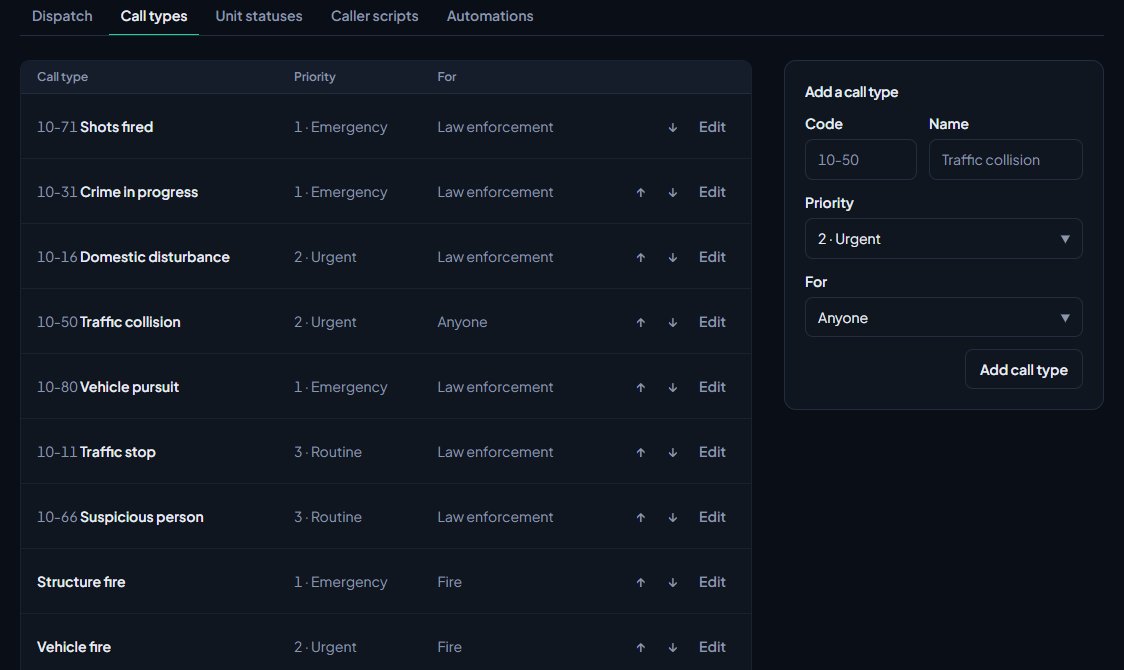
Add a call type#
- In the Add a call type box on the right, type a Code if you use one, like 10-50. You can leave it blank.
- Type the Name, like Traffic collision.
- Pick the Priority a new call of this type should start at.
- Pick who it's For: Anyone, Law enforcement, Fire or EMS. When a fire unit makes a call, the Fire call types are at the top of its list. Dispatchers see every type in your usual order.
- Click Add call type.
It's added to the bottom of the list.
Priorities#
| Priority | Meaning |
|---|---|
| 1 · Emergency | The most urgent, like shots fired or a structure fire. |
| 2 · Urgent | Needs a quick response, like a collision. |
| 3 · Routine | Normal calls, like a welfare check. |
| 4 · Low | Can wait. |
The priority is only where a call starts. Dispatch can change it on any call.
Edit or delete a call type#
- Click Edit next to the call type.
- Change the Code, Name, Priority or For.
- Click Save changes.
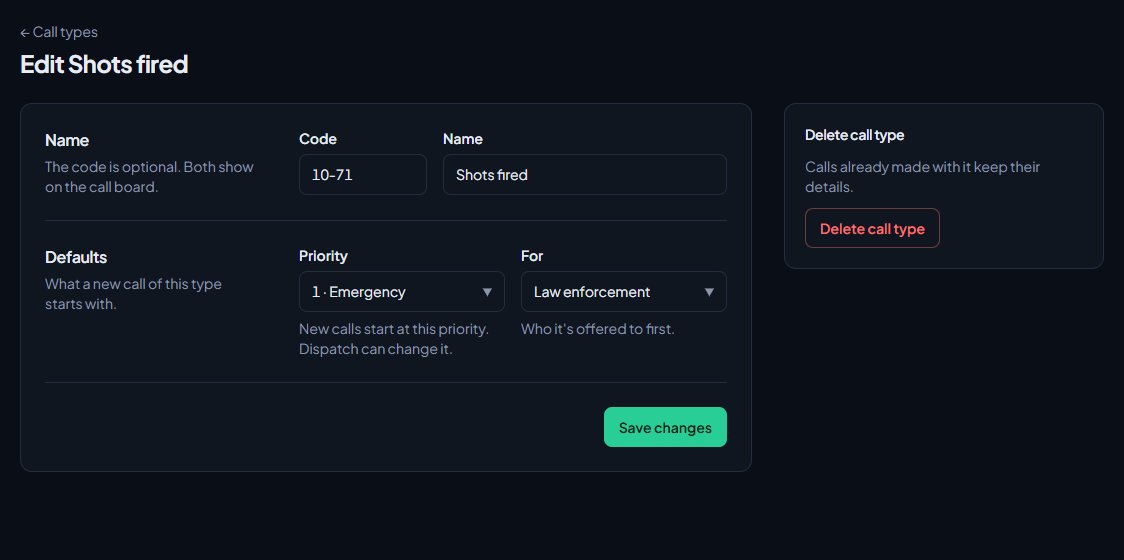
To delete it, click Delete call type on the same page and confirm. Calls already made with it keep their details, so old calls don't change.
Change the order#
Use the up and down arrows next to each call type. The order here is the order dispatchers see in the call type list, so put the ones you use most near the top.
The starter call types#
| Code | Name | Priority | For |
|---|---|---|---|
| 10-71 | Shots fired | 1 | Law enforcement |
| 10-31 | Crime in progress | 1 | Law enforcement |
| 10-16 | Domestic disturbance | 2 | Law enforcement |
| 10-50 | Traffic collision | 2 | Anyone |
| 10-80 | Vehicle pursuit | 1 | Law enforcement |
| 10-11 | Traffic stop | 3 | Law enforcement |
| 10-66 | Suspicious person | 3 | Law enforcement |
| Structure fire | 1 | Fire | |
| Vehicle fire | 2 | Fire | |
| Medical emergency | 1 | EMS | |
| Welfare check | 3 | Anyone | |
| 911 hang-up | 3 | Anyone | |
| Ungraded | 2 | Anyone |
Ungraded is the type that 911 calls and /quickcad calls from the game get, until dispatch changes it on the call. If you rename or delete it, check Call type for game calls on the Game resource tab under Status & servers. See 911 calls from the game.
The starter set is only added once, when the CAD is first set up. If you delete every call type, the list stays empty and a Load starter call types box shows on the right. Click it to get the starter set back.
Import call types from a spreadsheet#
If you already have a list, click Import CSV at the top of the Call types page. It opens the Import page with Call types already picked. Your sheet needs a name column, and can also have a code, a priority (1 to 4, or emergency, urgent, routine, low) and who it's sent to (anyone, leo, fire or ems). Call types you already have are skipped. See Import records into the CAD.
Call types elsewhere in the CAD#
- Caller scripts can be tied to a call type, so picking it opens a list of questions for dispatch to ask. See Write caller scripts for your dispatchers.
- Automations can run only for one call type, for example suggesting fire units for structure fires. See Set up dispatch automations.
- On the Log channels page you can choose which call types get posted to Discord. See Post logs to Discord channels.
Something not working?#
A call type I deleted came back. You deleted all of them, so the starter set was loaded again. Keep at least one of your own call types on the list.
A new call starts at the wrong priority. Edit the call type and change its Priority. Calls already open keep the priority they have.
The import skipped some of my call types. A call type with the same name and code is already on your list. The import never makes duplicates.
See also
Set up the CAD for your community
Install the CAD, set up the departments that sign on to it, give your staff access, and work through the CAD settings in the order that gets you running fastest.
Set up unit statuses and 10-codes
Choose the statuses police, fire and EMS units set themselves to, with your own 10-codes, colours and status-check timers, and learn what each status meaning does.
Write caller scripts for your dispatchers
Give dispatchers a list of questions to ask a caller for each call type. Each answer scores points, the score suggests a priority, and the questions and answers are added to the call for you.
Set up dispatch automations
Make simple when-this-then-that rules for the CAD. When a call is created or a panic is raised, add a note, alert a department, play a tone for dispatch or suggest free units.
Import records into the CAD
Bring characters, vehicles, firearms, charges, flags, call types and statuses in from a spreadsheet, or move a whole LonexCAD v3 community across. Check every row before it's saved, and undo an import for 24 hours.
Can't find what you need?
Open a ticket in our Discord and someone from the team will help. Found a bug, or missing a feature? Tell us on the feedback board.