911 calls from the game
Let players call 911 in game with their location and postal, choose whether players without Discord can call, set the wait between calls, or switch it off.
With the resource running, any player can call 911 from the game by typing /911 and what's happening. The call lands in the CAD straight away, with where they were standing, the street, the nearest postal and the caller's name. Dispatchers pick it up just like a call made on the website.
This article covers how the command works, the settings that control it and the messages players might see.
Before you start#
- The CAD needs to be installed and the resource connected. See Connect your game server.
- To change the settings you need to be the owner, or have one of these permissions: Run the status page: game servers, incidents and maintenance mode, Edit the community site: pages, navigation and branding or Set up the CAD: call types, statuses, penal code, designs and AOP.
How players call 911#
- The player types /911 followed by what's happening, for example /911 Car crash on the highway.
- They see Your 911 call has been sent.
That's all. They don't need to be on duty, and they don't need a civilian.
What dispatch sees#
The call shows up in the CAD like any other new call:
| Field | What's in it |
|---|---|
| Nature | 911 call |
| Call type | Ungraded, or the type picked under Call type for game calls |
| Priority | Urgent, or the priority of the type picked |
| Caller | The player's FiveM name |
| Description | What they typed after /911 |
| Location | The street they were on, and the cross street if there is one |
| Postal | The nearest postal to where they were, if your community uses postals |
The call is placed on the live map where the player was standing. Dispatchers then attach units in the usual way. See Create and dispatch calls.
If you post new calls to Discord, 911 calls are posted too, as long as they match the Post new calls at priority. If you've ticked any boxes under Only these call types, tick Ungraded too, or the type you picked for game calls, so they keep being posted. See Post logs to Discord channels.
Change the 911 settings#
- Open your control panel and click Status & servers in the left sidebar.
- Click the Game resource tab.
- Change the settings below.
- Click Save.
| Setting | Where it is | What it does | Starts |
|---|---|---|---|
| 911 calls from the game | CAD box | Players can place a 911 call in game. | On |
| 911 without Discord | CAD box | Players who haven't linked Discord to FiveM can still call 911. Everything else needs Discord. | On |
| Wait between 911 calls | In game box | How many seconds a player has to wait before calling again, from 0 to 3600. | 30 |
| Call type for game calls | CAD box | The call type 911 calls and /quickcad calls get, so automations and Discord call type filters can pick them out. Pick No call type to leave them without one. Dispatch can change it on the call. | Ungraded |
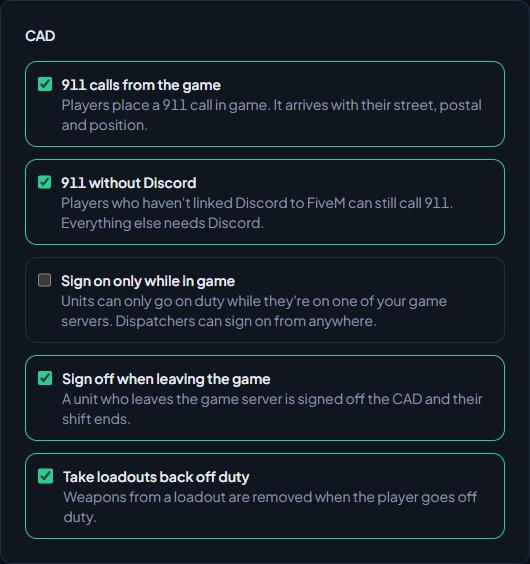
To rename the command, for example to /call911, change it under Commands. Leave the box empty to remove the command altogether. See Every in-game command.
If you turn off 911 calls from the game, also clear the command's name under Commands. Otherwise /911 is still there, and players get a message saying 911 calls are switched off.
Something not working?#
Players see "Wait 20 seconds before calling 911 again". They called recently. The wait is set by Wait between 911 calls. If a call fails, the wait is reset so they can try again straight away.
Players see "Usage: /911 <what is happening>". They typed /911 on its own. They need to say what's happening after it.
Players see "911 calls from the game are switched off for this community." 911 calls from the game is off. Turn it on, or clear the command's name so players don't see it.
Players see "Link Discord to FiveM to call 911 on this server." or "Link Discord to FiveM to use the CAD". 911 without Discord is off and the player doesn't have Discord linked in FiveM. They need the Discord desktop app running before they start FiveM, or you can turn the setting on.
Players see "Could not read your location". The game couldn't work out where they were. Ask them to try again in a moment.
Players see "The CAD isn't switched on for this community." The CAD isn't installed. Install it from Install modules.
The call has no postal. Your community has no postals set up, or postals are switched off. See Choose a map and postal set.
Calls aren't arriving at all. Check the resource is connected. See Fix the FiveM resource not connecting.
See also
Every in-game command
Every command the LonexOne resource adds, who can use it and what it does, plus how to rename commands, set the panic and tablet keys and change how messages look.
Connect your game server with a server key
Add your game server in Status & servers, make its server key, put it in server.cfg, check it's connected, and choose the in-game duty rules.
Create calls and dispatch units to them
Open a call, attach units, change priority and details, then clear it with a disposition. Also covers merging duplicates and reopening a call that closed too early.
Fix the FiveM resource not connecting
What each LonexOne message in your server console means, why the server shows Not connected yet, and how to fix players who can't use the CAD in game.
Can't find what you need?
Open a ticket in our Discord and someone from the team will help. Found a bug, or missing a feature? Tell us on the feedback board.