Edit the lists officers and civilians pick from
Change the caution flags, vehicle flags, licence types, restrictions, field interview reasons, registry types, evidence types and detail suggestions used across the CAD, plus the ID number and region settings on the Records page.
Lots of boxes in the CAD are picked from a list: the caution flags an officer puts on a name, the licences the DMV issues, the reasons for a field interview, the colours suggested for a character's eyes. Every one of those lists belongs to your community, so you can make them fit your server instead of a US police department.
Most of them are on the Records page. Evidence types are on the Evidence page.
Before you start#
You need the Set up the CAD: call types, statuses, penal code, designs and AOP permission.
Flags, licences and restrictions#
These four lists are at the bottom of the Records page.
- Open your control panel and click CAD settings in the sidebar.
- Click Records & courts along the top, then Records.
- Scroll down to the list you want.
| List | What it's for | What each entry has |
|---|---|---|
| Caution flags for people | Officers set these on a name return, like Armed & dangerous. | Name, colour, icon and severity (Information, Caution or Danger). |
| Vehicle flags | Set on a plate return, like Unmarked. Stolen and impounded are built in. | Name, colour, icon and severity. |
| Licence types | Licences the DMV issues, or civilians set for themselves. | Name, a short code like DL, The DMV issues it and Points suspend it. |
| Licence restrictions | Conditions attached to a licence, like Corrective lenses. | An optional code and a name. |
Add an entry#
- Fill in the fields at the bottom of the list's card.
- Click Add.
Edit or delete an entry#
- Click Edit next to the entry.
- Change the fields and click Save, or click Delete and confirm.
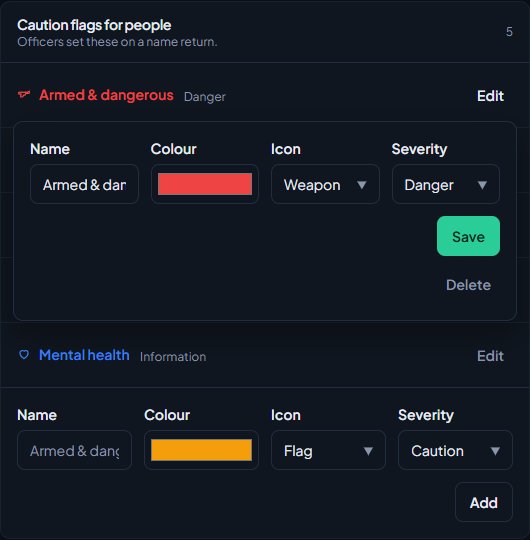
What happens when you delete depends on the list. A deleted flag or restriction comes off everyone who had it. A deleted licence type leaves licences people already hold on file.
Renaming a flag or licence type is safe. Records remember them by a hidden key made from the first name you gave, so renaming doesn't break anything already on file.
Load the starter entries#
Caution flags for people and licence types are filled in for you once, when the CAD is first set up. Vehicle flags and licence restrictions start empty. Any of these lists that's empty has a Load starter button on its card. Click it to add the starter entries. It only works while the list is empty.
If you delete every entry on a list, it stays empty until you add your own or click Load starter.
The starter licence types are Driver licence, Motorcycle licence, Commercial licence, Firearms licence, Hunting licence, Fishing licence, Boating licence and Pilot licence. Driver, motorcycle and commercial carry points.
Plain lists, one per line#
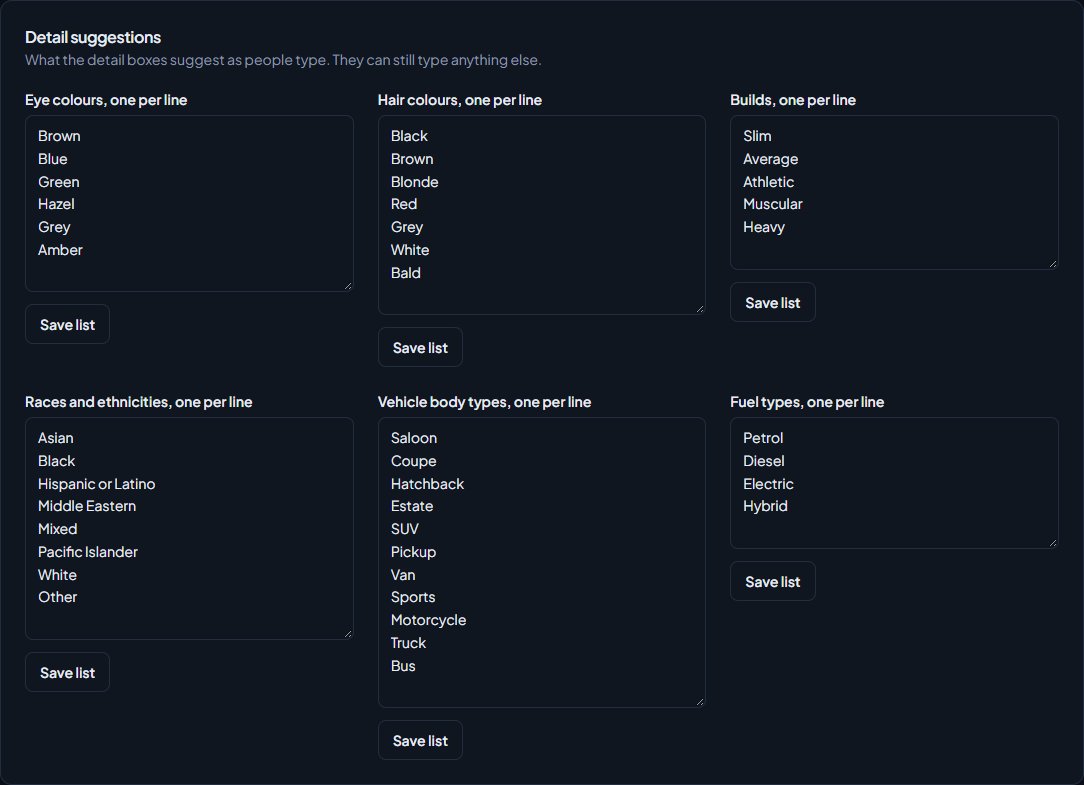
Further down the Records page are lists you edit as plain text, one entry per line.
- Find the list.
- Type one entry per line. Delete a line to remove it.
- Click Save list under that list.
| Group | Lists | Most entries |
|---|---|---|
| Field interviews, registries and contracts | Field interview reasons, Field interview outcomes, Aircraft types, Boat types, Property categories, Commercial contract types | 20 or 30 |
| Detail suggestions | Eye colours, Hair colours, Builds, Races and ethnicities, Vehicle body types, Fuel types | 15 to 30 |
Each entry can be up to 40 characters, and repeats are removed. Renaming an entry leaves cards and registrations already on file as they were.
The detail suggestions are only suggestions. People can still type something that isn't on the list.
Evidence types and storage#
- Click Records & courts, then Evidence.
- Edit Types (what officers pick when they log an item) or Storage locations (suggested when logging and transferring) one per line.
- Click Save list.
Officers can still type a storage location that isn't on the list.
The record settings on the same page#
The top of the Records page holds the settings for what a character's file contains. Click Save settings after changing any of them.
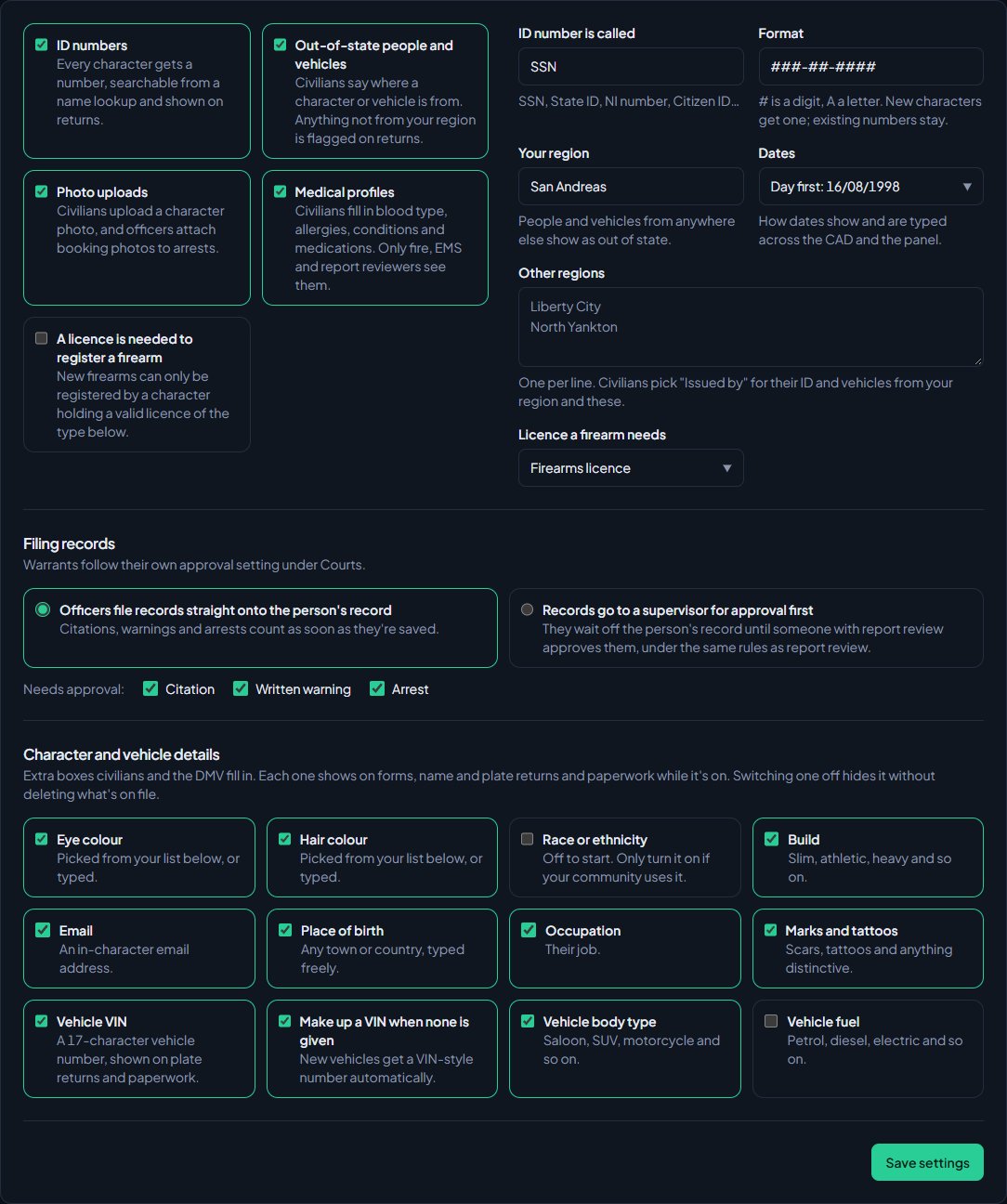
| Setting | What it does |
|---|---|
| ID number is called and Format | The name and pattern of the number every character gets, like SSN and ###-##-####. # is a digit and A is a letter. New characters get one, existing numbers stay. |
| Your region | Where your server is set, like San Andreas. People and vehicles from anywhere else show as out of state. |
| Other regions | One per line. Civilians pick "Issued by" for their ID and vehicles from your region and these. |
| Dates | Day first (16/08/1998) or month first (08/16/1998), across the CAD and the panel. |
| Licence a firearm needs | Used when A licence is needed to register a firearm is ticked. |
| Filing records | Whether citations, warnings and arrests go straight onto the person's record, or wait for a supervisor with the Review reports: approve them or send them back permission. |
| Character and vehicle details | Extra boxes like eye colour, race, VIN and fuel. Switching one off hides it without deleting what's on file. |
Something not working?#
There's no Load starter button on a list. The list already has entries. The button only shows on an empty list.
It says "Add at least one, one per line." A plain list can't be saved empty. Type at least one entry.
It says "Keep it to 30." (or another number) That list has a limit on entries. Remove some lines and save again.
It says "Keep each one under 40 characters." One of your lines is too long. Shorten it.
It says "Use # for digits and A for letters, with enough of them for at least 100,000 numbers." The ID format is too short or uses other characters. Add more # or A, for example ###-##-####.
It says "Pick the licence a firearm needs." You ticked A licence is needed to register a firearm but didn't choose a licence. Pick one in Licence a firearm needs.
It says "Pick which records need approval." You chose Records go to a supervisor for approval first but didn't tick Citation, Written warning or Arrest. Tick at least one.
See also
Turn CAD features on and off
Switch off the parts of the CAD your community doesn't use, from the DMV and courts to ride-alongs and Signal 100, and set the options that go with them, like quiet call closing, warrant approval and alert tones.
Build your penal code
Set up the charges officers pick on citations, arrests and warrants, with fines, jail time and licence points. Load the starter penal code, add your own charges or import them from a spreadsheet.
Import records into the CAD
Bring characters, vehicles, firearms, charges, flags, call types and statuses in from a spreadsheet, or move a whole LonexCAD v3 community across. Check every row before it's saved, and undo an import for 24 hours.
Get licences, registrations and plates from the DMV
Turn on the DMV so civilians apply for licences and registrations, and work the DMV desk: issue or deny applications, renew, suspend, re-plate and transfer vehicles.
Log a field interview card
Record someone you stopped and spoke to, even if they're not on file, and see the cards on name searches. For police and dispatch only.
Can't find what you need?
Open a ticket in our Discord and someone from the team will help. Found a bug, or missing a feature? Tell us on the feedback board.