Get licences, registrations and plates from the DMV
Turn on the DMV so civilians apply for licences and registrations, and work the DMV desk: issue or deny applications, renew, suspend, re-plate and transfer vehicles.
By default, civilians set their own licences and register their own vehicles. If you'd rather have a DMV, with staff checking each application, you can switch civilians over to applying instead. Members who work at the DMV then issue or deny applications from the DMV desk, and can renew, suspend, re-plate and transfer at the counter.
This article covers setting up the DMV, how civilians apply, and how DMV staff work the desk.
Before you start#
- DMV needs to be turned on under Modules on the CAD settings page. It's on to start with.
- To change the settings, you need the Set up the CAD: call types, statuses, penal code, designs and AOP permission.
- DMV staff need a role with the Work the DMV desk: licences, registrations, plates and business licences permission. They don't need to be in a department or on duty, because it's a civilian job.
Switch civilians over to the DMV#
-
Open your control panel and click CAD settings in the left sidebar.
-
Under Licences and registration, untick Civilians manage their own licences and registration (no DMV).
-
Set DMV issues last (days). It's 90 to start with. Leave it blank if licences and registrations should never expire.
-
Click Save settings.
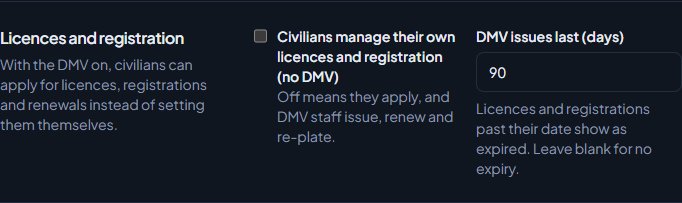
From now on civilians can't set their own licences or register new vehicles. They see an Applications section in the Civilian panel instead.
Licence types can be set up so the DMV doesn't issue them. Civilians still set those themselves, even with the DMV on. Your licence types are on the Records page under Records & courts in CAD settings.
Licences and registrations past their date show as expired on the character's file and on police returns.
How civilians apply#
-
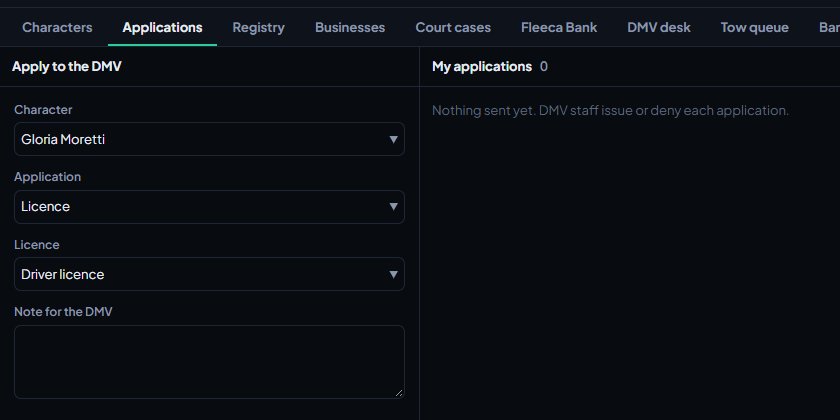
In the Civilian panel, open Applications.
-
Pick the Character.
-
Pick the Application: Licence, Vehicle registration or Renewal.
-
For a licence, pick which one. For a registration, fill in the Model, and the Make, Colour, Year and the Plate you'd like if they want. For a renewal, pick the licence, or pick A vehicle registration instead and choose the vehicle.
-
Add a Note for the DMV if needed.
-
Click Send application.
On a game server with the LonexOne FiveM resource, civilians can also apply for the car they're driving with /registervehicle or /regveh. The plate, make, model and colour are filled in from the car.
Their applications are listed under My applications with the status: Waiting, Issued, Denied or Withdrawn, and any note the DMV left. They can click Withdraw on one that's still waiting.
Open the DMV desk#
- Open the CAD on the community website.
- On the Select a panel screen, click DMV desk under Desks.
You can also open DMV desk from the sections along the top of the Civilian panel.
Issue or deny an application#
-
Waiting applications are listed under Applications on the left, oldest first. Click one.
-
Check the applicant, what they asked for and the licences they already hold.
-
Check Valid until. It's filled in from your community's usual length. Change it, or clear it for no expiry.
-
For a registration, check the Plate. Leave it empty to give them a new random plate.
-
To issue, click Issue.
-
To deny, write a reason in Note to the applicant, click Deny and confirm.
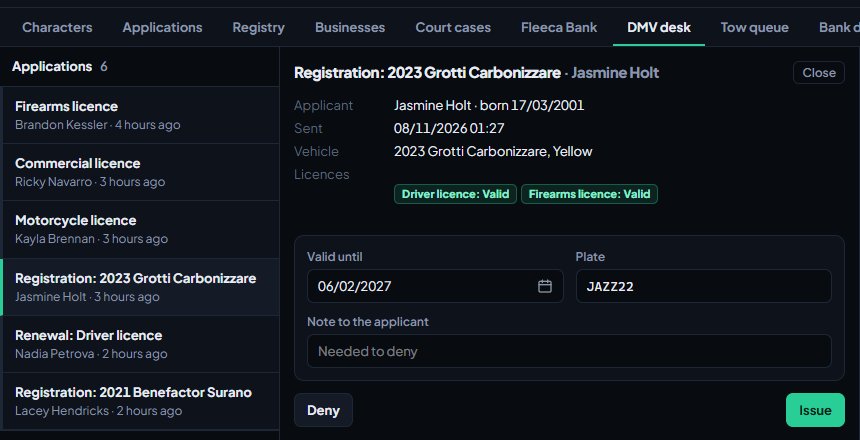
If the plate asked for is already taken, the vehicle gets a random plate instead, like 4KJX221.
Serve someone at the counter#
- Under Counter, search by name or date of birth and click Search. Searches are logged.
- Pick the person.
Their file opens with their licences, vehicles and businesses. From here you can:
| To | Do this |
|---|---|
| Issue a licence | Pick it from the list under Licences and click Issue licence. |
| Renew a licence | Click Renew next to it. It gets a new expiry date. |
| Suspend, revoke or reinstate | Click Status and pick Valid, Suspend or Revoke. |
| Set restrictions | Click a restriction code under the licence to add it, and again to take it off. |
| Renew a registration | Click Renew next to the vehicle. |
| Re-plate a vehicle | Type the new plate in New plate at the top of Vehicles, click Re-plate and confirm. Leave the box empty for a random plate. |
| Transfer a vehicle | Click Transfer and pick the new owner. |
| Fix their details | Click Edit details, or Details next to a vehicle. |
Transfer lists the other people from your latest counter search. With someone already open at the counter, search for the new owner: the current person stays open and the new owner shows up under Transfer.
Business licences#
If Businesses is turned on, new businesses wait for a licence from the DMV. They're listed under Business licences on the left of the desk. Click License to approve one. To turn one down, type a reason in the box underneath and click Deny. See Register businesses, aircraft, boats and property.
Something not working?#
DMV desk doesn't show under Desks. The member's role needs the DMV desk permission, and DMV has to be turned on under Modules in CAD settings.
Civilians don't see Applications. Civilians manage their own licences and registration (no DMV) is still ticked. Untick it and save.
It says "You already have a driver licence on file (suspended)." The character already holds that licence. If it's valid, they don't need a new one. If it's expired, they can apply for a renewal.
It says "That application is already waiting at the DMV." The same application is already in the queue. Wait for the DMV to decide it, or withdraw it first.
It says "Say why it was denied." Write a reason in Note to the applicant before clicking Deny.
It says the licence "is suspended by the police and can't be issued until they lift it." The police suspended it, usually for licence points. Only they can lift it. The DMV can't set it back to valid either.
It says "Another vehicle already has that plate." Plates are unique across the community. Try another, or leave the box empty for a random one.
See also
Create a civilian character
How members make a civilian character in the CAD, add licences, vehicles and firearms, and what staff control, like how many characters each member can have.
Register businesses, aircraft, boats and property
How civilians register businesses and hire staff, register aircraft, boats and serial-numbered property, and how the DMV licenses them when your community uses one.
Set up banking, cards and loans
Turn on banking in the CAD, set your bank name, currency, account types and duty pay, and run the bank desk: accounts, adjustments, cards and loan decisions.
Turn CAD features on and off
Switch off the parts of the CAD your community doesn't use, from the DMV and courts to ride-alongs and Signal 100, and set the options that go with them, like quiet call closing, warrant approval and alert tones.
Can't find what you need?
Open a ticket in our Discord and someone from the team will help. Found a bug, or missing a feature? Tell us on the feedback board.