Log a field interview card
Record someone you stopped and spoke to, even if they're not on file, and see the cards on name searches. For police and dispatch only.
A field interview card, or FI card, is a quick note that you stopped and spoke to someone, where, and why. It isn't a citation or an arrest, and it doesn't go on their criminal record. It builds up a picture over time: the next officer to run that name sees who has stopped them before.
You can log a card for a civilian on file, or describe someone whose name you don't know.
Before you start#
- Your community needs Field interview cards switched on under Modules in the CAD settings. It's on unless someone has turned it off.
- To write cards, you need to be on duty as a police unit.
- To read cards, you need to be on duty as police or dispatch. Fire and EMS don't see them.
Log a card#
-
Open a new card:
- From a person's record after a name search, click FI card (FI Card in Realistic). The person is filled in for you.
- Modern: click FI cards in the tabs, then New FI card.
- Classic: click FI in the top bar, then New FI card.
- Realistic: open Tools, choose Field Interviews, then New FI Card.
-
Under Person, search for them by name or date of birth and click the right one. If they're not on file, skip the search and describe them in Description: height, build, clothing, anything you noticed.
-
Check the Location and Postal. If you're on a call, they're filled in from it.
-
Pick the Reason you stopped them. This is required.
-
Pick an Outcome if there was one.
-
Pick the Call it was part of, if any. Your current call is picked for you.
-
Add any Notes.
-
Click Save card (Save Card in Realistic).
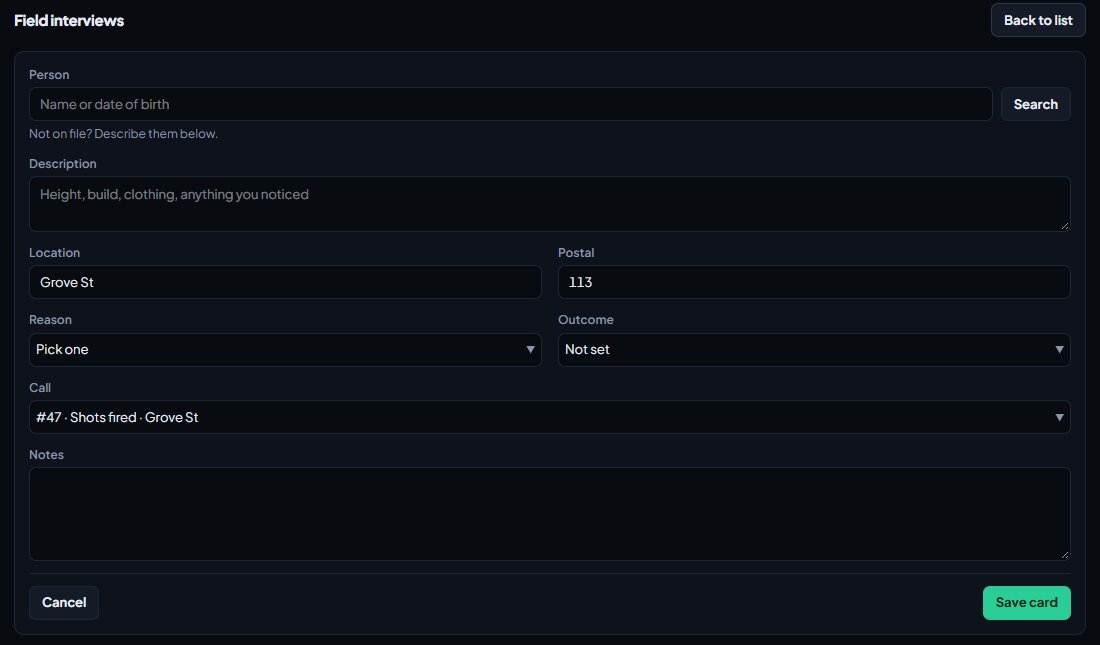
The card gets a number like FI-0012 and is timed at the moment you save it.
Reasons and outcomes#
Your community sets these lists. Unless they've changed them, they are:
| Reasons | Outcomes |
|---|---|
| Suspicious behaviour | Released |
| Matches a description | Warned |
| Loitering | Cited |
| Known associate | Arrested |
| Passenger on a stop | Referred |
| Other |
CAD admins change them under Records in the CAD settings. See Edit the lists officers and civilians pick from.
Read cards#
On a name search#
When police or dispatch open a person's record, their cards show under Field interviews, newest first, with the number, reason, time, place and officer. Click one to read it in full.
All recent cards#
Open the FI cards list:
- Modern: FI cards in the tabs.
- Classic: FI cards in the dispatch top bar, or FI on a unit screen.
- Realistic: Tools then Field Interviews.
You'll see the 40 latest cards from everyone, newest first. Click a card to read it: the person, description, where and when, outcome, call, officer and notes. If the card is for someone on file, click their name to open their record.
Rules and limits#
- Cards can't be edited or deleted once saved. If you got something wrong, log a new card with a note saying so.
- Descriptions can be up to 500 characters, and notes up to 5,000.
- Riders on a read-only ride-along can read cards but not write them.
Something not working?#
I don't see FI cards or the FI card button. Field interview cards are switched off for your community, or you're signed on as fire or EMS. Only police see the button to write one.
It says "Pick who it was, or describe them." Pick a person from the search, or fill in Description if they're not on file.
It says "Pick why you stopped them." Choose a Reason from the list.
It says "Type at least two characters." The person search needs at least two characters of a name, or a full date of birth.
It says "Postal 412 isn't on the map. Pick one from the list." Your community only accepts postals from its own list. Pick one from the suggestions.
See also
Run name, plate and serial lookups
Search people, plates, firearm serials and businesses while on duty, read what comes back, and know which units can search what.
Work a call as a police, fire or EMS unit
Set your status, attach yourself to calls, add notes, link people and vehicles, open your own calls and clear them when you're done.
Edit the lists officers and civilians pick from
Change the caution flags, vehicle flags, licence types, restrictions, field interview reasons, registry types, evidence types and detail suggestions used across the CAD, plus the ID number and region settings on the Records page.
Turn CAD features on and off
Switch off the parts of the CAD your community doesn't use, from the DMV and courts to ride-alongs and Signal 100, and set the options that go with them, like quiet call closing, warrant approval and alert tones.
Can't find what you need?
Open a ticket in our Discord and someone from the team will help. Found a bug, or missing a feature? Tell us on the feedback board.