Save a uniform's clothes for the game
Dress in a uniform in game and save it with /uniformsave, or type the drawable and texture numbers in on the uniform's page, for both the male and female characters.
A uniform in Fleet & uniforms can carry the actual clothes it's made of. Once they're saved, members put the whole uniform on in game with one click, instead of picking the top, trousers, badges and hat from a clothing menu every time. With the duty switch on, it even goes on by itself when they sign on.
You save the clothes once per uniform. The male and female characters are saved separately, because GTA numbers their clothes differently, so a uniform that both should wear needs saving twice.
Before you start#
- The Department Panel module needs to be installed, and the LonexOne FiveM resource needs to be running on your server. See Install the LonexOne FiveM resource.
- You need the Manage vehicles and uniforms and who has them permission. If it's limited to some departments, you can only save uniforms for those.
- The uniform has to exist already. Add it on the Uniforms tab of Fleet & uniforms. See Manage fleet vehicles and uniforms.
- Your Discord must be linked in FiveM (Settings, then Connections), and you must have signed in to your community site with that Discord account.
Save it from the game#
This is the quickest way, and the numbers are always right.
- Join your server playing the freemode male or female character.
- Dress in the uniform using your server's clothing menu. Include everything that's part of it: the hat, badges, body armour, gloves and so on.
- Type
/uniformsave. - A list of the uniforms you can save to opens. The Saved for column shows which characters each one has clothes for already.
- Click Save next to the uniform.
You'll see "Saved what you're wearing to Class A for the male character". To set up the other character, switch to it, dress it the same way and run /uniformsave again.
Saving again replaces the clothes for that character. The uniform's page shows who saved each character's clothes and when.
Your server may use a different name for the command. The names are set under Status & servers, then Game resource, under Commands.
What gets saved#
Saving copies these slots from your character:
| Clothing | Props |
|---|---|
| Top, Undershirt, Arms and gloves, Legs, Shoes, Neck and accessories, Body armour, Badges and decals, Bag, Mask | Hat, Glasses, Ears, Watch, Bracelet |
The face and hair are never touched, so a uniform keeps each player's own look. If you're not wearing a prop, like glasses, the uniform takes it off when someone puts it on.
Type the clothes in by hand#
If you know the numbers from your clothing menu, you can enter them on the website instead.
- Open your control panel and click Fleet & uniforms under Department Panel.
- Click the Uniforms tab, then Manage on the uniform.
- Under Clothes in game, fill in the Drawable and Texture for each slot, in the Male character and Female character columns.
- Click Save clothes.
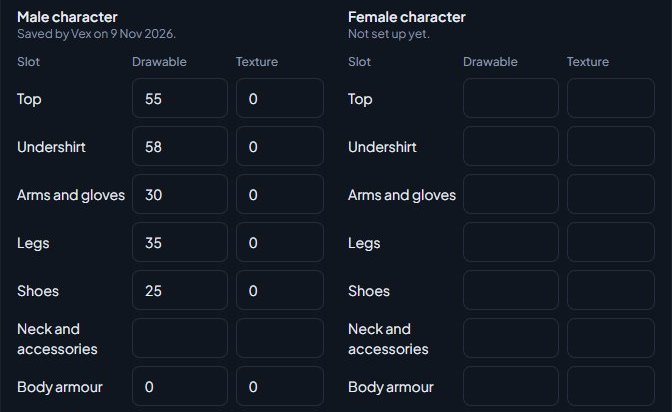
A few rules for the numbers:
- Leave a slot blank to keep whatever the player already wears there.
- Set a prop to -1 to take it off, for example to make sure nobody wears a hat with the uniform.
- Drawables go from 0 to 9999 and textures from 0 to 255. A blank texture counts as 0.
- Clear every slot for a character to remove that character's clothes from the uniform.
Uniforms with clothes saved show an In game tag on the Uniforms tab.
Something not working?#
"Uniforms can only be saved from the freemode male or female character" You're playing a different ped. Switch to the freemode male or female character first.
"There are no uniforms you can save to. Fleet managers add uniforms on the website under Fleet & uniforms first." Add the uniform on the website first. If it exists, check you have the fleet permission for its department.
"Only fleet managers can save uniforms, and only for their own departments." Your role doesn't have Manage vehicles and uniforms and who has them for that uniform's department.
"Your Discord isn't linked to Blackwater Roleplay on LonexOne. Sign in on the community website with Discord first." Sign in to your community site with the same Discord account you've linked in FiveM.
"Uniforms need the Department Panel module." Install the Department Panel from Install modules.
"Top needs a whole number from 0 to 9999." A number on the uniform's page is out of range or isn't a whole number. Fix the slot the message names.
Part of the uniform is missing when someone puts it on.
That slot was saved blank or with the wrong number. Dress in the full uniform and run /uniformsave again, or correct the slot on the uniform's page.
See also
Put on a uniform in game
How members put on the uniforms they've been given with /uniform, change back into their own clothes, and get their uniform on and off automatically with duty.
Manage fleet vehicles and uniforms
Keep a list of each department's vehicles and uniforms, assign them to members, take vehicles out of service, set which ranks and divisions can have a uniform, and add garage spots for the game.
Every in-game command
Every command the LonexOne resource adds, who can use it and what it does, plus how to rename commands, set the panic and tablet keys and change how messages look.
Set up duty loadouts
Build weapon loadouts with attachments and ammo for each department, limit them to ranks or divisions, and choose whether they're taken back off duty.
Can't find what you need?
Open a ticket in our Discord and someone from the team will help. Found a bug, or missing a feature? Tell us on the feedback board.