Set up duty loadouts
Build weapon loadouts with attachments and ammo for each department, limit them to ranks or divisions, and choose whether they're taken back off duty.
A loadout is a set of weapons and equipment a member can pick when they go on duty in game with /onduty. You might give patrol officers a pistol, taser and flashlight, and supervisors a rifle as well. When they sign on, the resource gives them the weapons, with the attachments and ammo you chose.
This article covers building a loadout, limiting it to ranks or divisions, and what happens when someone goes off duty.
Before you start#
- You need the FiveM resource running. See Install the LonexOne FiveM resource.
- You need to be the owner, or have one of these permissions: Run the status page: game servers, incidents and maintenance mode, Edit the community site: pages, navigation and branding or Set up the CAD: call types, statuses, penal code, designs and AOP.
- Loadouts belong to a police, fire or EMS department. Create one first under Departments & ranks.
Add a loadout#
-
Open your control panel and click Status & servers in the left sidebar.
-
Click the Game resource tab.
-
In the Loadouts box, click Add loadout, or Add next to a department.
-
Type a Name, like Patrol or Supervisor.
-
Pick the Department.
-
Under Weapons, click in the search box and type part of a weapon's name, then pick it from the list.
-
Type the Ammo to give with it.
-
Under the weapon, click the attachments you want, like a flashlight or suppressor. You can pick one attachment for each slot.
-
Click Add weapon to add another, and repeat.
-
Click Add loadout.
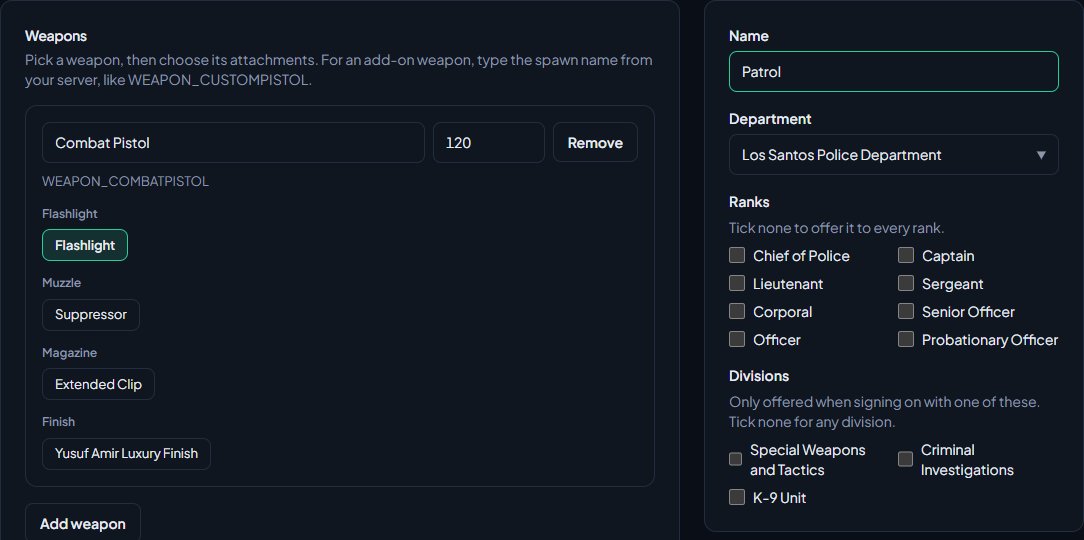
You're taken back to the Game resource tab with the message Loadout added.
Add-on weapons#
If your server has add-on weapons, type the weapon's spawn name in the search box, like WEAPON_CUSTOMPISTOL, and pick Use custom weapon. You can then type its attachment names, separated by commas, like COMPONENT_AT_PI_FLSH.
Limit a loadout to ranks or divisions#
On the loadout's page, under the department:
- Ranks: tick the ranks that can pick it. Tick none to offer it to every rank.
- Divisions: tick divisions to only offer it when someone signs on with one of them. Tick none for any division. This only shows when the department has divisions.
For example, a SWAT loadout limited to the SWAT division only appears in the duty menu when the member picks SWAT as their division.
Members pick a division when they sign on only if Divisions at sign-on is on under CAD settings, on the Dispatch tab. If it's off, a loadout limited to a division is offered to everyone in that division.
What members see in game#
- The member types /onduty.
- They pick their department.
- They check their Callsign, and pick a Division if they have one.
- Under Equip loadout?, they pick a loadout, or leave it on No loadout.
- They click Go on Duty.
The weapons are given straight away. Members only see loadouts for their own department and rank.
Take loadouts back off duty#
In the CAD box on the Game resource tab, Take loadouts back off duty is on to start with. When someone goes off duty, the weapons in the loadout they picked are removed. Weapons that aren't part of the loadout are left alone.
Untick it and click Save if you'd rather members keep their loadout after signing off.
Edit or delete a loadout#
- On the Game resource tab, click the loadout in the Loadouts box.
- Make your changes and click Save loadout, or click Delete and confirm.
Changes apply the next time someone goes on duty. People already on duty keep what they were given.
Limits#
| Limit | Value |
|---|---|
| Weapons in one loadout | 30 |
| Attachments on one weapon | 10 |
| Ammo per weapon | 0 to 9999 |
| Loadout name | 40 characters |
Something not working?#
It says "Add at least one weapon." Every loadout needs a weapon. Pick one under Weapons.
It says "... isn't a weapon name. They look like WEAPON_COMBATPISTOL." A custom weapon name doesn't look right. Check the spawn name on your server. It should start with WEAPON_ or GADGET_.
It says "... isn't an attachment name. They look like COMPONENT_AT_PI_FLSH." A custom attachment name doesn't look right. Attachment names start with COMPONENT_.
It says "Pick a police, fire or EMS department." Loadouts can only belong to police, fire or EMS departments, because those are the ones that go on duty in game.
The Loadouts box says "Add a police, fire or EMS department first. Loadouts belong to a department." You don't have a police, fire or EMS department yet. Create one under Departments & ranks.
A member can't see a loadout in the duty menu. Check the loadout's Ranks include their rank, and that they've picked the right Division.
A weapon in the loadout wasn't given. The game didn't recognise the weapon name. For an add-on weapon, check the resource that adds it is running and the spawn name is right.
See also
Every in-game command
Every command the LonexOne resource adds, who can use it and what it does, plus how to rename commands, set the panic and tablet keys and change how messages look.
Connect your game server with a server key
Add your game server in Status & servers, make its server key, put it in server.cfg, check it's connected, and choose the in-game duty rules.
The garage and fleet vehicles in game
Let units take fleet vehicles out in game with /vs, set up liveries, extras and plates on the website, add garage bays, and save a car's look with /vssave.
Go on duty in the CAD
Sign on with your department and callsign, skip the panel screen with a default, go off duty, and fix the messages that stop you signing on.
Can't find what you need?
Open a ticket in our Discord and someone from the team will help. Found a bug, or missing a feature? Tell us on the feedback board.