The garage and fleet vehicles in game
Let units take fleet vehicles out in game with /vs, set up liveries, extras and plates on the website, add garage bays, and save a car's look with /vssave.
The vehicles in your department's fleet can be taken out in game. A unit on duty types /vs, picks a vehicle from their department's garage, and it spawns with the livery, extras, colours and plate you set on the website. You can also add garage bays, so cars only come out at the station.
This article covers setting a fleet vehicle up for the game, using /vs, adding garage spots and copying a car's look with /vssave. For adding vehicles and assigning them, see Manage fleet vehicles and uniforms.
Before you start#
- You need the Department Panel module installed, and the FiveM resource running.
- To set up vehicles, garage spots or use /vssave and /garagespot, you need the Manage vehicles and uniforms and who has them permission for that department.
- The vehicle model has to be on your game server, either a base game car or an add-on.
Set a fleet vehicle up for the game#
- Open your control panel and click Fleet & uniforms under Department Panel in the sidebar.
- Pick the department, then click the vehicle.
- Under In game, type the Spawn code, for example police3. This is the model name your server spawns it with.
- Set anything else you want. Anything you leave on As the car comes isn't changed.
- Click Save changes.
A vehicle without a spawn code never shows in the garage.
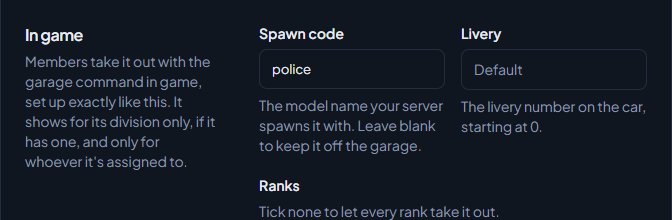
| Setting | What it does |
|---|---|
| Livery | The livery number, starting at 0. |
| Ranks | Tick the ranks that can take it out. Tick none for every rank. |
| Extras | Click an extra once for on, again for off, and again to leave it as the car comes. |
| Primary colour, Secondary colour, Pearlescent, Wheel colour | The car's colours. |
| Window tint | The tint. |
| Plate style | The style of number plate. |
| Plate text | The fleet plate number uses the vehicle's Unit or plate number. The callsign of whoever takes it out uses the unit's callsign. |
| Mods | Pick a part and type its number from the game's mod menu, starting at 0. |
Plates in game hold up to 8 letters and numbers. Dashes become spaces, so 1A-24 shows as 1A 24, and anything else is dropped.
Who sees a vehicle in the garage#
A unit sees a vehicle in /vs when all of these are true:
- It belongs to the department they're on duty with, and has a spawn code.
- It isn't Out of service.
- It's not assigned to someone else. If it's assigned to them, it shows Assigned to you.
- If it belongs to a division, they're on duty with that division, or they're in that division and didn't pick one when signing on.
- If it's limited to ranks, they hold one of them.
Take a vehicle out with /vs#
- Go on duty with /onduty.
- Get out of any vehicle you're in.
- Type /vs.
- In the Garage list, click Spawn next to the vehicle.
The car appears a few metres in front of you (or where you stand, if that's blocked), you're put in the driver's seat, and you're told its name and plate. You can take out a vehicle every 5 seconds.
Add garage spots#
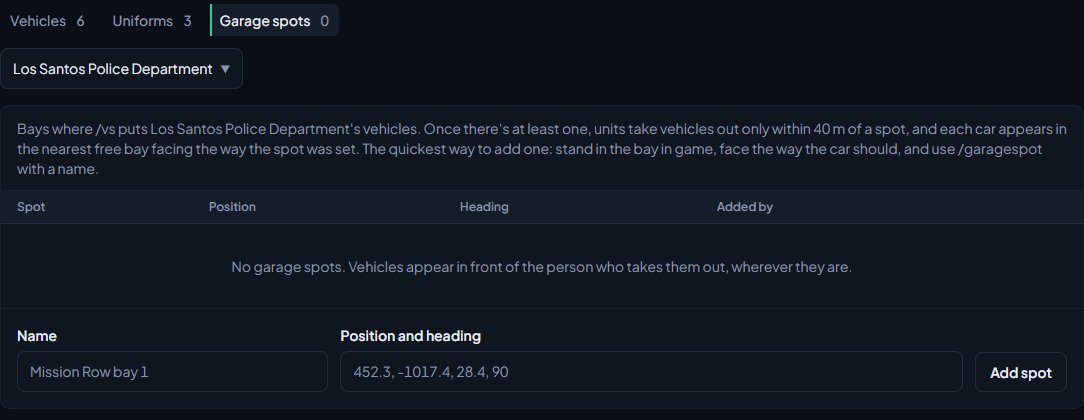
Garage spots are bays where /vs puts your department's vehicles. Once a department has at least one, units can only take vehicles out within 40 metres of a spot, and each car appears in the nearest free bay, facing the way the spot was set. Without spots, vehicles appear in front of whoever takes them out, wherever they are.
The quickest way to add a spot is in game:
- Go on duty with the department.
- Stand in the bay, facing the way the car should face.
- Type /garagespot followed by a name, like /garagespot Mission Row bay 1.
You'll see Garage spot "Mission Row bay 1" added for your department. If you leave the name out, it's called Spot 1, Spot 2 and so on.
You can also add one on the website:
-
On the Fleet & uniforms page, click the Garage spots tab.
-
Type a Name.
-
In Position and heading, paste the position as x, y, z and heading, like 452.3, -1017.4, 28.4, 90. A vector3 or vector4 works too.
-
Click Add spot.
To remove a spot, click Remove next to it on the Garage spots tab and confirm. A department can have up to 100 spots.
Copy a car's look with /vssave#
If it's easier to set up a car in game, /vssave copies its livery, extras, mods, colours, tint and plate style onto a fleet vehicle.
- Spawn the car and set it up how you want it.
- Sit in the driver's seat.
- Type /vssave.
- Under Save this car to…, click Save next to the fleet vehicle, or Save to all at the top to save it onto every vehicle listed.
You'll see Saved this car's setup to the vehicle's name, or how many vehicles it was saved to. Only fleet vehicles whose spawn code matches the car you're in are listed. The Plate text setting on the website stays as it was.
Something not working?#
/vs says "[Department] has no fleet vehicles yet. Add them in the panel under Fleet." Add vehicles on the Fleet & uniforms page first.
/vs says "None of [Department]'s fleet vehicles have a spawn code." Open a vehicle and fill in its Spawn code under In game.
/vs says "None of the 4 in-game vehicles are yours to take out", followed by reasons. It lists why, for example out of service, assigned to someone else, for a division you aren't on duty with, or for other ranks. Change the vehicle, or sign on with the right division.
It says "Take vehicles out at a garage. The nearest is ..., 120 m away: it's on your GPS." Your department has garage spots and you're too far from one. Follow your GPS to the nearest.
It says "Every garage spot here has something in it. Clear one and try again." All the bays near you are blocked. Move a car out of one.
It says "Couldn't load police3. Is it on the server?" The game can't find that model. Check the spawn code, and that the add-on vehicle's resource is running.
/vssave says "Only fleet managers can save cars to the fleet." You need the Manage vehicles and uniforms and who has them permission.
/vssave says "No fleet vehicle uses this model yet. Add its spawn code on the website first." No fleet vehicle has the spawn code of the car you're in. Set the spawn code on the website, then try again.
/garagespot says "Only fleet managers can add garage spots." You need the Manage vehicles and uniforms and who has them permission for the department you're on duty with.
See also
Every in-game command
Every command the LonexOne resource adds, who can use it and what it does, plus how to rename commands, set the panic and tablet keys and change how messages look.
Set up duty loadouts
Build weapon loadouts with attachments and ammo for each department, limit them to ranks or divisions, and choose whether they're taken back off duty.
Manage fleet vehicles and uniforms
Keep a list of each department's vehicles and uniforms, assign them to members, take vehicles out of service, set which ranks and divisions can have a uniform, and add garage spots for the game.
Connect your game server with a server key
Add your game server in Status & servers, make its server key, put it in server.cfg, check it's connected, and choose the in-game duty rules.
Can't find what you need?
Open a ticket in our Discord and someone from the team will help. Found a bug, or missing a feature? Tell us on the feedback board.