Set Discord nicknames from the roster
Have the bot rename members in Discord to match their callsign, name and rank, choose which department wins for people in several, and switch it off again.
LonexOne can set your members' Discord nicknames for you, built from the roster. A police officer might show as "1A24 | J. Matthews", and when they're promoted or given a new callsign, their nickname follows.
There are two parts: each department has a nickname format, and each Discord server has a switch to turn nicknames on. This article covers both, plus what happens when someone is in more than one department.
Before you start#
- Connect your Discord server. See Connect your Discord server.
- To set a department's format you need the Edit departments, ranks, divisions and certifications permission. To turn nicknames on for a server you need Connect Discord servers and link Discord roles.
- The bot needs the Manage Nicknames permission in Discord. It asks for this when you add it.
Set a department's nickname format#
-
Click Departments & ranks in the left sidebar and open the department.
-
Click Edit department.
-
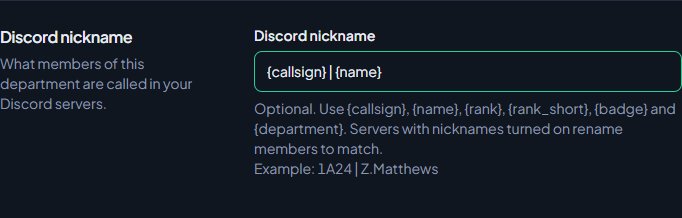
Under Discord nickname, type a format in the Discord nickname box, for example
{callsign} | {name}. -
Check the example underneath the box to see how it'll look.
-
Click Save changes.
You can use these placeholders:
| Placeholder | What goes in |
|---|---|
{callsign} |
Their callsign in this department. |
{name} |
Their character name on the roster, or their LonexOne display name if there isn't one. |
{rank} |
Their rank, for example Sergeant. |
{rank_short} |
The rank's abbreviation, for example Sgt. Set it when you edit the rank. If there isn't one, the full rank is used. |
{badge} |
Their badge number. |
{department} |
The department's short name, for example LSPD. |
Leave the box empty if you don't want this department to set nicknames.
If a placeholder is empty, LonexOne tidies up after it. {callsign} | {name} for someone without a callsign gives just their name, not "| John Doe". Empty brackets are removed too.
Turn nicknames on for a server#
-
Click Discord servers in the left sidebar.
-
Find the server. Under it, tick Set nicknames.
-
Leave Nickname from on Use the priority order, or pick one department (see below).
-
Click Save.
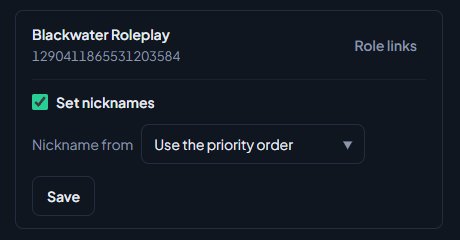
You'll see a message like Saved. Updating nicknames in Blackwater RP for 85 people. Everyone in the community is queued, so it can take a few minutes for a large server.
People in more than one department#
If someone is in several departments that have a nickname format, the Nickname priority list on the Discord servers page decides which one wins. The highest department in the list sets their nickname.
- On the Discord servers page, find Nickname priority.
- Use the up and down arrows next to a department to move it.
The list only shows departments that have a nickname format. If any server has nicknames on, moving a department re-checks everyone's nickname.
To make one server always use one department, for example a fire department's own Discord, pick that department in Nickname from for that server and click Save. The list only shows departments that have a nickname format. Anyone not in that department falls back to the priority order.
Long nicknames#
Discord nicknames can be at most 32 characters. When a nickname is too long, LonexOne shortens it in this order:
- The name is shortened: "John Michael Doe" becomes "J. M. Doe", then "J. Doe", then "Doe".
- If that's not enough,
{rank}is swapped for{rank_short}. - Only then is the end cut off.
Who gets a nickname#
- Anyone on the roster of a department with a nickname format, whatever their status, unless they've left the department. Someone who's suspended keeps their nickname, even though their department roles come off.
- People who aren't in any department with a format keep whatever nickname they have.
- If someone leaves their last department with a format, LonexOne removes the nickname it set. If they've changed their nickname themselves since, it leaves theirs alone.
Nicknames update at the same times as roles: straight away when the roster changes, every night, and when you click Sync everyone now on the Role links page.
Turn nicknames off#
- On the Discord servers page, untick Set nicknames under the server.
- Click Save.
You'll see LonexOne no longer sets nicknames in Blackwater RP. Nicknames already set stay as they are.
Something not working?#
There's a warning that says the bot can't change nicknames here. The bot is missing Manage Nicknames. In Discord, open Server Settings, then Roles, pick the LonexOne role and turn on Manage Nicknames.
One person's nickname never changes. Discord doesn't let a bot rename the server owner, or anyone whose highest role is above the bot's role. On the Role links page, under Latest sync, you'll see Can't set their nickname: they own the server or are above the bot's role. Move the LonexOne role above their roles, or set their nickname by hand.
It says "{something} is not a placeholder." Placeholders have to be spelled exactly as in the table above, in curly brackets. The message tells you the one it didn't recognise.
The nickname shows the wrong department. Check the Nickname priority list, and the Nickname from setting for that server.
I clicked Save and it says "Nothing changed." The settings were already the same. To refresh everyone's nickname, use Sync everyone now on the Role links page.
See also
Connect your Discord server
Add the LonexOne bot to your main Discord server, put its role in the right place, and fix the messages you might see while connecting.
Link Discord roles to departments and ranks
Give people Discord roles automatically for their department, rank, division, status, certifications and community roles, and take them away when that changes.
Use more than one Discord server
Connect department and division servers alongside your main one, what the main server is used for, and how to switch which server is main.
Fix Discord roles that aren't syncing
Read the Latest sync results, fix the bot's role and permissions, and sort out members who aren't getting or losing the Discord roles you linked.
Can't find what you need?
Open a ticket in our Discord and someone from the team will help. Found a bug, or missing a feature? Tell us on the feedback board.