Use more than one Discord server
Connect department and division servers alongside your main one, what the main server is used for, and how to switch which server is main.
Lots of communities run a main Discord server plus separate servers for departments, like a police server or a fire and EMS server. LonexOne can look after all of them at once. Your main server is the community's home, and the others are called child servers.
This article explains the difference between the two, how to add a child server, and how to change which one is main.
Before you start#
- Connect your main server first. See Connect your Discord server.
- You need to be the owner, or have a role with the Connect Discord servers and link Discord roles permission.
- You need Manage Server in each Discord server you add.
Main server and child servers#
Every server you connect works on its own: it has its own role links, its own nickname setting, and its channels show up wherever you pick a Discord channel, like the Log channels page.
A few things only ever use your main server:
| Feature | What it uses the main server for |
|---|---|
| Team page | Grouping your staff by their Discord roles. |
| Staff Panel | The Discord roles offered in the Staff settings, and the roles given by the Reward ladder. |
| Application forms | New-application notices are only posted while the bot is in your main server. |
| Overview checklist | Connect your main Discord server is ticked off once you have one. |
Add a child server#
- Click Discord servers in the left sidebar.
- Under Child servers, click Add child server.
- Discord opens. Pick the server and approve the bot.
- You're sent back with the message Server connected.
The heading shows how many child servers you have and how many you can add, for example Child servers (2/10). Once you reach the limit, the Add child server button goes away.
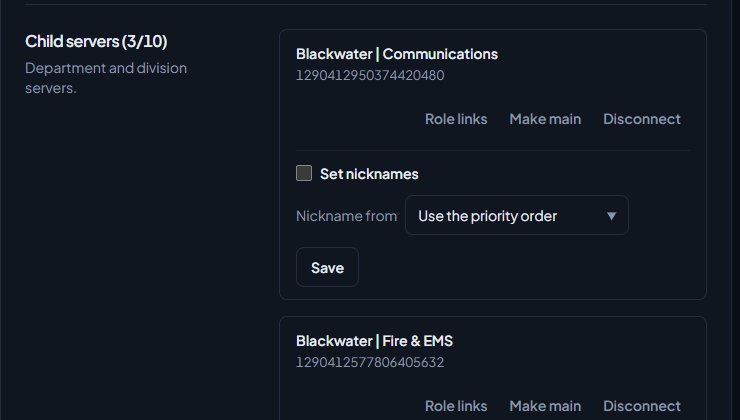
If you add a child server before you have a main server, it becomes your main server automatically.
Remember to drag the LonexOne role above your roles in each new server, just as you did for the main one.
Set up roles and nicknames for each server#
Role links belong to one server, because each server has its own roles. Next to each server on the Discord servers page, click Role links to set up that server's roles. In the Discord roles section when you edit a department, rank or division, there's a separate box for each server.
For example, in your police server you could link @Sergeant to the Sergeant rank, and in your main server link a general @Police role to everyone in the department.
Nicknames are switched on per server too. Under each server, tick Set nicknames and choose where the nickname comes from in Nickname from. A good setup for a department server is to pick that department, so everyone there is named after their callsign in it. See Set nicknames from the roster.
Say which department a server is for#
Under each child server, Server for says who the server belongs to. It starts on The whole community. Pick a department and click Save to make it that department's server. You'll see a message like Blackwater Police is now the BPD server.
This keeps the Log channels page tidy: a department's lists show its own server and your community servers, and leave out other departments' servers. See Post logs to Discord channels.
Make a different server your main server#
- On the Discord servers page, find the child server.
- Click Make main.
You'll see a message like Blackwater Police is now your main server. Your old main server becomes a child server. If the new main server was a department's server, it goes back to being for the whole community. Nothing else changes: role links, nicknames and log channels stay as they were.
You can also click Replace main server to connect a brand new server as your main one. Your old main server stays connected as a child server, so this needs a free child server slot. If every slot is used, disconnect a child server first.
Disconnect a child server#
- On the Discord servers page, find the server.
- Click Disconnect.
The bot leaves the server and that server's role links are removed. There's no "are you sure?" step.
Your main server can only be disconnected when you have no child servers. To remove it, make another server main first.
Something not working?#
It says "You have reached the maximum number of child servers." You've used every child server slot. Disconnect one you no longer need, then add the new one.
It says "Make another server your main server before removing this one." You're trying to remove your main server while child servers are still connected. Click Make main on another server first.
It says "That server is already connected to another LonexOne community." Each Discord server can only belong to one community. Disconnect it from the other community first.
Someone has a role in one server but not another. Role links are separate for each server. Open Role links for the server where the role is missing and check it's linked there.
The team page or reward ladder roles don't show my department server's roles. Those only read roles from your main server. Use a role from your main server, or click Make main on the server you want to use.
See also
Connect your Discord server
Add the LonexOne bot to your main Discord server, put its role in the right place, and fix the messages you might see while connecting.
Link Discord roles to departments and ranks
Give people Discord roles automatically for their department, rank, division, status, certifications and community roles, and take them away when that changes.
Set Discord nicknames from the roster
Have the bot rename members in Discord to match their callsign, name and rank, choose which department wins for people in several, and switch it off again.
Post logs to Discord channels
Choose which Discord channel each event goes to, give departments their own channels, filter and colour CAD posts, and send a test message.
Can't find what you need?
Open a ticket in our Discord and someone from the team will help. Found a bug, or missing a feature? Tell us on the feedback board.