Sign in with Discord, Google or email
Discord is your main login. Link Google or a verified email as backup ways into the same account, and remove them when you need to.
Your LonexOne account is tied to your Discord account. That's how your communities know who you are, and how roles and nicknames get synced. You can also add two backup ways to sign in, Google and a one-time email link, which come in handy if you're on a device where you're not signed in to Discord.
This works the same for owners, staff and members.
Sign in with Discord#
- Go to lonexone.com and click Sign in, or click Sign in on your community's website.
- Click Continue with Discord.
- If Discord asks, click Authorize.
If you've never used LonexOne before, this creates your account.
Add Google as a way to sign in#
- Sign in with Discord.
- Open your account page. In the control panel, click your picture at the top right, then Account.
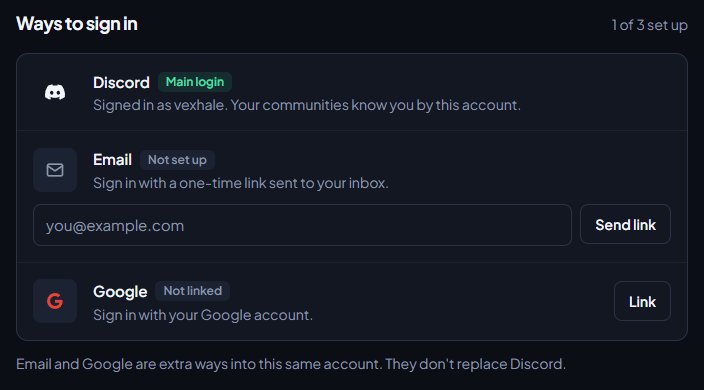
- Under Ways to sign in, find Google and click Link.
- Choose your Google account.
Google now shows as Linked. Next time, you can click Continue with Google on the sign in page.
Add an email address#
- On your account page, under Ways to sign in, find Email.
- Type your email address and click Send link.
- Open the email we send you and click the link to confirm it.
Your email now shows as Verified. To sign in with it, type your email address on the sign in page and click Email me a link. Open the email, click the link, then click Sign in. The link works once and lasts 15 minutes.
To change your email address, type the new one in the same box and click Send link again.
Remove Google or your email#
On your account page, click Unlink next to Google, or Remove next to your email.
Google and email are extra ways into the same account. They don't replace Discord, and you can't remove Discord. If you change which Discord account you use, you'll be a different person to LonexOne and your communities.
Your communities#
Your account page also lists Your communities, with your role in each one. Click Site to open a community's website, or Panel to open its control panel if you help run it.
Something not working?#
Continue with Google doesn't sign me in. Google only works after you've linked it while signed in with Discord. Sign in with Discord, then link Google from your account page.
The email link didn't arrive. Check your spam folder. The sign in page only sends links to email addresses that have been added and confirmed on an account, and it says the same thing either way, so make sure you've done that first. If the link has expired, ask for a new one.
I signed in with the wrong Discord account. Sign out from your account menu, then sign out of Discord in your browser, and sign in again with the right account.
See also
Get your members signed in
How members join your community by signing in on your website, where they land, and how to get them into your departments.
Find your way around the control panel
A tour of the control panel: the Overview page, the sidebar, the community switcher, search and your account menu, and why staff see different pages.
Can't find what you need?
Open a ticket in our Discord and someone from the team will help. Found a bug, or missing a feature? Tell us on the feedback board.