Put out a BOLO and clear it
Tell every unit to be on the lookout for a person or vehicle, see BOLOs on plate searches, and clear them once the subject is found.
A BOLO (be on the lookout) tells every unit on duty to watch for a person, a vehicle or both. It stays on everyone's screen until someone clears it or the time you set runs out, and if it has a plate, it shows up whenever anyone runs that plate.
Before you start#
You need to be on duty, as a dispatcher or as a police, fire or EMS unit. Riders on a read-only ride-along can see BOLOs but can't create or clear them.
Create a BOLO#
-
Open the BOLO form:
- Modern: click New BOLO above the BOLO list. To start one from a call, open the call and click Create BOLO. The call's nature and location are filled in for you.
- Classic: dispatchers click BOLOs in the top bar and use the New BOLO form at the bottom. Units click BOLO in the top bar, or New on the Active BOLOs card.
- Realistic: open Tools and choose Create BOLO. Dispatchers can also click New BOLO on the toolbar. Or click Alerts on the quick bar, then New BOLO.
-
Choose what you're looking for: Person, Vehicle or Person & vehicle.
-
Set the Threat: Armed, Flight risk or Low.
-
Describe the subject in the title box, for example "Black Sultan RS, two occupants". This is the only box you have to fill in.
-
Add the Plate if you have it.
-
Fill in Last seen with a street or postal.
-
Pick how long it Stays up: Until cleared, or from 1 hour to 1 week. When the time runs out, it comes off every screen by itself.
-
Add a description: direction of travel, clothing, why they're wanted.
-
Click Create BOLO (Issue BOLO in Realistic).
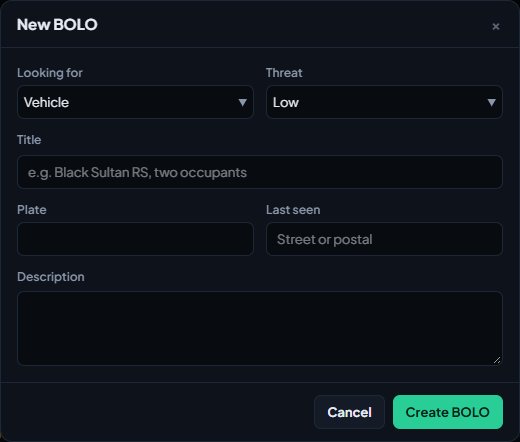
The title box is called Title in Modern, Who or what in Classic and Subject in Realistic. The description is Reason in Realistic.
Where BOLOs show#
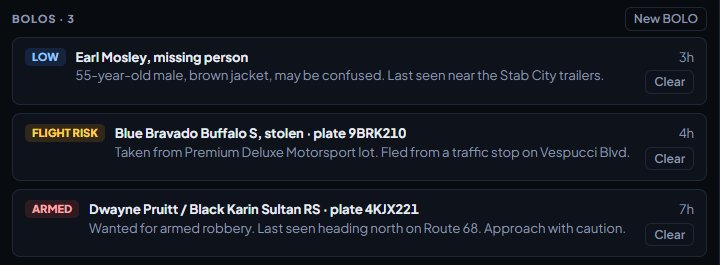
- Modern: under BOLOs below the calls on the dispatch screen, and in the BOLOs box on unit screens.
- Classic: in the BOLOs pop-up for dispatchers, and on the Active BOLOs card for units. Armed BOLOs are highlighted.
- Realistic: click Alerts on the quick bar, the bell icon, or View then Active BOLOs. The bell shows how many are active.
Each one shows its threat level, title, plate, description, where it was last seen and how long ago it went out.
BOLOs on plate searches#
When anyone runs a plate that matches an active BOLO, the plate result shows a BOLO line with its title and description. Plates are matched whatever their spacing or capitals, so "7HDL 903" matches "7hdl903". See Run name, plate and serial lookups.
Clear a BOLO#
When the person or vehicle is found, or the BOLO no longer applies:
- Find the BOLO in the list.
- Click Clear (Modern) or the × next to it (Classic and Realistic).
- Confirm when asked "Clear this BOLO?".
It disappears from every screen. Any dispatcher or unit on duty can clear any BOLO, not only the one who created it.
A BOLO set to Until cleared stays up until someone clears it. Clear them when they're done, so the list stays useful.
If your community posts CAD events to Discord, new BOLOs are posted to their chosen channel too.
Something not working?#
It says "Say who or what to look out for." Describe who or what you're looking for in the title box. Everything else is optional.
A plate search didn't show my BOLO. Check the BOLO has the plate in its Plate box, not only in the title or description. Only the plate box is matched.
I can't see New BOLO or Clear. You're riding along read-only, or you're not on duty. Sign on first.
See also
Run name, plate and serial lookups
Search people, plates, firearm serials and businesses while on duty, read what comes back, and know which units can search what.
Create calls and dispatch units to them
Open a call, attach units, change priority and details, then clear it with a disposition. Also covers merging duplicates and reopening a call that closed too early.
Work a call as a police, fire or EMS unit
Set your status, attach yourself to calls, add notes, link people and vehicles, open your own calls and clear them when you're done.
Can't find what you need?
Open a ticket in our Discord and someone from the team will help. Found a bug, or missing a feature? Tell us on the feedback board.