Choose who camera alerts go to
Pick which departments each camera alerts, what officers see in the CAD and in game when a camera goes off, and who can see the list of alerts in the control panel.
When a camera catches a speeding car or a plate hit, it alerts the officers who should respond. Each camera can alert every police and dispatch department, or just the departments you pick, so a highway camera can go to your state troopers and a city camera to your city police.
Before you start#
- To choose a camera's departments you need Place cameras in game, edit them and choose who they alert.
- To see the alerts list in the control panel you need See camera alerts and the list of cameras, or the manage permission above.
Pick a camera's departments#
-
In your control panel, click Cameras under Cameras.
-
Click Edit next to the camera.
-
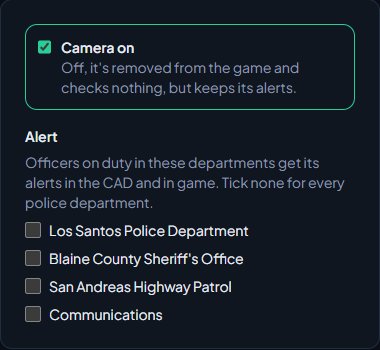
Under Alert, tick the departments that should get its alerts. Police and dispatch departments are listed.
-
Click Save camera.
If you tick none, the camera alerts every police and dispatch department.
What officers see#
When a camera goes off, its alert goes out in two places at once.
In the CAD. A broadcast message is sent to each of the camera's departments, from the camera's reference (or Camera if it hasn't got one). It reads like:
SPEED CAMERA · CAM-003 ROUTE 68: 4KJX221 Sultan RS · 52 mph in a 35
or for a plate hit:
PLATE HIT · CAM-003 ROUTE 68: 4KJX221 Sultan RS · Stolen, Owner has a warrant
Plate hits list every reason the plate matched, such as Stolen, BOLO: and the BOLO's title, an expired registration or insurance, a warrant, or a vehicle flag.
In game. Officers on duty in the CAD in those departments get a notification with the same details, a sound, and a flashing red blip on their map where the car was caught. The blip goes after a minute. Officers have to be on one of your game servers to get it, and their game server collects it within a minute of the alert or it's dropped.
Officers who aren't on duty in the CAD don't get camera alerts in game. See Go on duty in the CAD.
Stop the same car alerting again and again#
A car driving back and forth past a camera would set it off every time. Same plate on the same camera alerts again after in the Settings box on the Cameras page holds back repeat alerts for the same plate on the same camera. It's 5 minutes to start with. Set it to 0 to alert every time.
The alerts list#
The Cameras page in your control panel lists every alert, newest first, with when it happened, the camera, the plate and model, and what it caught. Use All, Speeding and Plate hits to filter. Hits from the plate reader in police cars show here too, as Plate reader with the callsign that read them. See Set up the plate reader in police cars.
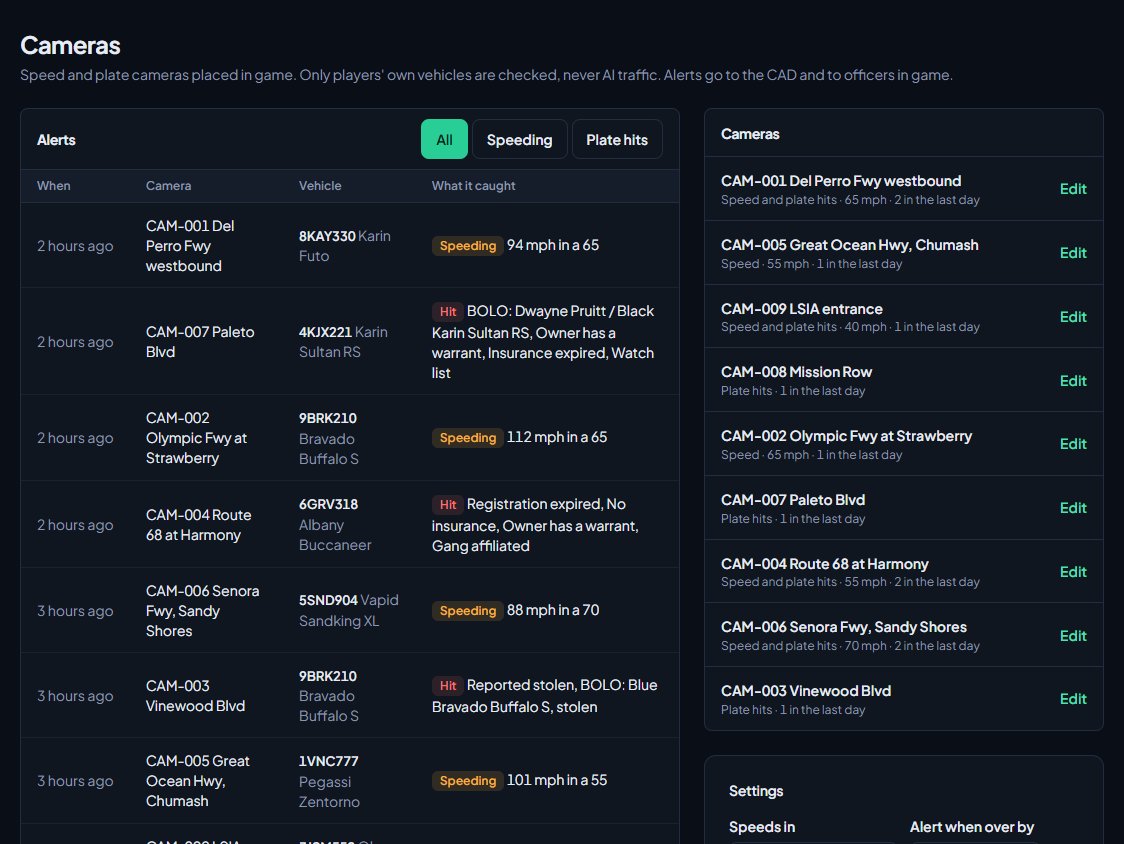
The Cameras box on the right lists every camera, its type and limit, and how many alerts it has had in the last day. Cameras that are switched off are marked Off.
Give your supervisors See camera alerts and the list of cameras if they should be able to look through alerts without being able to change cameras.
Something not working?#
A department isn't listed under Alert. Only police and dispatch departments can get camera alerts. If there are none, you'll see Add a police department first.
Officers say they never get alerts in game. Check they're on duty in the CAD, in one of the camera's departments, and on one of your game servers with Discord linked in FiveM. Also check the camera isn't switched off.
A car alerted once and then not again. That's the repeat setting. The same plate on the same camera won't alert again until Same plate on the same camera alerts again after has passed.
See also
Place speed and plate cameras
Put speed and plate cameras on your roads from inside the game, choose what makes a plate a hit and how far over the limit counts, then edit, switch off or remove cameras in the control panel.
Send private messages and broadcasts in the CAD
Message another unit or a dispatcher privately, send a broadcast to every screen on duty or one department as dispatch, and know who can read what.
Go on duty in the CAD
Sign on with your department and callsign, skip the panel screen with a default, go off duty, and fix the messages that stop you signing on.
Put out a BOLO and clear it
Tell every unit to be on the lookout for a person or vehicle, see BOLOs on plate searches, and clear them once the subject is found.
Can't find what you need?
Open a ticket in our Discord and someone from the team will help. Found a bug, or missing a feature? Tell us on the feedback board.