Decide results and sign trainees off
After a session, mark practical questions, decide who passed, post the results to Discord, and sign off checklist steps by hand until the certification is awarded.
When a session ends, LonexOne adds up each trainee's marks and tells you whether the marks say pass or fail. The final call is yours: you decide each result, and a pass signs off any programme step tied to that test. You can also sign off checklist steps by hand, for things that aren't tested in a session.
When every step on someone's checklist is signed off, their certification is awarded automatically.
Before you start#
You need Sign off training, run training sessions and decide results, or Create training programmes, their checklists and tests, in the department the session or certification belongs to.
Find the results to decide#
- In the left sidebar, under Training, click Results. It lists finished and cancelled sessions, with a To decide count for each. A message at the top says how many results are still to decide.
- The Training Overview also shows Results to decide.
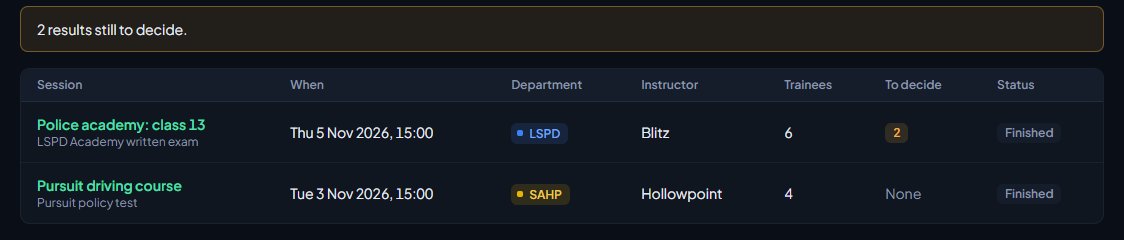
Open a session to see its trainees.
Decide a result#
Each trainee has a card with:
- their marks, their percentage, and what the marks say, for example the marks say pass (pass mark 70%)
- Lost marks in, listing the sections they dropped marks in
- a row for each practical question, to mark
- Every answer, which opens a table of each question, what they answered, the right answer and the marks
To decide:
-
Mark any practical questions first. Type the Marks and any Notes, then click Mark (or Update). The trainee's total is worked out again straight away.
-
Under Result, pick Passed or Not passed.
-
Add Feedback for them if you like. They see it with their result.
-
Click Save result.
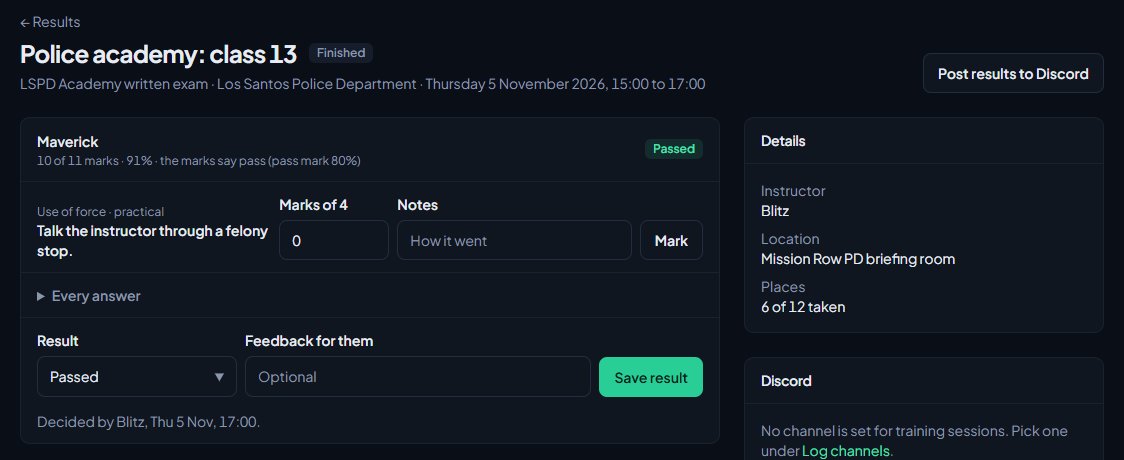
The card then shows who decided it and when. You'll see Saved the result. at the top.
What happens when you save a result#
- The trainee is told. If Tell trainees their result is on in Training Settings, they get a notification and a Discord direct message with their percentage and your feedback.
- A pass signs off steps. If the trainee is enrolled in a programme with a step tied to this test, that step is signed off, with a note saying they passed and their score. If it was their last step, the certification is awarded.
- It shows on their Training page, if Show members their results is on, with the sections they should work on.
You can change a result later. Set it back to Not decided to take a decision away.
Saving the same result again, for example to fix your feedback, doesn't tell the trainee a second time.
Changing a pass to Not passed or Not decided takes back the steps it signed off, as long as the training is still under way. If the pass already finished the training, the certification stays awarded and you're told so. Revoke it on their People page if it shouldn't stand.
Post the results to Discord#
On a finished session, click Post results to Discord and confirm. The results go to the Results channel for the session's department, or the community's. The post lists every trainee with Passed, Not passed or Pending and their percentage, along with the test, pass mark and instructor.
If Post results to Discord by themselves is on in Training Settings, this happens on its own as soon as every trainee in the session has a result.
Sign off steps by hand#
-
In the left sidebar, under Training, click Trainees.
-
Open the trainee.
-
Under Checklist, find the step. Add a Note if you like.
-
Click Sign off to pass it, or Fail to mark it as failed.
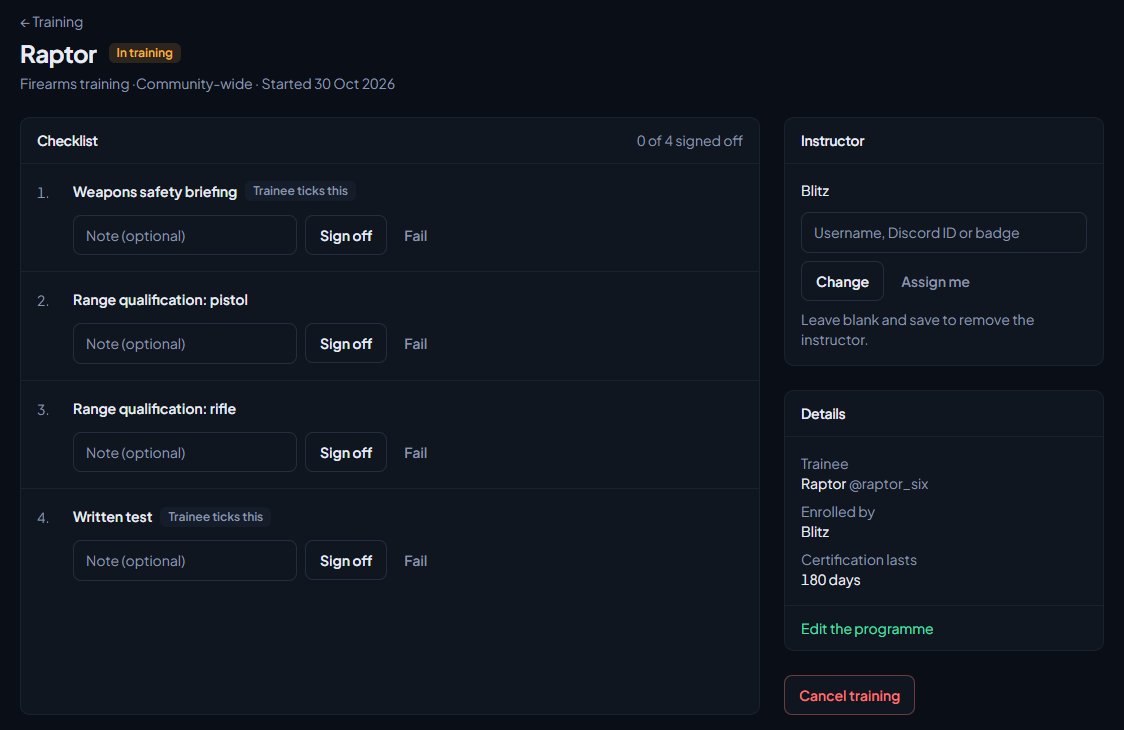
To undo a sign-off or a fail, click Reset on the step. A failed step can be signed off later without resetting it.
Each sign-off shows who did it, when, and the note. When a step is signed off, the trainee gets a notification. Steps that say Trainee ticks this can be ticked by the trainee on their own Training page.
You can't sign off your own training. If you're the trainee, the checklist says This is your own training. Another instructor signs it off.
When the certification is awarded#
As soon as the last step is passed, whether by you, by a test result or by the trainee ticking it:
- the certification is awarded, with an expiry date if the certification expires
- the enrolment moves to the Completed tab
- you'll see All steps signed off. ... has been awarded ...
- the trainee gets a notification saying they've been awarded it, and until when it runs
If the trainee ticks the last step themselves, the award is recorded as given by their instructor.
Something not working?#
There's nobody to decide on a finished session. You'll see No trainees joined this session. Only people who joined the live session with the code are trainees.
It says "Results are decided once the session has finished." The session is still live. End it first.
Posting says "No channel is set for training results." Pick a Results channel under Training Settings or Log channels, then post again. If you can't open either page, the message says so: ask someone who looks after Training settings.
A pass didn't sign off the trainee's step. The step has to be tied to this same test, and the trainee has to be in training for that programme (not waiting on a request). Check the step under Programmes, and enrol the trainee if they're not.
There are no Sign off buttons on a checklist. The training isn't active (it's completed, cancelled or still a request), or it's your own training.
See also
Run a live training session with a join code
Schedule a session, start it to get a six-digit code, teach section by section from the console while trainees follow on their own screens, and end it to work out the results.
Create a training programme with a checklist
Turn a certification into a checklist of steps, decide who signs each step off, enrol trainees or let them ask to join, and assign their instructor.
Write a test for your training sessions
Build a test in sections, with material trainees read, notes only instructors see, and multiple choice, yes or no and practical questions. Then mark it ready to run.
What trainees see on the community site
A guide for staff to the trainee's side of Training: their Training page, booking sessions, the live classroom, results, and the notifications and Discord messages they get.
Can't find what you need?
Open a ticket in our Discord and someone from the team will help. Found a bug, or missing a feature? Tell us on the feedback board.