What trainees see on the community site
A guide for staff to the trainee's side of Training: their Training page, booking sessions, the live classroom, results, and the notifications and Discord messages they get.
Trainees never use the control panel. Everything they do happens on your community site and in Discord. This article walks through what they see, so you can help them when they get stuck.
Their Training page#
Each member has a Training page in the member area of your site, at your site's address with /me/training on the end. Everyone signed in reaches it from Training in the member bar under the site header, whether or not they're in a department. The number next to it counts steps they can tick off and certifications about to expire.
Training works without the Department Panel. Members still get the Training page and the member bar, just without the department pages like Dashboard, Shifts and Leave.
At the top are two buttons: Join a live session, and Join training if there's a programme they can ask to join.
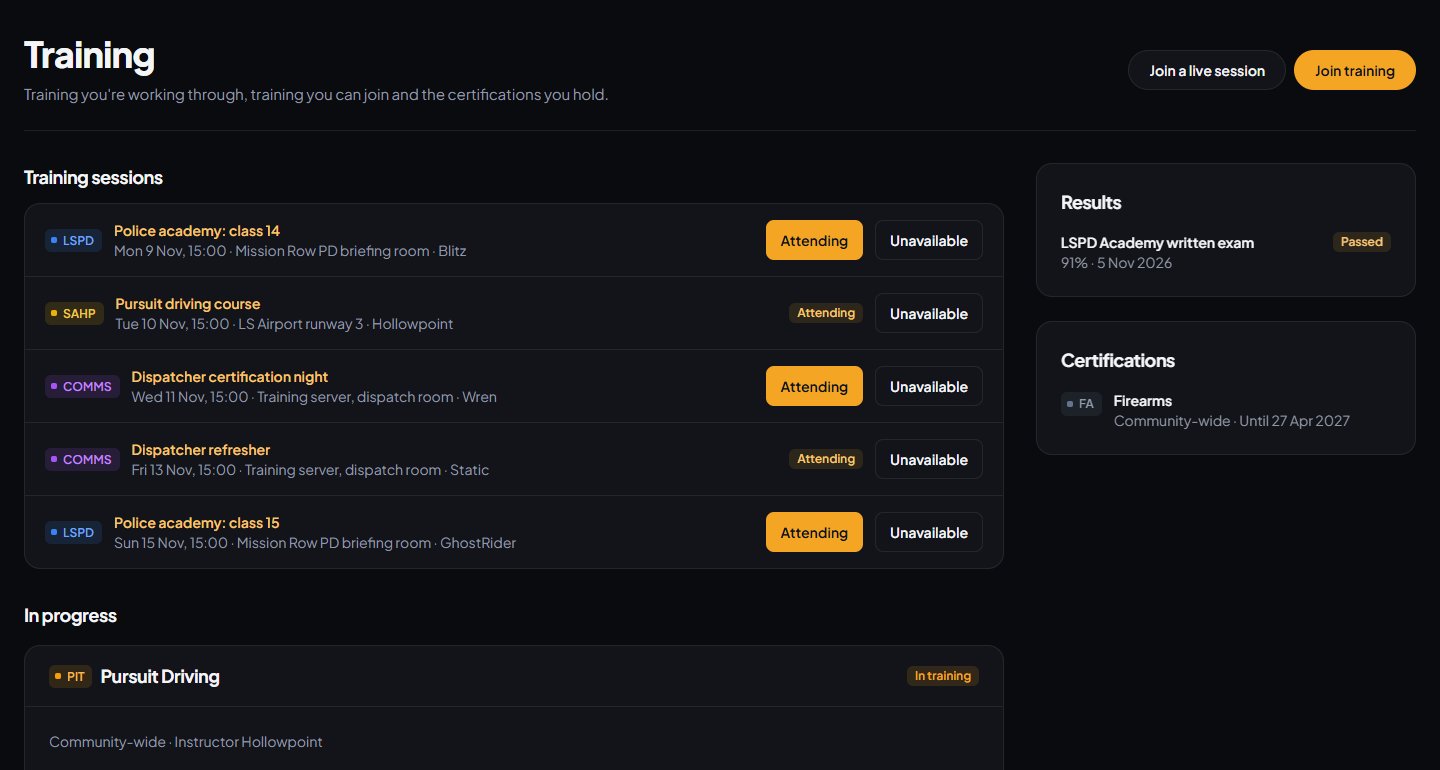
The page then has:
| Section | What's in it |
|---|---|
| Training sessions | Upcoming sessions they can book or have answered, with the date, location and instructor. They can click Attending or Unavailable, or Join if a session is running now. |
| In progress | Each programme they're in, with a progress bar and every step. Steps already done have a tick, with the date and any note. Steps an instructor has to sign off say Signed off by an instructor. |
| Training you can join | Programmes that let members ask to join, each with Ask to join. |
| Results | Their last 20 decided results: the test, their percentage, Passed or Not passed, your feedback and Work on: with the sections they lost the most marks in. |
| Certifications | What they hold now, with Until and the expiry date, or No expiry. A certification in its last 30 days is tagged Expires soon. |
The Results section only shows if Show members their results is on in Training Settings.
Steps they tick themselves#
Steps you set up as The trainee can tick this off themselves have a Mark done button. Once ticked, they can click Undo, but only on a tick they made. Their member dashboard also reminds them of steps waiting to be ticked.
Asking to join#
When a member clicks Ask to join, they see Asked to join ... training. An instructor will pick it up. The programme moves to In progress, tagged Waiting for an instructor, with a Withdraw request button.
A session's page#
Each session has a page on your site, which the View on the site button on the Discord post opens. It shows the test and its description, start and end times, when bookings close, the location, vehicle and pass mark, who's running it and the training roles, and who's attending. Members book or change their answer here too.
When the session is running, the button says Join with the code. For instructors, it says Open the console.
The live classroom#
Trainees join at your site's address with /training/live on the end, by entering the six-digit code and clicking Join.
- At first they see You're in while they wait for you to start.
- Their screen then follows you section by section, with the section's material. They never see your instructor notes.
- When you open the questions, they appear under the material. Trainees pick an answer for each, and can't change it once it's in. They're never shown the right answer.
- If a section has questions you haven't opened yet, they see a note saying the questions will show when you open them.
- Leave the session takes them out. They can join again with the same code.
- When you end the session, they see That's the end of the session, with a button to their Training page.
Notifications and Discord messages#
| When | What they get |
|---|---|
| You enrol them, or approve their request | A Discord direct message saying they've been enrolled, and who their instructor is. |
| You decline their request | A Discord direct message saying it was declined. |
| A step is signed off | A notification with the step and any note. |
| Their certification is awarded | A notification saying they've been awarded it, and until when it runs. |
| You decide a session result | A notification and Discord direct message with their percentage and feedback, if Tell trainees their result is on. |
| A session they're attending is about to start | A reminder notification and Discord direct message, if reminders are on. |
| A certification is about to expire | A Discord direct message, if the programme has a reminder set. |
Notifications for steps, awards, results and session reminders come under Training and certifications, which members can turn off. See Choose what members are notified about. Discord direct messages only reach people who signed in with Discord and allow messages from the server.
Messages trainees might ask you about#
"This training is by invitation from an instructor." The programme doesn't let members ask to join. Enrol them from the Trainees page.
"This training is only for members of the department." They're not in the certification's department, or their status there is suspended or inactive.
"You already hold ..." They hold the certification already. If it expires, they can ask to renew once it's close to running out.
"Only requests can be withdrawn. Ask your instructor to end training." Their training has started, so they can't withdraw it themselves. Open them on the Trainees page and click Cancel training if they want to stop.
"Join the community first." They're signed in to LonexOne but not a member of your community yet. Signing in on your site adds them.
See also
Create a training programme with a checklist
Turn a certification into a checklist of steps, decide who signs each step off, enrol trainees or let them ask to join, and assign their instructor.
Run a live training session with a join code
Schedule a session, start it to get a six-digit code, teach section by section from the console while trainees follow on their own screens, and end it to work out the results.
Take attendance for training sessions from Discord
Post a session to Discord with Attending and Unavailable buttons, see who's coming, set places and a booking deadline, and remind people before it starts.
Decide results and sign trainees off
After a session, mark practical questions, decide who passed, post the results to Discord, and sign off checklist steps by hand until the certification is awarded.
Choose what members are notified about
Pick which notifications go out on the site, by email and by Discord DM for each kind of update, see what members can turn off themselves, and check for Discord DMs that didn't arrive.
Can't find what you need?
Open a ticket in our Discord and someone from the team will help. Found a bug, or missing a feature? Tell us on the feedback board.