Choose what members are notified about
Pick which notifications go out on the site, by email and by Discord DM for each kind of update, see what members can turn off themselves, and check for Discord DMs that didn't arrive.
LonexOne tells members when something happens that's about them: an application decision, a promotion, a reply on their ticket, a reminder before an event they're going to. Each kind of update can go out three ways: On the site (the bell at the top of your website), Email and Discord DM.
You choose which ways each kind of update goes out for your whole community. Each member can then turn any of those off for themselves, but they can't turn on something you've switched off.
Before you start#
- You need to be the owner or an administrator, or have a role with Edit the community site: pages, navigation and branding.
- The Notifications page is part of the Community Site module.
- Discord DMs need your Discord server connected with the LonexOne bot in it. See Connect your Discord server.
Choose the channels#
-
Open your control panel and click Notifications in the left sidebar, under Community Site.
-
Each row is a kind of notification. Tick the channels it should go out on: On the site, Email and Discord DM.
-
Untick every box on a row to stop that notification completely.
-
Click Save.
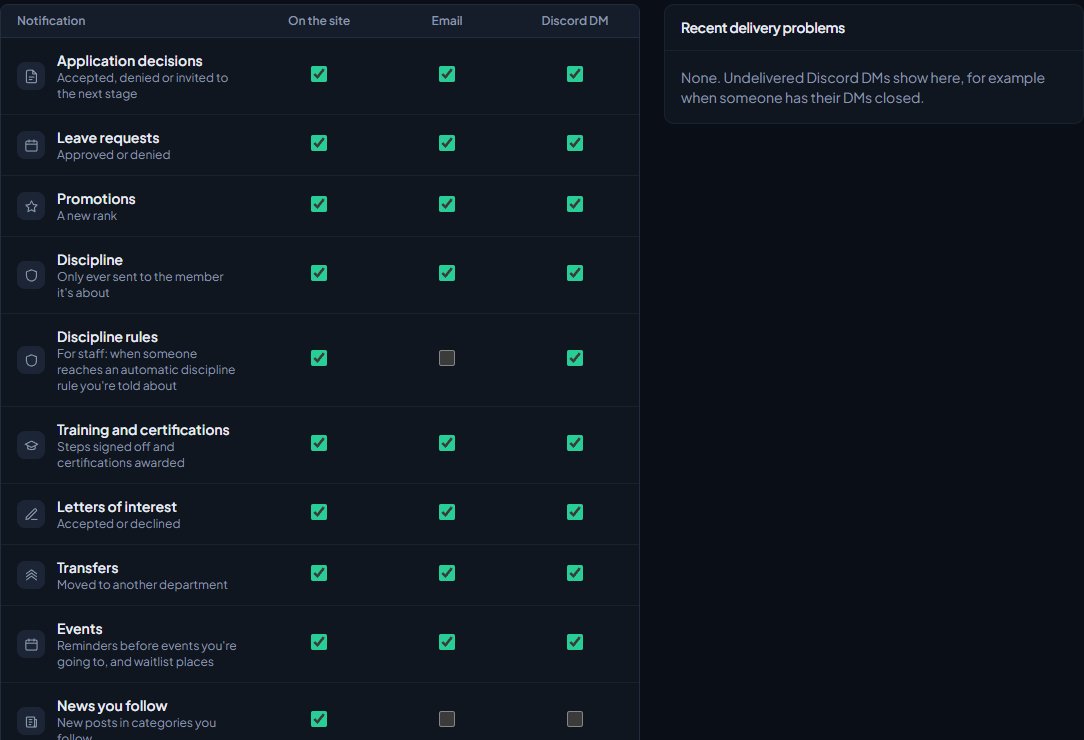
You'll see "Notification settings saved." Changes apply to the next notification sent.
Every notification#
Only the notifications that apply to your community are listed. For example, you won't see Promotions without the Department Panel, or Your support tickets if support is switched off.
| Notification | What it's about | Starts on | Shows when |
|---|---|---|---|
| Application decisions | Accepted, denied or invited to the next stage | Site, email, DM | Department Panel |
| Leave requests | Approved or denied | Site, email, DM | Department Panel |
| Leave to review | For staff: new leave requests they can approve | Site, DM | Department Panel |
| Logged shifts | Shifts they logged by hand, approved or denied | Site, email, DM | Department Panel |
| Promotions | A new rank | Site, email, DM | Department Panel |
| Discipline | Only ever sent to the member it's about | Site, email, DM | Department Panel |
| Discipline rules | For staff: when someone reaches an automatic discipline rule they're told about | Site, DM | Department Panel |
| Training and certifications | Steps signed off and certifications awarded | Site, email, DM | Department Panel or Training |
| Letters of interest | Accepted or declined | Site, email, DM | Department Panel |
| Letters to review | For staff: new letters of interest they can review | Site, DM | Department Panel |
| Transfers | Moved to another department | Site, email, DM | Department Panel |
| Events | Reminders before events they're going to, and waitlist places | Site, email, DM | Events turned on |
| News you follow | New posts in categories they follow | Site | News turned on |
| Your support tickets | Replies, status changes and closing reminders | Site, email, DM | Support turned on |
| Tickets you handle | For staff: new tickets, replies on tickets assigned to them, replies on unassigned tickets they can handle, and assignments | Site, DM | Support turned on |
| Your game record | Decisions on appeals of bans, kicks and warnings | Site, email, DM | Staff Panel |
| Suggestions | Status changes and staff replies on their suggestions and ones they follow | Site | Suggestions turned on |
If you remove a module, its notifications disappear from this page but keep their settings, so they're back as you left them if you install it again.
Guests who open a support ticket without signing in always get their replies by email, because that's the only way back to their ticket. These settings don't affect them.
How each channel works#
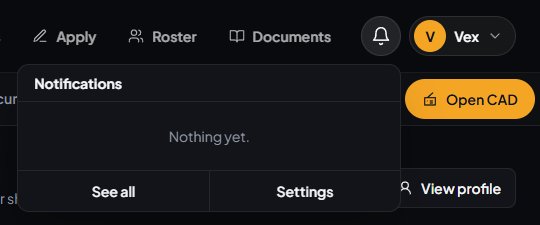
On the site. Notifications appear under the bell next to the member's picture at the top of your website. They can Mark all read or click See all for the full list.
Email. Sent to the email address on the member's LonexOne account. Members who signed in with Discord only may not have one. They can add one on their Account page. Every email has a link to stop that kind of email, which turns off email for that notification for them only.
Discord DM. Sent by the LonexOne bot. It only arrives if the member has a linked Discord account, shares a server with the bot, and allows DMs from it.
What members can change#
Members open their own settings from the bell, by clicking Settings, or from Settings on their notifications page.
Under What you hear about, and where, they see the same list with a box for each channel you've turned on. Channels you've turned off show as a dash. They untick anything they don't want and click Save settings.
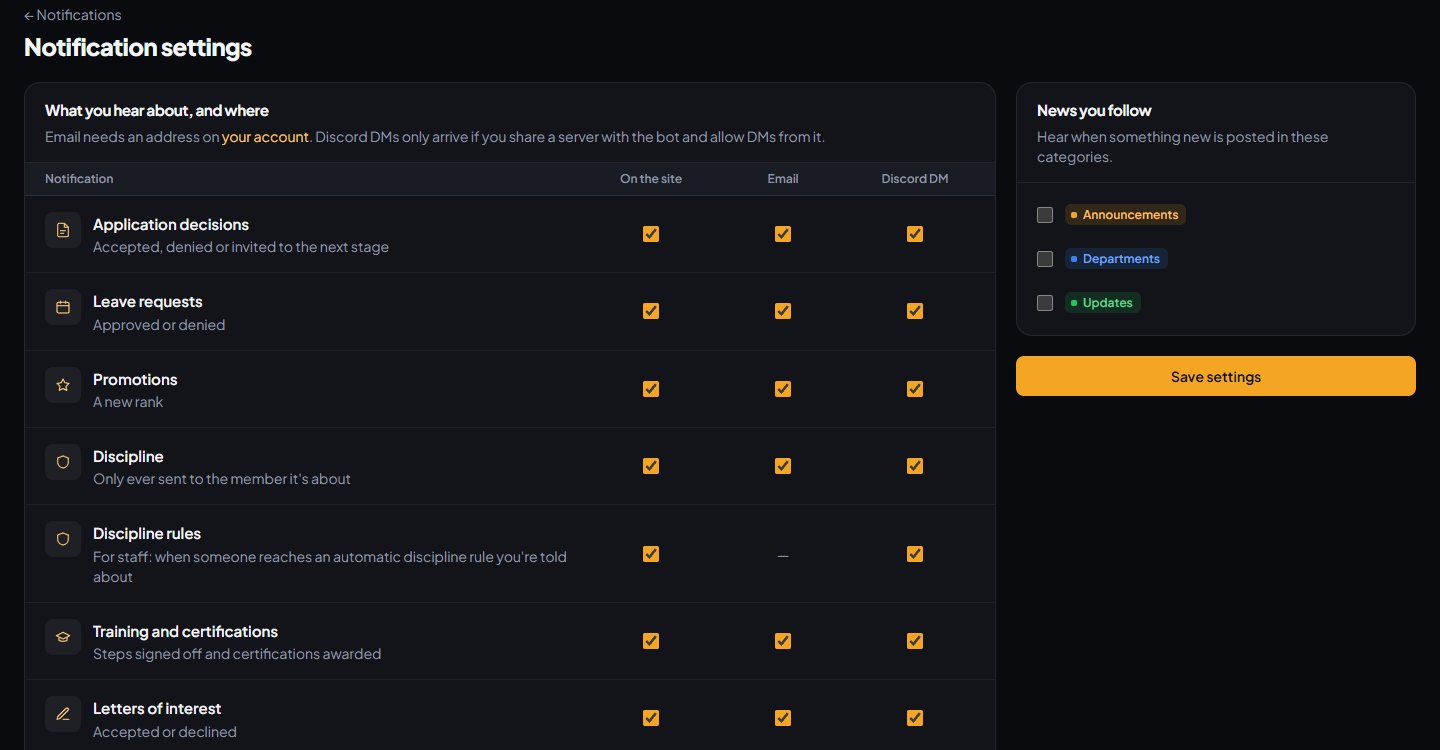
If news is turned on and you have news categories, they can also pick the categories they want to hear about under News you follow.
Check for DMs that didn't arrive#
Recent delivery problems on the right of the Notifications page lists the last 15 Discord DMs that couldn't be sent, with who it was for, what kind of notification it was, when, and why.
The most common reasons are the member having their DMs closed, or not having a Discord account linked. You'll see "No Discord account linked." for the second one.
Something not working?#
A member isn't getting emails. Check Email is ticked for that notification, that the member has an email address on their account, and that they haven't turned it off in their own settings or used the link in an email to stop them. Ask them to check their spam folder too.
A member isn't getting Discord DMs. Check Recent delivery problems for their name. Usually they need to allow DMs from server members in Discord's privacy settings, or link their Discord account.
A notification I want isn't on the list. It belongs to a module that isn't installed, or a feature that's switched off. For example, Events only shows while events are turned on.
A member says they can't turn something on. Members can only turn off channels you've turned on. Tick that channel for the notification on this page first.
Everyone on the support team hears about every reply. When a ticket has nobody assigned, a member's reply goes to everyone who can handle its category. Assign the ticket, and from then on only the assignee is told.
See also
What members see on their profile
For staff helping members: what a member profile shows, where it comes from, what members can edit or hide, who can see it, and where members find their own pages.
Connect your Discord server
Add the LonexOne bot to your main Discord server, put its role in the right place, and fix the messages you might see while connecting.
Reply to and close support tickets
Work the ticket queue, reply or leave internal notes, assign and tag tickets, add other members, merge duplicates and close tickets with the right status.
Collect and moderate suggestions
Run a suggestions board where members post ideas and vote, then set statuses, reply in public, lock, merge duplicates and delete, with your own statuses and categories.
Can't find what you need?
Open a ticket in our Discord and someone from the team will help. Found a bug, or missing a feature? Tell us on the feedback board.