Make someone an administrator
Give a trusted member every permission in your community, take it away again, and when a role is the better choice. Only the community owner can do this.
Administrators can do everything in your community, the same as the owner, apart from billing. They don't need any roles, and no permission is ever greyed out for them.
That makes it quick to set up a co-owner or a head of staff, but it also means there's nothing they can't change or delete. If someone only needs part of the control panel, give them a role instead. See Create a role and choose what it can do.
Before you start#
Only the owner of the community can add or remove administrators. Administrators can't make other people administrators.
The person has to be a member of your community already. People join the first time they sign in on your community website.
Make someone an administrator#
-
Open your control panel and click Roles & permissions in the left sidebar.
-
In the Owner & administrators box, type their name, username or Discord ID.
-
Click Find member.
-
Click Make administrator next to the right person.
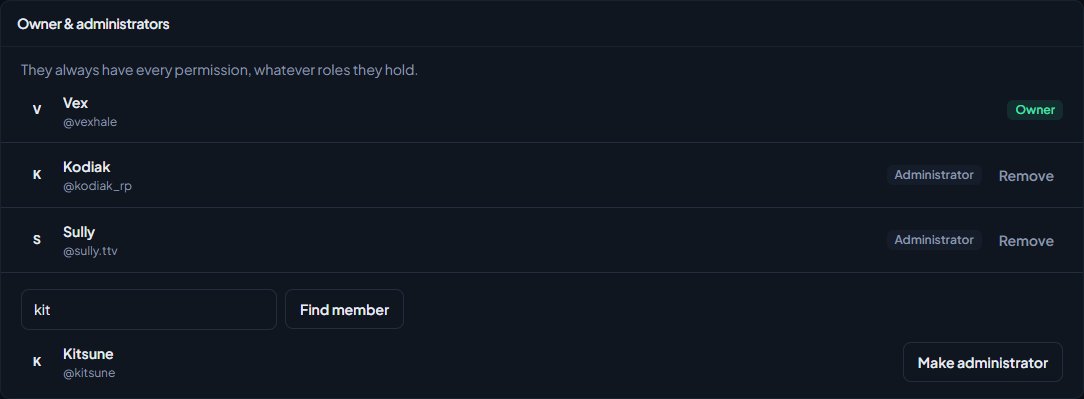
You'll see a message like Jake Hale is now an administrator. They're listed under Owner & administrators, and their access on the People page changes to Admin.
Remove an administrator#
- On the Roles & permissions page, find them in the Owner & administrators box.
- Click Remove.
- Confirm when you're asked Remove this administrator?
You'll see a message like Jake Hale is no longer an administrator. They go back to being a member, and keep any roles they hold. Check their roles afterwards if they should lose access completely.
What administrators can and can't do#
| Administrators can | Only the owner can |
|---|---|
| Use every permission in the control panel and CAD, whatever roles they hold. | See the Billing page and change the card. |
| Give any role to anyone, and make roles with any permission. | Add and remove administrators. |
| Install and remove modules, and create and delete departments. |
The owner is always listed under Owner & administrators, and can't be removed here.
Administrators can delete departments, remove modules and change every setting. Only make someone an administrator if you'd trust them as a co-owner.
Administrator or a role?#
| If they need to | Use |
|---|---|
| Run everything with you | Administrator |
| Run part of the community, like the website or support | A community-wide role with those permissions |
| Run one department | A department role or rank permissions. See Limit a permission to one department. |
Something not working?#
I can't see the search box under Owner & administrators. Only the owner can add administrators. If you're an administrator yourself, ask the owner.
It says "No members match." They haven't joined your community yet, or they're already an administrator. Ask them to sign in on your community website, then search again. Check you've typed their Discord ID in full if you're searching by ID.
I want to make someone else the owner. That can't be done from Roles & permissions. See the LonexOne FAQ.
See also
Create a role and choose what it can do
Make a role like Staff or Department command, tick the permissions it gives, hand it to people, and understand how roles work alongside ranks and administrators.
Every permission explained
A reference list of every permission you can give a role or rank, grouped by module, with what each one lets someone do and whether it can be limited to one department.
LonexOne questions owners often ask
Quick answers for community owners: what LonexOne is, what it costs, who can see what, changing the owner, cancelling, where your data lives and how to get help.
Can't find what you need?
Open a ticket in our Discord and someone from the team will help. Found a bug, or missing a feature? Tell us on the feedback board.