Medical records and marking someone deceased
How civilians fill in a medical profile, what fire and EMS see on a name search, the medical history built from patient care reports, and how to mark a character deceased or bring them back.
Every character can carry medical information: a medical profile the player fills in, and a medical history that builds up from the patient care reports fire and EMS write. Fire and EMS see both when they look someone up, so they know about allergies and past treatment before they start.
Fire, EMS and staff can also mark a character deceased. That closes the character's file so nothing on it can change.
Before you start#
- Medical profiles needs to be turned on. It's on to start with. You'll find it on the Records page under Records & courts in CAD settings.
- The medical history doesn't need any setting. It comes from patient care reports.
Fill in a medical profile#
Civilians fill this in for their own characters.
-
In the Civilian panel, open the character.
-
Under Medical profile, click Add. If there's one already, click Edit.
-
Pick the Blood type, or leave it on Unknown.
-
Tick Organ donor if it applies.
-
Fill in any Allergies, Conditions, Medications and Notes.
-
Click Save.
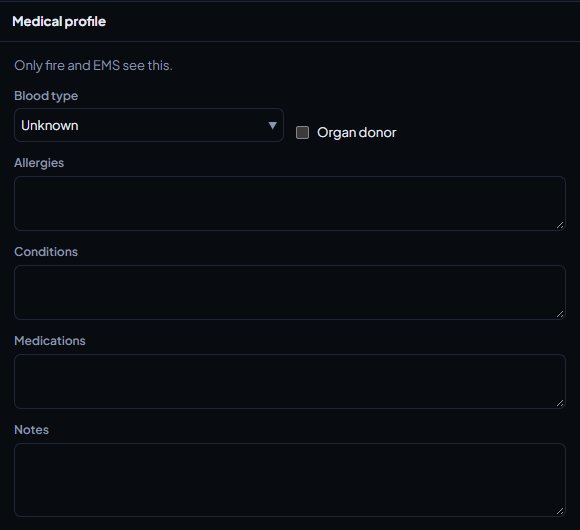
You'll see Medical profile saved. Only fire and EMS see it.
What fire and EMS see#
When a fire or EMS unit on duty runs a name search and opens someone's file, they see:
- Medical profile: blood type, allergies, conditions, medications, notes and whether they're an organ donor. If nothing's been filled in, it says No medical profile on file.
- Medical history: the latest 30 patient care reports written about the person, with the report number, the complaint, the date, the hospital they went to, who wrote it and the triage colour. Drafts aren't included.
The author of a report, and anyone who can review reports, can click the report number to open it.
When fire or EMS link a patient on a patient care report, the same medical profile shows on the form while they write. See Write fire and patient care reports.
Police and dispatch never see medical profiles or medical history, even if they can review reports. Reviewers read a patient care report through the review queue instead.
Mark a character deceased in the CAD#
Fire and EMS units on duty can do this from the person's file.
- Run a name search and open the person.
- Under Mark deceased, set the Date. Leave it empty for today. It can't be in the future or before they were born.
- Fill in the Cause of death, for example "Gunshot wound to the chest".
- Click Mark deceased and confirm.
Mark a character deceased from the control panel#
Staff with the Set up the CAD: call types, statuses, penal code, designs and AOP permission can also do this, and undo it.
-
Open your control panel and click CAD settings in the left sidebar.
-
Click Records & courts along the top, then Characters.
-
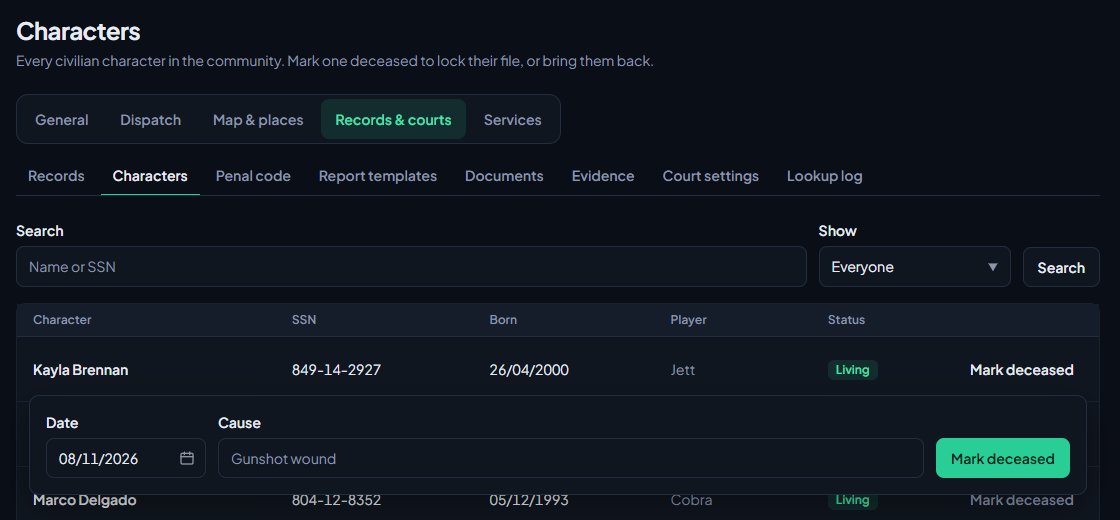
Find the character. You can search by name or ID number, and use Show to list Everyone, Living or Deceased.
-
Click Mark deceased on their row.
-
Check the Date and fill in the Cause.
-
Click Mark deceased and confirm.
The page lists every civilian character in the community, with their ID number, date of birth and the player who owns them.
What happens when someone is marked deceased#
- The character shows as Deceased with the date and cause, in the Civilian panel and on lookups.
- The file is locked. The player can't edit the character, their vehicles, firearms, licences, photo or medical profile, and can't delete it.
- No new paperwork can be written about them, and the DMV can't issue them anything.
- The player can't open new bank accounts for the character.
Bring a character back#
If someone was marked deceased by mistake, or your community allows it:
- Open Characters in the control panel as above.
- Set Show to Deceased and click Search.
- Click Reverse on their row and confirm.
The file unlocks and the player can use the character again. Both marking and reversing are recorded in your activity log.
Something not working?#
Fire or EMS can't see the medical profile. Check Medical profiles is turned on, on the Records page in CAD settings. The unit also needs to be on duty as fire or EMS.
It says "Medical profiles are switched off here." Medical profiles are turned off for your community, so civilians can't fill them in.
It says "Give the cause of death." The cause can't be left empty.
It says "The date of death can't be in the future." Pick today or an earlier date.
It says the character "is already marked deceased." Someone has already marked them. To change the date or cause, reverse it in the control panel and mark them again.
I can't see Mark deceased in the CAD. Only fire and EMS units on duty can mark someone deceased in the CAD. Everyone else uses the control panel.
See also
Write fire and patient care reports
Fill in a patient care report for each patient you treat, write a fire incident report after a fire call, and send both for review.
Create a civilian character
How members make a civilian character in the CAD, add licences, vehicles and firearms, and what staff control, like how many characters each member can have.
Run name, plate and serial lookups
Search people, plates, firearm serials and businesses while on duty, read what comes back, and know which units can search what.
Can't find what you need?
Open a ticket in our Discord and someone from the team will help. Found a bug, or missing a feature? Tell us on the feedback board.