Write fire and patient care reports
Fill in a patient care report for each patient you treat, write a fire incident report after a fire call, and send both for review.
Fire and EMS units have two forms of their own in the CAD, as well as any report templates your community has set up. The patient care report (PCR) records one patient: who they were, their vitals, what you gave them and where they went. The fire incident report records a fire call: what kind of incident it was, what you did, the times and any losses.
Both go through the same review as every other report. You save a draft, submit it, and a reviewer approves it or sends it back to you.
Before you start#
- You need to be on duty in the CAD. See Go on duty in the CAD.
- Patient care reports can be written by fire and EMS units.
- Fire incident reports can only be written by fire units.
- To pick a destination hospital, your community needs at least one hospital set up. See Set up stations, apparatus, hydrants and hospitals.
Start a report#
The quickest way is from the call, because the report is then linked to it and the CAD fills in what it already knows.
- Open the call.
- Click Write report. In the Realistic design the button is Create Report.
- Pick Patient care report or Fire incident report from the list.
You can also start one without a call:
-
Open Reports. In Modern it's a tab above the board, in Classic it's a button in your unit bar, and in Realistic it's in the toolbar or the Tools menu.
-
Click New report. In Realistic, the forms are listed under New Report on the left.
-
Pick the form.
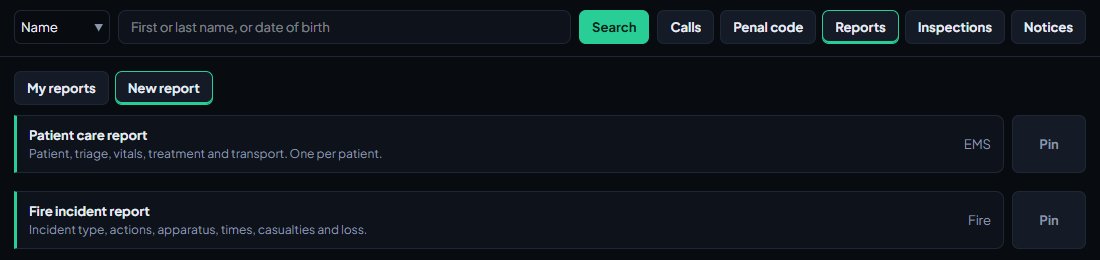
If your community allows it, click Pin next to a form to keep it at the top of the list.
Each report gets a number like R-0042 and starts as a Draft.
Fill in a patient care report#
- Under Patient, type the patient's name or date of birth and click Search, then pick them from the results. The search is logged like any other name check. If they aren't on file, type a name or description in the box underneath instead.
- Fill in the Chief complaint, for example "Chest pain".
- Pick a Triage category: Green, Yellow, Red or Black.
- Pick your Provider level: EMR, EMT, AEMT or Paramedic. Next time you start a PCR, your last provider level is filled in for you.
- Under Vitals, fill in the first row. Click Add vitals for each new set you take.
- Under Treatment and medication, click Add treatment for each thing you gave or did, with the time and the dose.
- Pick Transport: Not transported, Routine, Urgent or Emergent.
- If the patient was transported, pick the Destination hospital. You can also fill in Handed over (the time) and Received by (the name at the hospital).
- Write the Narrative: what you found, what you did and how the patient responded.
If you linked a patient who has filled in a medical profile, their blood type, allergies, conditions and medications show under their name while you write. See Medical records and marking someone deceased.
Write one PCR per patient. If you treated three people, start three reports.
Vitals you can record#
Each set of vitals needs a time. You can have up to 20 sets, and up to 20 treatments.
| Vital | What to enter |
|---|---|
| BP | Written as 120/80 |
| Pulse | 0 to 300 |
| Resp | 0 to 80 |
| SpO2 | 0 to 100 |
| GCS | 3 to 15 |
| Temp | 20 to 115 |
| Pain | 0 to 10 |
Fill in a fire incident report#
If you started from a call, the CAD fills in the apparatus and personnel that were on it, the dispatched, en route, on scene and clear times, and a guess at the incident type from the call's nature. Check them and change anything that's wrong.
- Pick the Incident type, for example Structure fire or Alarm, no fire.
- Pick the Property use, for example Residential or Commercial or retail.
- Under Actions taken, tick everything that was done, for example Extinguished and Ventilation.
- Check Apparatus on scene and Personnel on scene, one per line.
- Fill in the Times: Dispatched, En route, On scene, Under control and Clear. Each time has to be the same as or later than the one above it.
- Fill in any Casualties: civilian and firefighter injuries and deaths.
- Enter the Estimated loss as a whole number.
- Pick the Cause. If you don't know, pick Undetermined or Under investigation.
- Write the Narrative: what you found, what was done and in what order.
Add a diagram#
If your community has diagrams turned on, both forms have Add diagram under the narrative. Use it to sketch the scene, then save the report as normal.
Save and submit#
- Click Save draft to keep your work and come back to it later. Only the boxes you've filled in are checked.
- Click Submit for review when you're done. Now every required box (marked with a *) is checked.
- Click Discard to delete a draft you don't need. This only shows on drafts that have never been submitted.
Your report shows Waiting for review until a reviewer approves it or returns it. If it's returned, you'll see Returned for changes with the reviewer's comment at the top. Make the changes and click Resubmit. Once a report is submitted or approved, you can't change it.
To find your reports again, open Reports and click My reports.
Something not working?#
I can't see Patient care report or Fire incident report. You need to be on duty as a fire or EMS unit. EMS units only see the patient care report, because fire incident reports are for fire units.
It says "Pick the hospital the patient went to." You picked a transport option other than Not transported, so you need to choose a hospital. If the list is empty and says No hospitals set up yet, ask someone with CAD settings access to add them.
It says "Record at least one set of vitals." Fill in at least one value in a vitals row. A row with only a time doesn't count.
It says "Write BP as 120/80." or "Pulse has to be 0 to 300." A vital is in the wrong format or out of range. Check the table above.
It says "Give each set of vitals a time." or "Give each treatment a time." Every row you've filled in needs a time. Click into the time box and set it.
It says "On scene can't be before the time above it." The times on a fire report have to run in order from top to bottom. Check the time named in the message and the one above it.
It says "Tick at least one action taken." Tick at least one box under Actions taken. If you were stood down, tick Cancelled en route.
It says "Type at least two characters." The patient search needs at least two letters or numbers.
See also
Set up stations, apparatus, hydrants and hospitals
Add your fire stations, the engines and ambulances that run from them, hydrants and hospitals, and see how units use them on duty and in incident command.
Medical records and marking someone deceased
How civilians fill in a medical profile, what fire and EMS see on a name search, the medical history built from patient care reports, and how to mark a character deceased or bring them back.
Review and approve reports
Approve reports or send them back with a comment, from the control panel or on duty, plus citations, warnings and arrests that wait for approval.
Write a report and send it for review
Start a report from one of your community's templates or straight from a call, fill it in, save it as a draft, submit it and fix it if it comes back.
Can't find what you need?
Open a ticket in our Discord and someone from the team will help. Found a bug, or missing a feature? Tell us on the feedback board.