Set your rules and punishment guidelines
Add your server rules to the Staff Panel so staff can cite them, and give each rule a ladder of punishments so every player gets the same outcome for the same offence.
When staff take action on a player, they pick which rule was broken. Giving a rule a guideline (a ladder of punishments for the first, second and third offence) means the Staff Panel suggests the right step for each player. Two staff members dealing with the same thing end up giving the same punishment, and leadership can see when someone went their own way and why.
Before you start#
You need the Set up the Staff Panel: rules, guidelines and settings permission.
Add a rule#
-
In your control panel, click Rules & guidelines under Staff Panel.
-
Scroll to Add a rule.
-
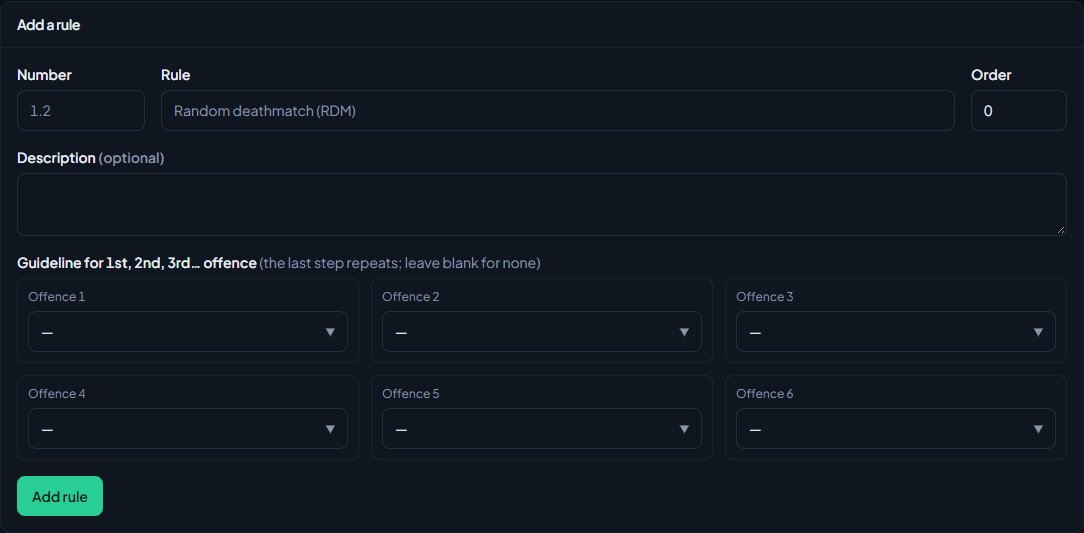
Optionally, type a Number, like 1.2. It shows in front of the rule's name.
-
Type the Rule, like Random deathmatch (RDM).
-
Optionally, add a Description, and an Order to place it in the list. Lower numbers come first. Leave Order blank to add it at the bottom.
-
Under Guideline for 1st, 2nd, 3rd… offence, pick the action for each offence: Warning, Kick or Ban, with a length for bans. You can set up to 6 steps. Leave every step on the blank first option for no guideline.
-
Click Add rule.
The rule shows in the list with its steps, like A warning → A kick → A 1 day ban, and how many active actions cite it.
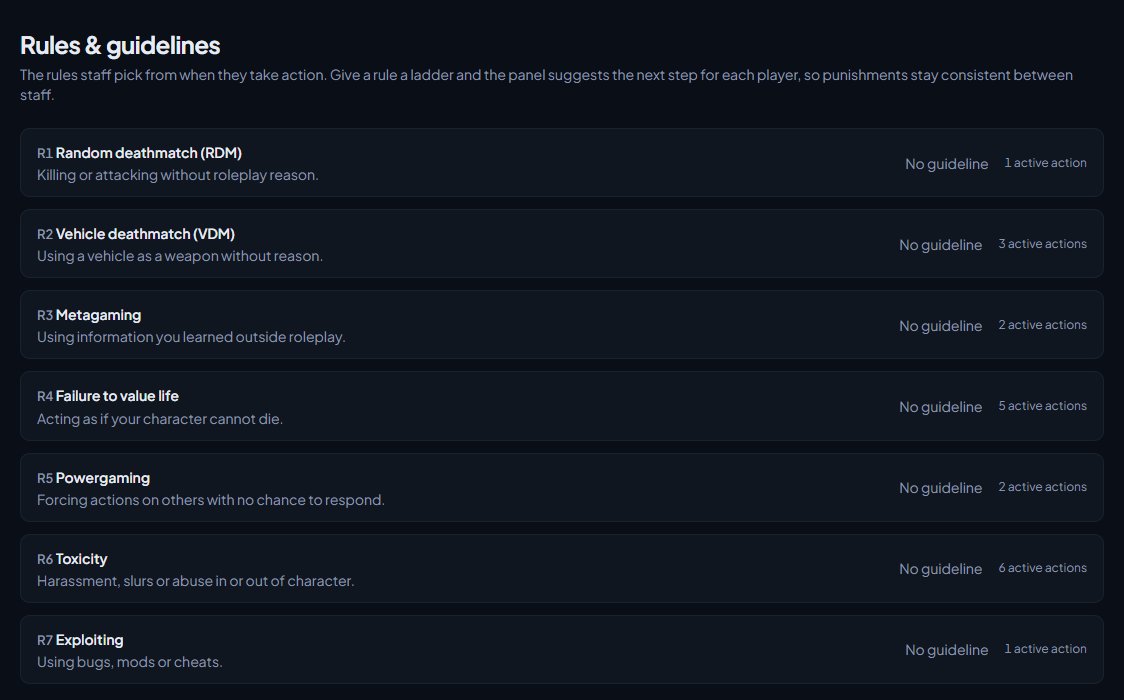
The last step repeats. With warning, kick, 1 day ban, a player's fourth and fifth offences are also a 1 day ban. If you want it to keep getting stricter, add more steps.
Edit, reorder or delete a rule#
- Click the rule to open it.
- Change what you need. Use Order to move it up or down the list: lower numbers come first.
- Click Save rule.
To delete a rule, open it and click Delete rule, then confirm. Actions that cited it keep their reasons, but they're no longer linked to the rule.
How guidelines work for staff#
When a staff member picks a rule while taking action, the Staff Panel counts the player's past offences under that rule and suggests the next step. The form switches to the suggested action and length, and shows a line like Guideline for this player's 2nd offence: a kick.
Staff can still pick something else. If they do, they have to say why in Why not the guideline?. That reason is kept on the action, the action is marked Off guideline in the Moderation log, and it counts against their Followed guidelines score on the Staff team page.
Only active actions count as past offences. Revoked actions, lifted bans and commendations don't.
Let old offences drop off#
A player who has behaved for months shouldn't be judged on something from last year. Offences older than a set number of days don't count towards a rule's ladder, so the player starts again from the first step.
- Click Staff settings under Staff Panel.
- Under Guidelines, set Count offences from the last (days). It's 180 to start with.
- Leave it blank to count every offence, however old.
- Click Save settings.
Something not working?#
The form isn't suggesting anything when a rule is picked. The rule has no guideline steps. Open it on Rules & guidelines and add some. If the step is an action you can't give, for example a ban when you can't ban, the guideline line still shows but the form stays on your action.
It asks why I'm not following the guideline. You picked a different action or ban length from the guideline's step. Fill in Why not the guideline? or switch to the suggestion.
A player's offence count seems wrong. Only active actions under that rule in the last Count offences from the last (days) count. Actions given with No rule, or under a different rule, don't count towards this one.
See also
Warn, kick and ban players
Give warnings, kicks and bans from a player's profile, pick the rule they broke, attach evidence, choose what players see, and set up automatic kicks or bans after repeated warnings.
Your staff team: hours, quotas and infractions
See how each staff member is doing, set weekly staff duty quotas by role, count staff duty as department shifts, fix duty time the game missed, and record infractions against staff.
Search the moderation log and change or undo actions
Find any commendation, warning, kick or ban, export the log to a spreadsheet, add evidence and comments, change a ban's length, and lift bans or revoke actions.
Set up the Staff Panel
Install the Staff Panel, connect your game server, give your staff the right permissions and work through the staff settings before you start moderating.
Can't find what you need?
Open a ticket in our Discord and someone from the team will help. Found a bug, or missing a feature? Tell us on the feedback board.