Award a certification to a member
Give someone a certification from their profile, see when it expires, revoke it if you need to, and fix the problems that stop a certification showing in the list.
Certifications record what someone is qualified to do, like pursuit driving or field training. When you award one, it shows on their profile, can count towards a promotion, and can give them a Discord role. If the certification expires, LonexOne works out the expiry date for you.
This article covers awarding and revoking a certification by hand on someone's profile. To create the certifications first, see Create certifications. Certifications can also be awarded through Training, see Certifications that expire and renew.
Before you start#
You need a role or rank with the Award and revoke certifications permission. Owners and administrators have it already.
This permission can be limited to a department:
- With it for the whole community, you can award any certification.
- With it for one department only, you can award that department's certifications, but not community-wide ones.
Award a certification#
- Click People in the left sidebar and open the person's profile.
- Scroll to the Certifications section.
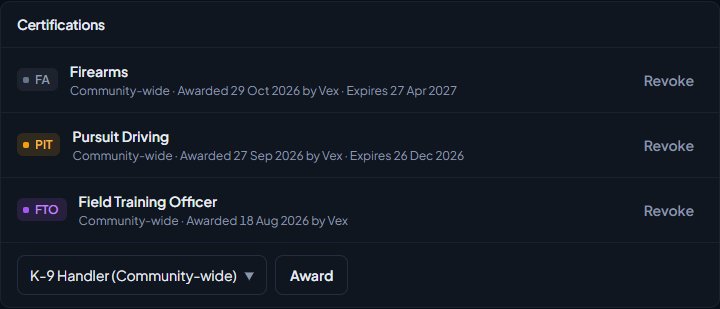
- Pick the certification from the box at the bottom of the section. Each one shows the department it belongs to in brackets, or Community-wide.
- Click Award.
You'll see a message like Awarded Pursuit driving. and the certification moves into the list at the top of the section.
What happens when you award one#
- It shows on their profile with the date it was awarded and who awarded it.
- If the certification has an expiry set, it shows Expires and the date. The date is worked out from the Expires after (days) setting on the certification.
- The member is sent a notification saying You've been awarded and the certification's name, with the expiry date if it has one. They get it wherever their notification settings say.
- Any Discord roles linked to the certification are given to them.
- It's recorded in the activity log.
If a rank requires the certification for promotion, it now counts towards that. See Set up ranks and their order.
Renew a certification early#
A certification that expires can be renewed before it runs out, for example after a refresher.
- Open the person's profile.
- In Certifications, click Renew next to the certification.
You'll see a message like Renewed Pursuit driving until 4 Feb 2027. The old award moves to Past certifications and the new one gets a fresh expiry date, counted from today. The member is told it was renewed. Certifications that never expire don't have a Renew button.
Revoke a certification#
- Open the person's profile.
- In Certifications, click Revoke next to the certification.
- Confirm when you're asked Revoke this certification?
You'll see a message like Revoked Pursuit driving. Any Discord roles linked to it are taken away.
Past certifications#
Certifications that were revoked or have expired move to Past certifications at the bottom of the section. Click it to see each one with the date it was awarded and the date it was revoked or expired.
Past certifications stay on the profile as a record. They don't count towards promotions and don't give Discord roles.
Rules and limits#
- Someone can only hold one current award of each certification. The box only lists certifications they don't hold right now. Use Renew to give a fresh expiry date to one they hold.
- Once a certification has expired or been revoked, you can award it again. The new award gets a fresh expiry date.
- You can only revoke certifications you're allowed to award.
Something not working?#
There's no box to award a certification. Either your community has no certifications yet, the person already holds every certification you're allowed to award, or your permission is limited to a department that has no certifications. Check the certifications on the Certifications page in the sidebar.
The certification I want isn't in the list. They may already hold it. Check the list at the top of the section. If it's a community-wide certification and your permission is limited to one department, you can't award it. Ask someone with community-wide access.
It says "They already hold" the certification. Someone else awarded it while you had the page open, and it never expires. Refresh the page to see it.
I can't see Revoke next to a certification. It belongs to a department you don't have Award and revoke certifications for, or it's community-wide and your permission is limited to one department.
The member didn't get a Discord role. Check the certification has a Discord role linked to it, and that your Discord server is connected. See Fix Discord roles that aren't syncing.
See also
Create certifications
Set up the qualifications your members can hold, like pursuit driving or field training, for one department or the whole community, with an optional expiry, and see where they're used.
Certifications that expire and renew
Give a certification an expiry, remind holders before it runs out, enrol them in retraining automatically, and let members ask to renew from the community site.
Set up ranks and their order
Add a department's ranks, put them in order from highest to lowest, give each rank its own callsigns, promotion requirements and permissions, and choose how it shows on the public roster.
Find anyone on the People page
Search everyone in your community by name, username, badge, Discord ID or game identifier, filter by department and status, and open a profile to see their departments, certifications and history.
Can't find what you need?
Open a ticket in our Discord and someone from the team will help. Found a bug, or missing a feature? Tell us on the feedback board.