Certifications that expire and renew
Give a certification an expiry, remind holders before it runs out, enrol them in retraining automatically, and let members ask to renew from the community site.
Some qualifications shouldn't last for ever. Give a certification an expiry and every award of it runs out after that many days. Training can remind holders before that happens, and put them back through the programme so they renew in time.
Before you start#
- To set an expiry you need Edit departments, ranks, divisions and certifications.
- To set reminders and retraining you need Create training programmes, their checklists and tests for the certification's department.
Give a certification an expiry#
-
Click Certifications in the left sidebar.
-
Click the certification.
-
Under Expiry, enter Expires after (days), from 1 to 3,650.
-
Click Save certification.
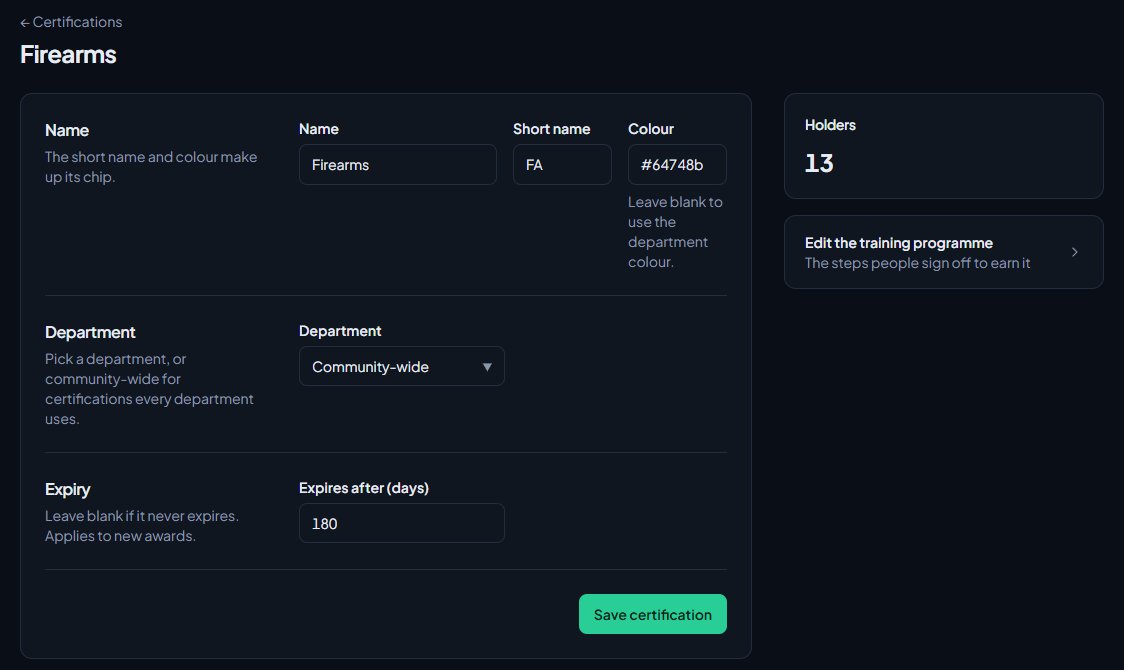
The expiry applies to new awards. Anyone who already holds the certification keeps the expiry date they were given. Leave the box blank for a certification that never expires.
Remind holders and start retraining#
These settings are on the certification's training programme. They only appear once the certification has an expiry.
-
In the left sidebar, under Training, click Programmes.
-
Click Edit (or Set up) next to the certification.
-
In the Settings box, enter Remind holders before it expires (days), from 1 to 365.
-
Tick Renewing needs retraining if holders should go through the programme again to renew.
-
Click Save settings.
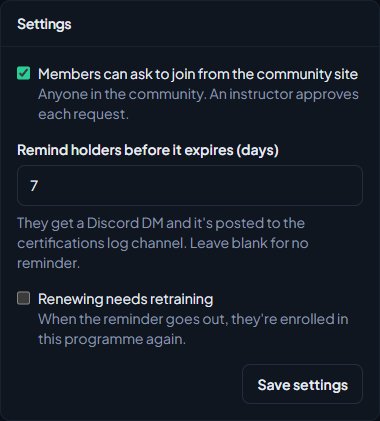
Leave the reminder blank for no reminder.
What happens before it expires#
Once a day, LonexOne checks for certifications inside their reminder window. For each one:
- The holder gets a Discord direct message saying when their certification expires. It either tells them they've been enrolled in training to renew it, or to talk to an instructor about renewing.
- A Certification expiring post goes to your Certifications log channel, with the person, department, expiry date and whether they were enrolled in retraining.
- If Renewing needs retraining is on, they're enrolled in the programme again. The enrolment is marked as a renewal, and Enrolled by shows Automatic renewal. It has no instructor, so assign one from the Trainees page.
Each award is only reminded once.
The log channel post needs a channel set for Certifications under Log channels. See Post logs to Discord channels.
Members asking to renew#
Members see when a certification is close to running out:
- Their member dashboard shows it, with the date it expires and a Renew button that opens their Training page. This starts at the reminder window, or 7 days before it expires if no reminder is set.
- On their Training page, the certification is tagged Expires soon in its last 30 days.
If Members can ask to join from the community site is on for the programme, they can ask to renew it themselves. From the start of the same window, the programme shows under Training you can join on their Training page, with Ask to join. Their request goes to the Requests tab on the Trainees page like any other.
If the programme doesn't let members ask to join, the Renew button takes them to a page with nothing to click. Turn on Members can ask to join from the community site, or turn on Renewing needs retraining so they're enrolled for you.
When they finish renewing#
When every step is signed off, the certification is awarded again with a fresh expiry date. The new award replaces the old one, so nothing shows as revoked.
When a certification runs out#
If someone doesn't renew in time:
- the certification no longer counts as held, and drops off the list on their Training page
- any Discord roles linked to the certification are taken off at the next daily role sync
- a renewal enrolment that's already open carries on, so they can still finish it and get the certification back
Something not working?#
I don't see the reminder or retraining settings on the programme. The certification doesn't expire. Add Expires after (days) to it first.
A holder wasn't reminded. Check the programme has a number in Remind holders before it expires (days). Reminders go out once a day, and only once per award. Direct messages only reach people who signed in with Discord and allow messages from the server.
Nobody was enrolled in retraining. Renewing needs retraining has to be on, and the programme needs at least one step. People who already have an open enrolment or request for the programme aren't enrolled twice.
I changed the expiry, but people's dates didn't change. The expiry only applies to new awards. Existing holders keep their dates until they renew.
See also
Create a training programme with a checklist
Turn a certification into a checklist of steps, decide who signs each step off, enrol trainees or let them ask to join, and assign their instructor.
Create certifications
Set up the qualifications your members can hold, like pursuit driving or field training, for one department or the whole community, with an optional expiry, and see where they're used.
Decide results and sign trainees off
After a session, mark practical questions, decide who passed, post the results to Discord, and sign off checklist steps by hand until the certification is awarded.
What trainees see on the community site
A guide for staff to the trainee's side of Training: their Training page, booking sessions, the live classroom, results, and the notifications and Discord messages they get.
Post logs to Discord channels
Choose which Discord channel each event goes to, give departments their own channels, filter and colour CAD posts, and send a test message.
Can't find what you need?
Open a ticket in our Discord and someone from the team will help. Found a bug, or missing a feature? Tell us on the feedback board.