Create certifications
Set up the qualifications your members can hold, like pursuit driving or field training, for one department or the whole community, with an optional expiry, and see where they're used.
Certifications are the qualifications people in your community hold, like pursuit driving, field training or a firearms licence. You create the list here, then award them to people from their profile or through Training.
Once a certification exists you can use it across LonexOne: ranks can require it before promotion, Training programmes can award it when someone passes, and Discord roles can be linked to it so holders get a role automatically.
Before you start#
You need the Edit departments, ranks, divisions and certifications permission. If it's limited to one department, you can only create and edit that department's certifications. Community-wide certifications need the permission across the whole community.
To give a certification to someone, you need a different permission, Award and revoke certifications. See Award a certification to a member.
Create a certification#
-
Click Certifications in the left sidebar.
-
Click New certification.
-
Type the Name, for example Pursuit driving. Up to 80 characters.
-
Optionally add a Short name, like PIT. Up to 16 characters.
-
Optionally pick a Colour as a hex code, like
#3b82f6. Leave it blank to use the department's colour. -
Pick the Department, or Community-wide for a certification every department uses.
-
Optionally type a number of days in Expires after (days), from 1 to 3,650. Leave it blank if it never expires.
-
Click Create certification.
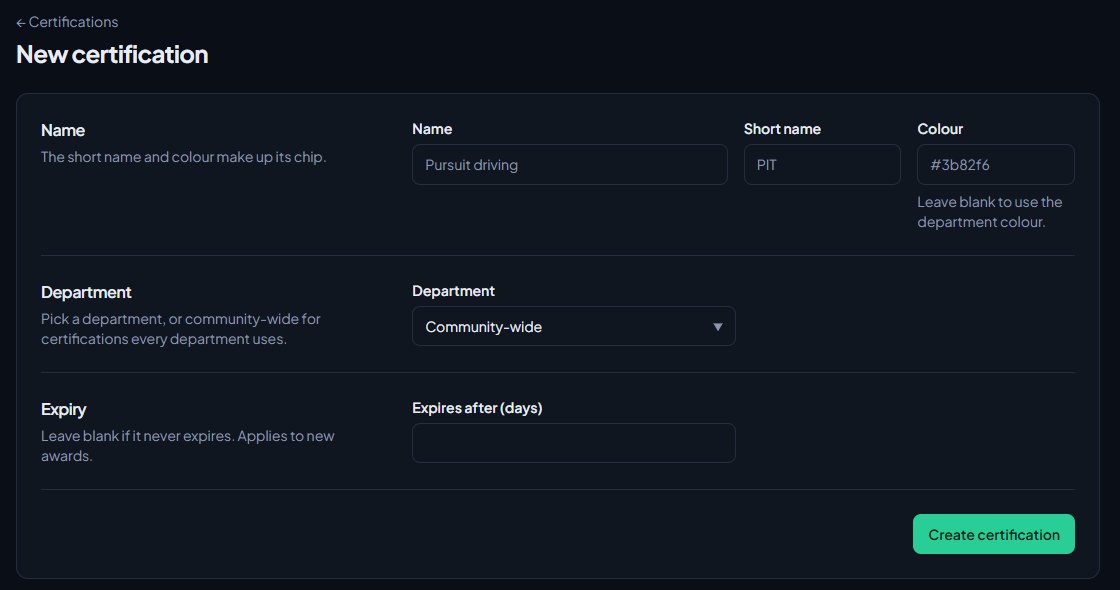
You'll see Created Pursuit driving. and it appears on the Certifications list.
The short name and colour make up the certification's chip, which shows next to it on people's profiles.
Department or community-wide#
| Choice | Use it for |
|---|---|
| A department | Qualifications that only mean something in that department, like a fire department's driver operator course. Only people who manage that department can edit it. |
| Community-wide | Qualifications every department shares, like a first aid course. Only people with community-wide access can edit it. |
Ranks can require community-wide certifications and their own department's certifications.
How expiry works#
When you set Expires after (days), every new award runs out that many days after it's given. Expired certifications move to Past certifications on the person's profile, and they no longer count for rank requirements or Discord roles.
Changing the expiry only affects awards given after the change. People who already hold it keep their current expiry date.
If you use the Training module, people can be reminded before a certification expires and put back into training. See Certifications that expire and renew.
The Certifications list#
The list shows every certification you can manage, community-wide ones first, with its department, when it expires and how many people hold it now.
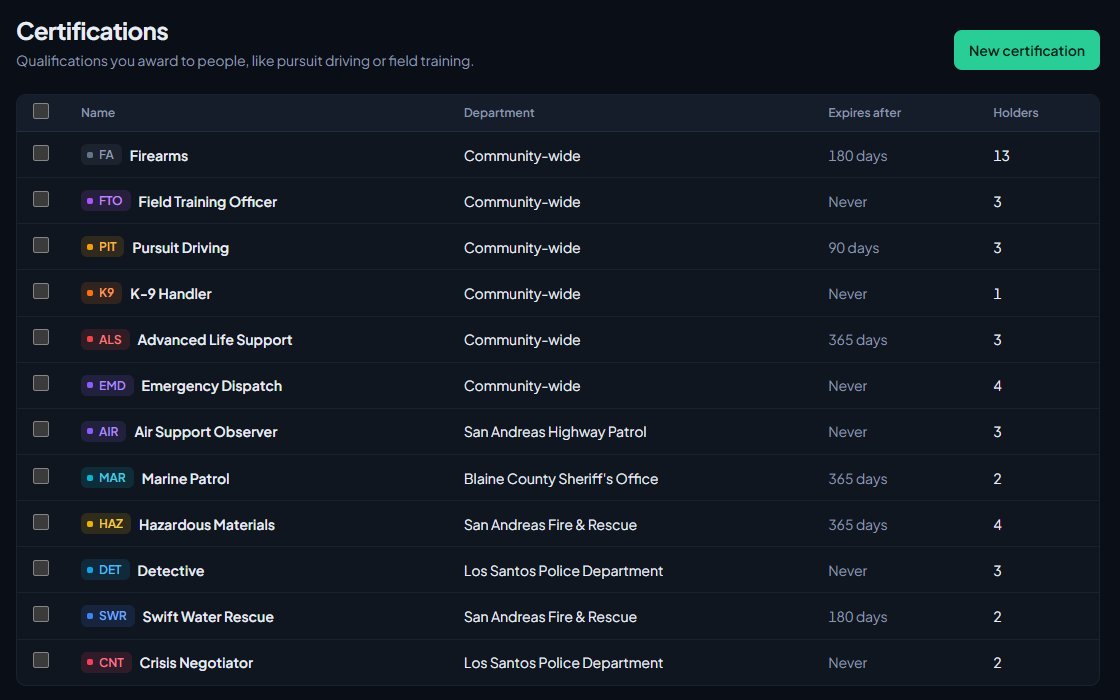
Click a certification's name to edit it. On its page you'll also see how many Holders it has, and, if you use Training and can manage training programmes, a link to Edit the training programme that awards it.
Where certifications are used#
- People's profiles: award and revoke them under Certifications. See Award a certification to a member.
- Promotion requirements: tick them under Certifications on a rank's edit page. See See who's ready for promotion.
- Training: a training programme is built for a certification and awards it when the trainee is signed off. See Create a training programme with a checklist.
- Discord roles: link a Discord role to a certification so holders get it. See Link Discord roles to departments and ranks.
Delete certifications#
To delete one:
- Open the certification.
- Click Delete certification at the bottom and confirm.
To delete several at once:
- On the Certifications list, tick the ones to delete.
- Click Delete selected and confirm.
Deleting a certification takes it off everyone who holds it and removes its Discord role links. Their Discord roles update to match. This can't be undone.
Something not working?#
"Use a hex colour like #3b82f6."
The colour needs to be a # followed by six letters or numbers. Leave it blank to use the department colour.
I can't pick Community-wide. Your permission is limited to a department. Ask someone with community-wide access to create it.
I can't see a certification on the list. You only see certifications for departments you manage. Community-wide ones need community-wide access.
Someone's certification disappeared from their profile. It probably expired. Check Past certifications on their profile. Award it again to give them a fresh expiry date.
See also
Award a certification to a member
Give someone a certification from their profile, see when it expires, revoke it if you need to, and fix the problems that stop a certification showing in the list.
Create a training programme with a checklist
Turn a certification into a checklist of steps, decide who signs each step off, enrol trainees or let them ask to join, and assign their instructor.
Certifications that expire and renew
Give a certification an expiry, remind holders before it runs out, enrol them in retraining automatically, and let members ask to renew from the community site.
See who's ready for promotion
Use the Promotions page to find everyone who meets the requirements for their next rank, and everyone one requirement away, then promote them from the list.
Link Discord roles to departments and ranks
Give people Discord roles automatically for their department, rank, division, status, certifications and community roles, and take them away when that changes.
Can't find what you need?
Open a ticket in our Discord and someone from the team will help. Found a bug, or missing a feature? Tell us on the feedback board.