Bans that need a second staff member
Make long and permanent bans wait for a second staff member to approve them, set your temporary ban limit, and approve or deny bans that are waiting.
A long ban is a big decision, so you might not want one person making it alone. With second approval switched on, bans over a certain length don't start until another staff member has looked at them and agreed.
Your ban limits decide two things: how long a ban junior staff can give at all, and how long a ban can be before someone else has to approve it.
Before you start#
- To change the ban limits you need Set up the Staff Panel: rules, guidelines and settings.
- To approve or deny a waiting ban you need Give bans of any length, including permanent, and approve bans waiting for a second staff member.
Set your ban limits#
- Click Staff settings under Staff Panel.
- Go to Ban limits.
- Set Longest temporary ban (days). Staff with Ban players, up to the longest temporary ban set in the staff settings can give bans up to this length. It's 7 days to start with.
- Set Second approval for bans of at least (days):
- A number of days, for example 14, means bans of 14 days or longer, and every permanent ban, wait for approval.
- 0 means every ban waits for approval.
- Leave it blank to switch approval off. This is how it starts.
- Click Save settings.

| Setting | Who it affects |
|---|---|
| Longest temporary ban (days) | Only staff without the Give bans of any length permission. They can't pick longer lengths at all. |
| Second approval for bans of at least (days) | Everyone, including staff with the Give bans of any length permission. |
What happens when a ban needs approval#
When a staff member gives a ban at or over the approval length:
- They see Ban K7MPQ2 is waiting for a second staff member to approve it. In game, the message ends with in the panel.
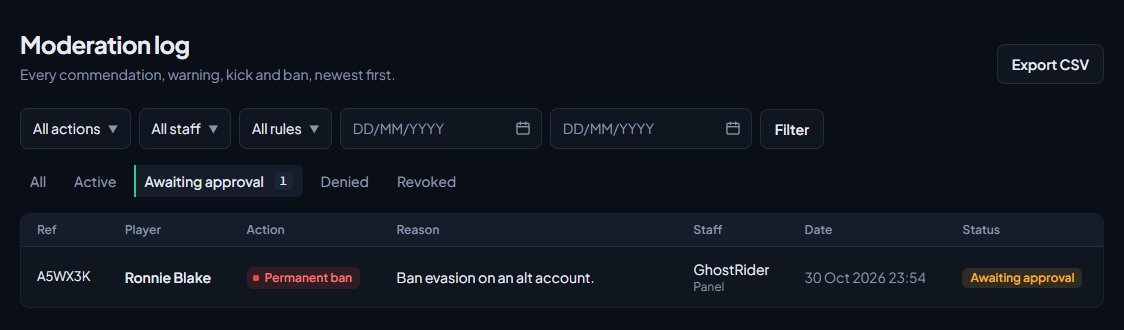
- The ban shows as Awaiting approval in the player's history and in the Moderation log.
- The player isn't removed from the server and can still join.
- It's posted to your Bans waiting for approval log channel on Discord, if you've set one. Nothing goes to the bans channel until it's approved.
- The count shows on the Bans waiting for approval card on the staff dashboard, and next to Awaiting approval in the moderation log.
Point the Bans waiting for approval log channel at a channel your senior staff watch, so they know when there's a ban to look at. See Post logs to Discord channels.
Approve or deny a ban#
-
Click Moderation log under Staff Panel.
-
Click Awaiting approval to see the waiting bans.
-
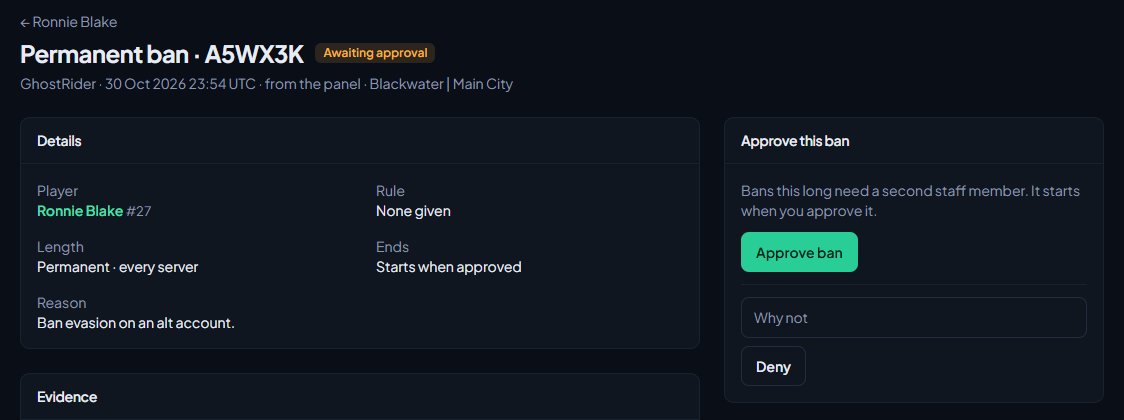
Click a ban to open it. Read the reason, the evidence and the Staff discussion, and check the player's other actions on the right.
-
In the Approve this ban box, either:
- click Approve ban, or
- type why in the Why not box and click Deny.
When you approve a ban:
- It starts from the moment you approve it, not from when it was given. A 30 day ban approved today ends 30 days from today.
- If the player is online, they're removed with your ban screen.
- It's posted to your bans log channel on Discord, with your name under Approved by.
- It counts against the player's trust score from then on.
When you deny a ban, it's marked Denied with your reason, and it never takes effect.
If the ban is right but the length is wrong, someone with Lift bans, revoke warnings and change ban lengths, on anyone's actions can change the length first, under Manage on the same page. Then approve it.
Something not working?#
I can't see the Approve this ban box. Either you gave the ban yourself (someone else has to approve it), or you don't have Give bans of any length, including permanent, and approve bans waiting for a second staff member.
It says "Someone other than the person who gave the ban has to approve it." or "... has to deny it." You can't approve or deny your own ban. Ask another staff member.
It says "This ban isn't waiting for approval." Someone else has already approved, denied or lifted it. Refresh the page.
A ban started straight away when I expected it to wait. Check Second approval for bans of at least (days) isn't blank, and that the ban was at least that long. Bans shorter than the setting start straight away.
Junior staff can't pick longer ban lengths. That's Longest temporary ban (days) working. Lengths over it say (needs long bans). Raise the limit, or give their role the Give bans of any length permission.
See also
Warn, kick and ban players
Give warnings, kicks and bans from a player's profile, pick the rule they broke, attach evidence, choose what players see, and set up automatic kicks or bans after repeated warnings.
Search the moderation log and change or undo actions
Find any commendation, warning, kick or ban, export the log to a spreadsheet, add evidence and comments, change a ban's length, and lift bans or revoke actions.
Read the staff dashboard
What each part of the staff dashboard shows: players online, staff on duty, open reports, bans waiting for approval, the last two weeks of actions and your own duty hours.
Set up the Staff Panel
Install the Staff Panel, connect your game server, give your staff the right permissions and work through the staff settings before you start moderating.
Can't find what you need?
Open a ticket in our Discord and someone from the team will help. Found a bug, or missing a feature? Tell us on the feedback board.