Read the staff dashboard
What each part of the staff dashboard shows: players online, staff on duty, open reports, bans waiting for approval, the last two weeks of actions and your own duty hours.
The staff dashboard is the first page of the Staff Panel. It shows what's happening on your servers right now and what needs a staff member's attention, so it's a good page to keep open while you're on duty.
Before you start#
You need the See the player database: profiles, playtime, past names and linked accounts permission.
Open the dashboard#
In your control panel, click Dashboard under Staff Panel.
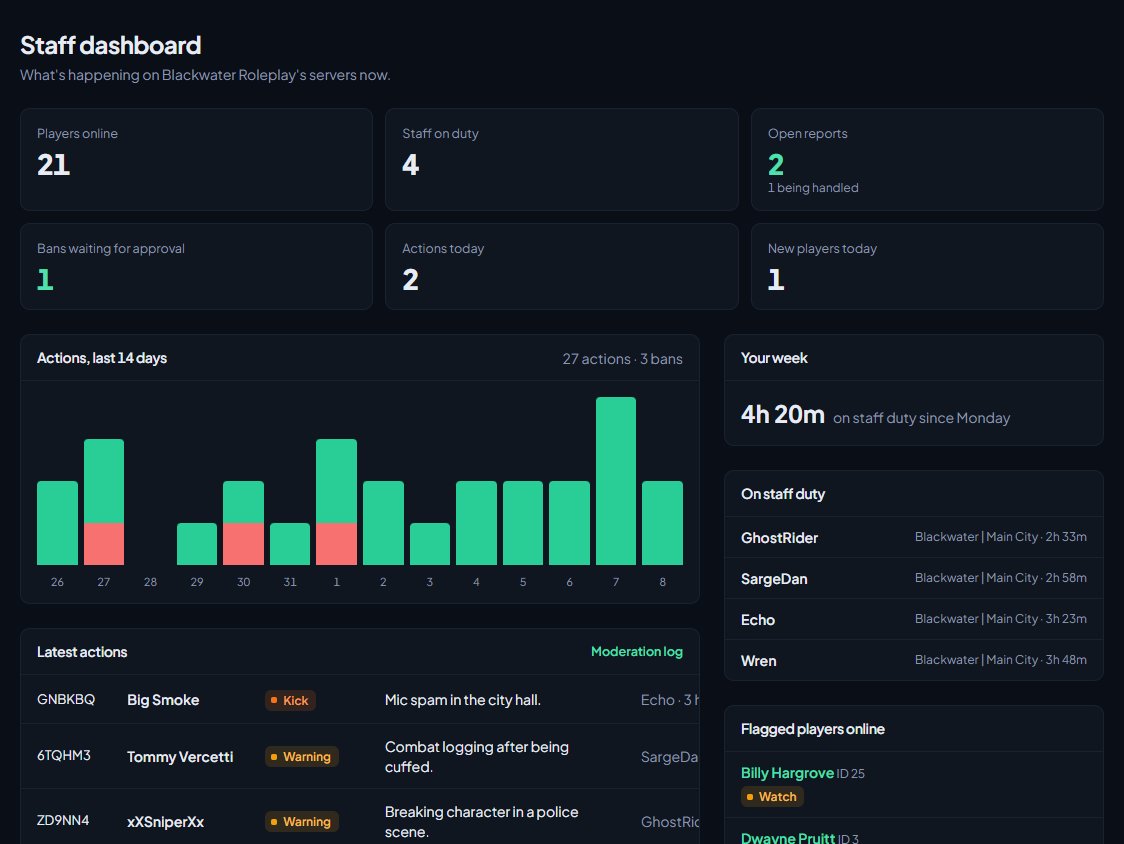
The cards along the top#
| Card | What it shows |
|---|---|
| Players online | Players on all your servers right now. |
| Staff on duty | Staff on staff duty right now. |
| Open reports | Reports nobody has claimed yet, and how many are being handled. Click it to go to Reports. |
| Bans waiting for approval | Bans waiting for a second staff member. Click it to see them in the moderation log. |
| Actions today | Commendations, warnings, kicks, community service and bans given since midnight. |
| New players today | Players who joined for the first time today. |
The rest of the page#
| Section | What it shows |
|---|---|
| Actions, last 14 days | A bar for each day, with bans in red. Hover over a bar for that day's numbers. The totals are at the top. |
| Latest actions | The 10 most recent actions, with the player, type, reason, staff member and when. Click one to open it, or click Moderation log for the rest. |
| Your week | Your own staff duty since Monday 00:00 UTC, against your quota if you have one. If you're on approved leave, it says so. |
| On staff duty | Who's on staff duty now, the server they're on and for how long. |
| Flagged players online | Players online now with a flag that alerts staff, and their server ID. Only shown when there's someone to show. |
| Most actions this week | The five staff members who gave the most actions since Monday (UTC). Automatic actions aren't counted. |
| Servers | How many players are on each server. Only shown if you have more than one. |
The dashboard doesn't update by itself. Refresh the page to see the latest numbers.
Something not working?#
Everything shows 0. Nothing has come in from your game servers. Check the LonexOne resource is connected. See Fix the FiveM resource not connecting.
Staff on duty is 0, but staff are on the server. Staff duty is separate from being on the server. Staff go on duty in game with /staffduty. See Use the staff menu and staff commands in game.
Your week shows no quota. None of your roles have a weekly quota. A manager can set them on the Staff team page. See Your staff team: hours, quotas and infractions.
A flagged player isn't under Flagged players online. Only flags that alert staff are listed there. Flags like Trusted don't alert.
See also
Handle player reports and staff requests
How players report each other and ask for help in game, how staff are alerted, and how to claim, investigate and resolve reports from the control panel or the staff menu.
Bans that need a second staff member
Make long and permanent bans wait for a second staff member to approve them, set your temporary ban limit, and approve or deny bans that are waiting.
Your staff team: hours, quotas and infractions
See how each staff member is doing, set weekly staff duty quotas by role, count staff duty as department shifts, fix duty time the game missed, and record infractions against staff.
Notes and flags on players
Leave notes for other staff on a player, flag players to watch them, choose which flags alert staff when the player joins, and make your own flags.
Watch your servers on the live staff map
See every player on your game servers on a map in the control panel, find a player by name or server ID, and spot staff on duty and flagged players at a glance.
Can't find what you need?
Open a ticket in our Discord and someone from the team will help. Found a bug, or missing a feature? Tell us on the feedback board.