Notes and flags on players
Leave notes for other staff on a player, flag players to watch them, choose which flags alert staff when the player joins, and make your own flags.
Notes and flags help your staff keep each other in the loop about a player. A note is a few lines of context, like "Talked to them about their driving, seemed to understand". A flag is a label, like Watch or Suspected cheater, that shows next to the player's name everywhere in the Staff Panel. Some flags also tell staff on the server when that player joins.
Players never see notes or flags.
Before you start#
| To do this | You need |
|---|---|
| Add notes, and delete your own | Add notes to players, and delete your own |
| Delete anyone's notes | Delete anyone's notes on players |
| Add and remove flags | Flag players, for example to watch them, and remove flags |
| Change the list of flags | Set up the Staff Panel: rules, guidelines and settings |
Everyone also needs See the player database: profiles, playtime, past names and linked accounts to open player profiles.
Add a note#
-
Open the player's profile from Players under Staff Panel.
-
Scroll to Staff notes.
-
Type your note in the box. Notes can be up to 2,000 characters.
-
Click Add note.
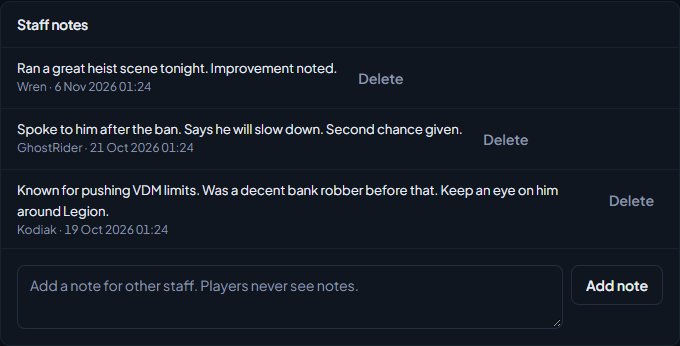
The note shows with your name and the date. You can also add notes from the in-game staff menu, on the player's record. See In-game staff tools.
Delete a note#
Click Delete next to the note and confirm. You can delete your own notes, or anyone's if you have Delete anyone's notes on players. Deleting a note is recorded in the activity log, with the start of what it said.
Flag a player#
-
Open the player's profile.
-
In the Flags card on the right, pick a flag from the list. Flags that alert staff say (alerts staff when they join).
-
Optionally, type why in the Why (optional) box.
-
Click Add flag.
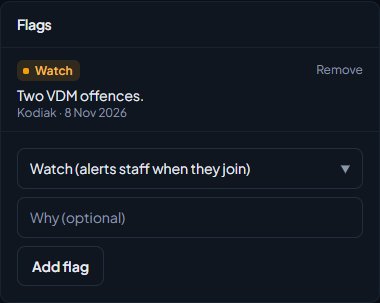
The flag shows on the profile with who added it and when, and as a coloured label next to the player's name on the Players page. A player can only have each flag once.
To take a flag off, click Remove next to it.
To find everyone with a flag, click Flagged on the Players page.
What alerting flags do#
When a player with an alerting flag joins one of your servers:
- Every staff member on that server gets a message in game naming the player and the flag.
- The message is posted to Discord if you've picked a channel for Flagged players and possible ban evasion joining under Log channels. See Post logs to Discord channels.
- While they're online, they're listed under Flagged players online on the staff dashboard.
The flags you start with#
| Flag | Alerts staff |
|---|---|
| Watch | Yes |
| Suspected cheater | Yes |
| Trusted | No |
| Possible ban evasion | Yes. LonexOne adds this one itself. |
Possible ban evasion is added automatically when a player joins who shares an identifier with a banned player, if you have ban evasion alerts switched on. You can't add it by hand, but you can remove it. See Control who can join your servers.
Change your flags#
- Click Staff settings under Staff Panel.
- Go to the Flags section.
- To add a flag, type its name in one of the empty New flag rows, pick a colour, and tick Alert staff if it should alert.
- To rename a flag, change its name. To stop it alerting, untick Alert staff.
- To remove a flag, clear its name.
- Click Save settings.
You can have up to 20 flags. Two empty rows are shown each time, so save and come back if you want to add more than two at once.
Removing a flag from the list doesn't take it off players who already have it. It stays on their record, shown by its old internal name.
Something not working?#
It says "They already have that flag." The player already has that flag. Each flag can only be on a player once.
Staff didn't get an alert when a flagged player joined. Check the flag has Alert staff ticked in Staff settings. Alerts go to staff who are on the same server at the moment the player joins. A server restart doesn't set alerts off again for players who were already on.
I can't see the Add flag form or the Remove buttons. You need the Flag players, for example to watch them, and remove flags permission.
I can't see the box to add a note. You need Add notes to players, and delete your own, or Delete anyone's notes on players.
See also
Look up a player's history
Find any player who has joined your servers, and read their profile: playtime, past names, linked accounts, warnings and bans, sits and the event log of kills, damage and chat.
Control who can join your servers
How LonexOne checks every player as they connect: bans and ban evasion, a minimum trust score, and an allowlist that only lets in staff, chosen roles and accepted applicants.
Read the staff dashboard
What each part of the staff dashboard shows: players online, staff on duty, open reports, bans waiting for approval, the last two weeks of actions and your own duty hours.
Set up the Staff Panel
Install the Staff Panel, connect your game server, give your staff the right permissions and work through the staff settings before you start moderating.
Can't find what you need?
Open a ticket in our Discord and someone from the team will help. Found a bug, or missing a feature? Tell us on the feedback board.