Handle player reports and staff requests
How players report each other and ask for help in game, how staff are alerted, and how to claim, investigate and resolve reports from the control panel or the staff menu.
Players can report someone breaking the rules, or ask for staff help, without leaving the game. Staff on that server get an alert straight away, and each report keeps a copy of what was happening between the two players in the minutes before, so you have something to go on even if nobody recorded it.
Before you start#
- Staff need Handle player reports and staff requests: get alerts in game, claim and resolve them to see the Reports page and get alerts.
- To work reports from the in-game staff menu, they also need See the player database: profiles, playtime, past names and linked accounts.
- Your game server needs the LonexOne resource connected with the Staff Panel installed.
How players make a report#
Every player can use these, staff or not:
| Command | What it's for |
|---|---|
| /report id reason | Report another player, using their server ID. For example /report 14 Rammed me on purpose. |
| /calladmin reason | Ask for staff help, for example /calladmin Stuck under the map. |
Your community can rename both under In game in Staff settings. Players are told Report sent to staff or Staff have been asked to help.
Players have to wait between reports, 60 seconds to start with. Change it with Seconds between reports from one player under Reports and the event log in Staff settings. Set it to 0 for no wait.
What staff get#
When a report comes in:
- Every staff member on the same server with the reports permission gets a message in game, like Sam reported Alex: Rammed me on purpose (open the staff menu to claim it).
- It's posted to your New reports and staff requests log channel on Discord, if you've set one.
- It shows on the Reports page and the Open reports card on the staff dashboard.
Each report records where both players were, how far apart they were, and every kill, hit and chat message involving either of them in the 3 minutes before. That copy is kept with the report, even after old events are deleted from the event log.
Handle a report in the control panel#
-
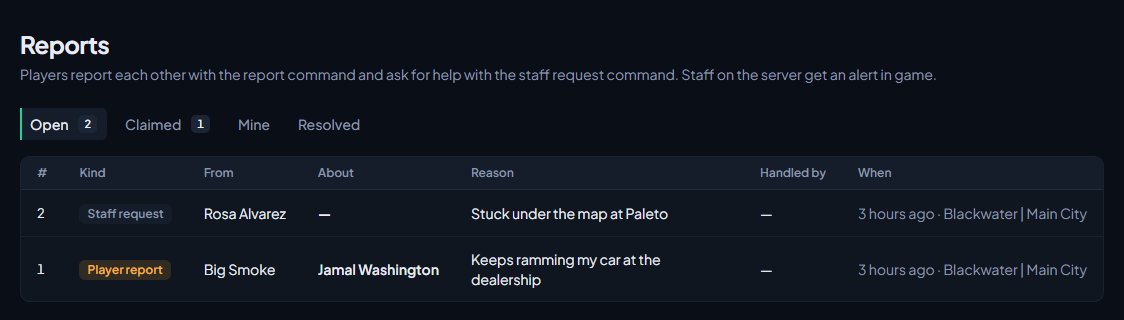
Click Reports under Staff Panel.
-
The Open tab shows reports nobody has taken. Click one to open it.
-
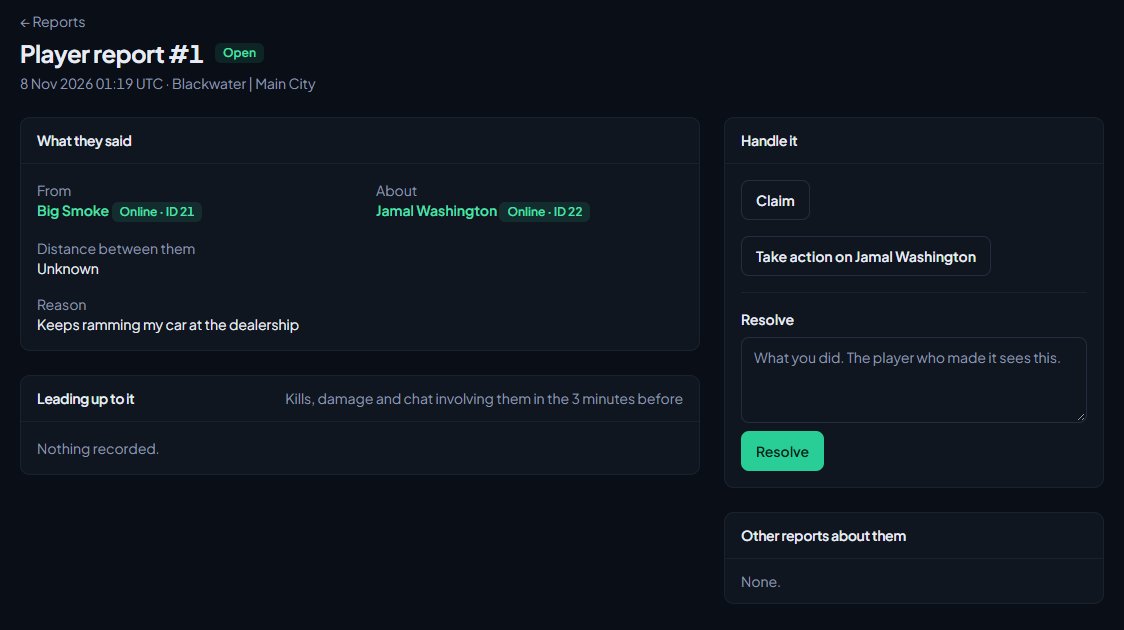
Read What they said, and Leading up to it for the events before the report. Other reports about them shows past reports about the same player.
-
Click Claim so other staff know you're on it.
-
To act on the reported player, click Take action on followed by their name. Their profile opens at the Take action box. See Warn, kick and ban players.
-
Back on the report, type what you did in the Resolve box. The player who made the report sees this.
-
Click Resolve.
If the player who made the report is online, they're told Your report was handled by staff: followed by what you wrote. For a staff request it says request instead.
The tabs on the Reports page are Open, Claimed, Mine (claimed by you and not resolved yet) and Resolved.
Handle a report in game#
- Open the staff menu and click the Reports tab. It lists open and claimed reports on the server you're on.
- Click Claim on the report.
- Use Go to to teleport to the player who made it, or Open to see the reported player's record and take action.
- Type what you did in the box and click Resolve.
See Use the staff menu and staff commands in game.
Claiming and resolving#
- Claiming is optional. You can resolve a report without claiming it, and it's credited to you.
- Once someone has claimed a report, nobody else can claim it, but anyone with the reports permission can still resolve it.
- How quickly staff claim reports and how many they resolve shows on the Staff team page. See Your staff team: hours, quotas and infractions.
Something not working?#
A player says their report didn't send. If they used /report, they need to give a server ID of someone on the server, and a reason after it. They'll see No player with that server ID or Say what they did after their ID. They also can't report themselves.
A player gets "Wait 45 seconds before sending another". They're inside your report cooldown. Lower Seconds between reports from one player if it's too long.
Staff on the server didn't get an alert. Alerts only go to staff on the same server as the player who made the report, with the reports permission, whose Discord is linked to a member. Check their role.
It says someone "is already handling this." Another staff member claimed it first. You can still resolve it if needed.
It says "You don't handle reports." Your roles don't include Handle player reports and staff requests: get alerts in game, claim and resolve them.
"Leading up to it" says "Nothing recorded." Nothing involving either player happened in the 3 minutes before, or chat recording is off. Kills, damage and chat are only recorded while the resource is connected.
See also
Use the staff menu and staff commands in game
Open the in-game staff menu, go on staff duty, use the chat commands, teleport, spectate, freeze, run sits and announcements, and rename or switch off any command.
Warn, kick and ban players
Give warnings, kicks and bans from a player's profile, pick the rule they broke, attach evidence, choose what players see, and set up automatic kicks or bans after repeated warnings.
Look up a player's history
Find any player who has joined your servers, and read their profile: playtime, past names, linked accounts, warnings and bans, sits and the event log of kills, damage and chat.
Your staff team: hours, quotas and infractions
See how each staff member is doing, set weekly staff duty quotas by role, count staff duty as department shifts, fix duty time the game missed, and record infractions against staff.
Post logs to Discord channels
Choose which Discord channel each event goes to, give departments their own channels, filter and colour CAD posts, and send a test message.
Can't find what you need?
Open a ticket in our Discord and someone from the team will help. Found a bug, or missing a feature? Tell us on the feedback board.