Commendations and community service
Reward good roleplay with commendations, set up a community service area in game, and send players to do tasks there instead of kicking or banning them.
Not every action has to be a punishment. A commendation thanks a player for good roleplay and raises their trust score. Community service is a lighter punishment than a kick or ban: the player is taken to an area you choose and has to finish a number of tasks before they can go back to playing.
Before you start#
| To do this | You need |
|---|---|
| Give commendations | Commend players |
| Give community service | Give community service |
| Set up the service area in game | Set up the Staff Panel: rules, guidelines and settings |
Everyone also needs See the player database: profiles, playtime, past names and linked accounts.
Give a commendation#
- Open the player's profile from Players under Staff Panel.
- In Take action, set Action to Commend.
- Type the Reason. The player sees it.
- Click Give action.
In game, use /commend followed by the player's server ID and the reason, or the Commend button in the staff menu.
If they're online, the player gets your commendation message straight away. If not, they see it about 20 seconds after they next join. A commendation adds 5 points to their trust score to start with, and counts towards the reward ladder if it's earned by commendations. See Trust scores and the reward ladder.
You can commend anyone except yourself, including staff and members above you.
Set up community service#
Community service needs an area and at least one task spot, both set in game where you stand. Do this once.
- Join your game server.
- Stand in the middle of where you want community service to happen, and type /servicearea followed by how far from that point players may wander, in metres. For example /servicearea 60. You can use 10 to 500, and 60 is used if you leave it out.
- Walk to the first spot where a player should do a task and type /servicespot followed by what they're doing, for example /servicespot Sweep the path. If you leave the label out, it's Clean up.
- Repeat at each spot. You can have up to 30. Adding a 31st drops the oldest.
To start again, type /servicereset to clear every task spot, then add new ones. Your community can rename these commands under In game in Staff settings.
Give community service#
-
Open the player's profile.
-
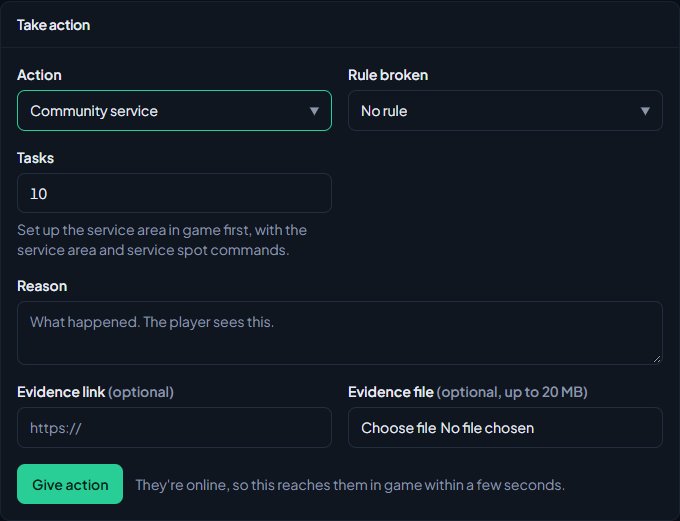
In Take action, set Action to Community service.
-
Set Tasks (1 to 100). It starts at 10, or whatever your community set as Community service tasks to start with in Staff settings.
-
Type the Reason.
-
Click Give action.
In game, use /service followed by the player's server ID, the number of tasks and the reason, for example /service 12 5 Reckless driving in the city.
What the player has to do#
If they're online, the player gets your community service message and is taken to the service area straight away. If they're offline, it starts when they next join.
While they're doing community service:
- A marker shows the next task spot, with a route on their map.
- They hold E at the spot for 8 seconds to finish a task. The help text shows what the task is and how many are left.
- They can't use weapons or drive. If they get in a vehicle, they're taken out of it.
- If they walk out of the area, they're brought back to the middle.
When the last task is done, they're told Community service done. You can go. and taken back to where they were when it started.
Their progress is saved by LonexOne, so leaving the server doesn't get them out of it. When they rejoin they're told they still have community service to finish and go straight back to it.
Follow progress or end it early#
Open the action from the player's History or the Moderation log. Progress shows how many tasks are done, and when it was finished.
To let a player off, someone with Lift bans, revoke warnings and change ban lengths, on anyone's actions can type a reason under Manage and click Revoke. If the player is in game, they're told Staff have ended your community service. and taken back to where they were.
Community service takes 8 points off the trust score to start with.
Something not working?#
It says "Set up the community service area and task spots in game first, with the service area and service spot commands." Your community has no service area, or no task spots. Follow the steps under Set up community service.
The player was told "You have community service, but the server has no service area set up yet. Tell staff." Their game server didn't have the area when the service started. Set up the area and spots, then ask the player to leave and rejoin. They go straight into their community service.
It says "Setting up community service needs the Staff Panel setup permission." Only staff with Set up the Staff Panel: rules, guidelines and settings can set the area and spots.
Community service isn't posted to Discord. Pick a channel for Community service under Log channels. See Post logs to Discord channels.
See also
Warn, kick and ban players
Give warnings, kicks and bans from a player's profile, pick the rule they broke, attach evidence, choose what players see, and set up automatic kicks or bans after repeated warnings.
Use the staff menu and staff commands in game
Open the in-game staff menu, go on staff duty, use the chat commands, teleport, spectate, freeze, run sits and announcements, and rename or switch off any command.
Trust scores and the reward ladder
How each player's trust score is worked out, how to tune it, how to use it to keep players out or gate applications, and how to reward regular players with tiers and Discord roles.
Search the moderation log and change or undo actions
Find any commendation, warning, kick or ban, export the log to a spreadsheet, add evidence and comments, change a ban's length, and lift bans or revoke actions.
Can't find what you need?
Open a ticket in our Discord and someone from the team will help. Found a bug, or missing a feature? Tell us on the feedback board.