Let players appeal and decide their appeals
Turn on the player portal so players can see their record and appeal bans, kicks and warnings on your community site, then read each appeal alongside their history and accept or deny it.
Staff get things wrong sometimes, and players deserve a fair way to say so. With appeals switched on, players can see their own record on your community website and appeal a ban, kick or warning they think was wrong. Your staff read the appeal next to the player's full history and decide it on one page.
Before you start#
- To change the portal and appeal settings you need Set up the Staff Panel: rules, guidelines and settings.
- To decide appeals you need Decide appeals: accepting one lifts the ban or revokes the action.
Choose what players can do#
- Click Staff settings under Staff Panel.
- Go to Player portal and appeals.
- Tick the options you want:
- Show players their record on the community site
- Show players their own trust score
- Let players appeal
- Next to They can appeal, tick Bans, Kicks and Warnings as you like.
- Click Save settings.

All of these are on to start with.
Players appeal from their record, so Let players appeal needs Show players their record on the community site ticked too. If it isn't, saving says Players appeal from their record on the community site, so turn on Show players their record too.
Your own appeal link#
If you'd rather take appeals somewhere else, like a Discord ticket channel or a form, put its address in Appeal link under Messages to players. The {appeal} part of your ban, kick and warning messages then points there.
If you leave Appeal link empty and players can appeal on your site, {appeal} points to their record on your community site instead.
What players see#
Players find their record under My record in the member menu on your community website (at /me/record). It shows:
- the game accounts that are theirs, matched by Discord,
- their trust score, if you show it,
- everything staff have recorded: commendations, warnings, kicks, community service and bans, with whether each one is still in force.
To appeal, they click Appeal this under the action, write at least 20 characters about what happened and why it should be lifted, and click Send appeal. They can appeal each action once.
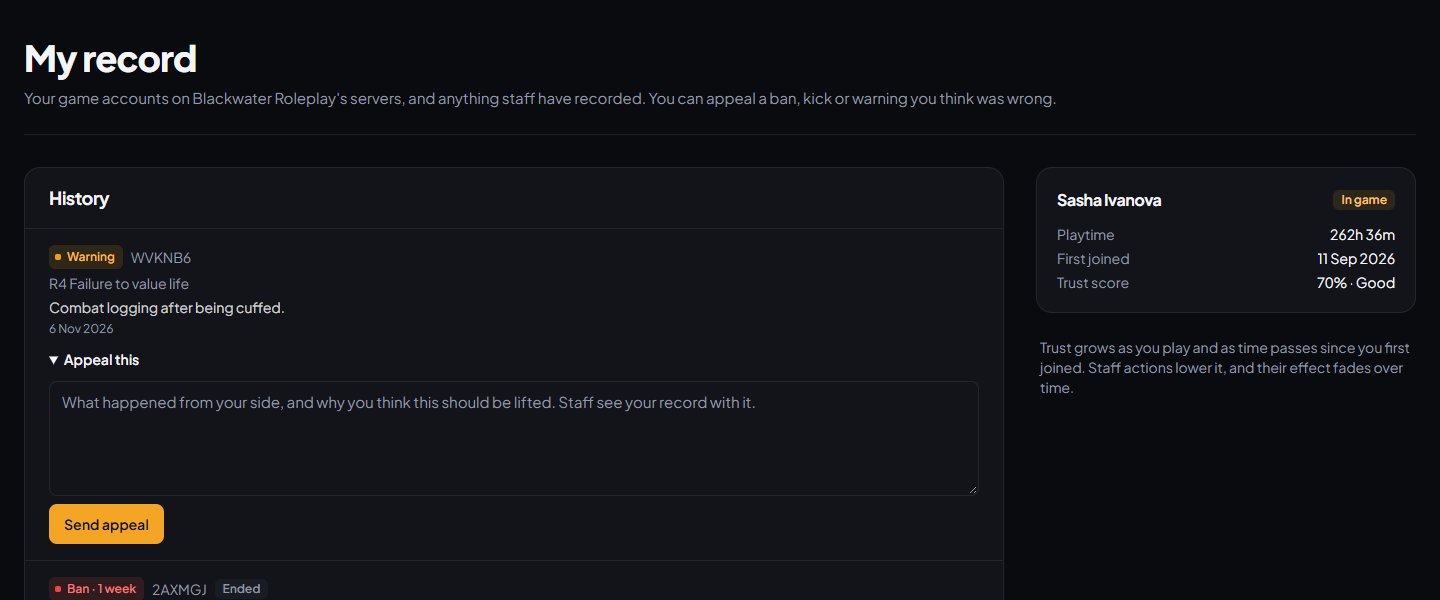
They can't appeal commendations, community service, bans that have run out or been lifted, or anything you haven't ticked under They can appeal.
Players who can't find their record need to join one of your servers with the Discord app running, then sign in on your community website with the same Discord account.
Decide an appeal#
-
Click Appeals under Staff Panel. The Waiting for staff tab lists new appeals.
-
Click an appeal to open it.
-
Read Their appeal, What they're appealing and Rest of their record. The cards at the top show their trust score, playtime, when they first joined and how many other actions they have.
-
Type your answer in the box under Decide. The player sees this.
-
Click Accept and lift the ban (or Accept and revoke it for a kick or warning), or Deny.
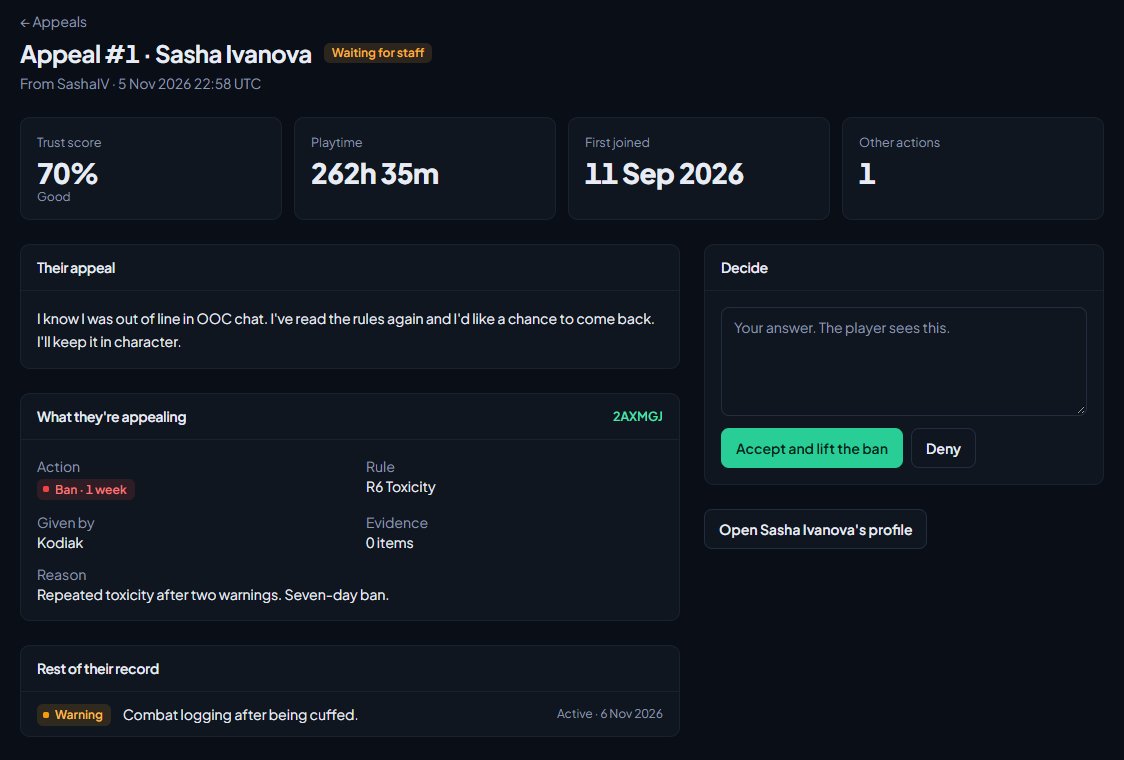
The staff member who gave the action can't decide its appeal. They see You gave this action, so someone else has to decide the appeal.
What happens afterwards#
If you accept an appeal:
- The ban is lifted, or the kick or warning is revoked, with the reason Appeal accepted: followed by your answer.
- It stops counting against the player's trust score.
- On the Staff team page it counts as overturned for the staff member who gave it.
Either way, the player is told the outcome and your answer, with a link to their record. They're notified in the ways they've chosen for Your game record in their notification settings, which starts as on the site, by email and on Discord.
New appeals are posted to your New appeals log channel on Discord, if you've set one. See Post logs to Discord channels.
Decided appeals stay under the Accepted and Denied tabs.
Something not working?#
A player says they have nothing to appeal, or no game account. Their record is matched by Discord. They'll see No game account found yet until LonexOne has seen them join with Discord linked to the account they sign in with on your website.
A player sees "Appeals are closed." Let players appeal is unticked.
A player sees "This kind of action can't be appealed." That type isn't ticked under They can appeal.
A player sees "This is no longer in force." The ban has run out or been lifted, or the action was revoked.
A player sees "You've already appealed this." Each action can only be appealed once. If there's something new, they'll need to contact your staff another way.
My record isn't in the member menu. Show players their record on the community site is unticked, or the Staff Panel isn't installed.
See also
Warn, kick and ban players
Give warnings, kicks and bans from a player's profile, pick the rule they broke, attach evidence, choose what players see, and set up automatic kicks or bans after repeated warnings.
Search the moderation log and change or undo actions
Find any commendation, warning, kick or ban, export the log to a spreadsheet, add evidence and comments, change a ban's length, and lift bans or revoke actions.
Trust scores and the reward ladder
How each player's trust score is worked out, how to tune it, how to use it to keep players out or gate applications, and how to reward regular players with tiers and Discord roles.
Choose what members are notified about
Pick which notifications go out on the site, by email and by Discord DM for each kind of update, see what members can turn off themselves, and check for Discord DMs that didn't arrive.
Can't find what you need?
Open a ticket in our Discord and someone from the team will help. Found a bug, or missing a feature? Tell us on the feedback board.