Import players from txAdmin or LonexStaff
Bring your player records, notes, warnings and bans over from txAdmin's playersDB.json or a LonexStaff database export, so nothing is lost when you move to the Staff Panel.
If you've been running your servers with txAdmin or LonexStaff, you can bring your player history with you. The import adds every player with their identifiers and playtime, along with their notes, warnings and bans, so your staff can see a player's full past from day one.
Imported bans are enforced straight away. A player who was banned in txAdmin is kept out of your servers by LonexOne as soon as the import finishes.
Before you start#
- You need the Set up the Staff Panel: rules, guidelines and settings permission.
- The Staff Panel module needs to be installed. See Set up the Staff Panel.
- The file can be up to 20 MB.
What comes across#
| From | What's imported |
|---|---|
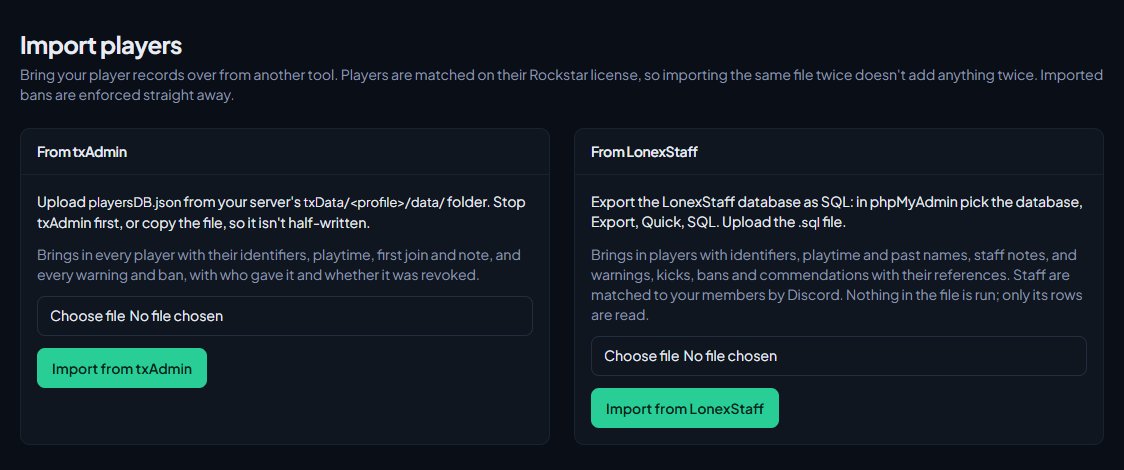
| txAdmin | Every player with their identifiers, playtime, first join and txAdmin note, and every warning and ban, with who gave it and whether it was revoked. |
| LonexStaff | Players with their identifiers, playtime and past names, staff notes, and warnings, kicks, bans and commendations with their references. |
Players are matched on their Rockstar license. A player who isn't in the file with a Rockstar license is skipped.
Import from txAdmin#
-
On your game server, find playersDB.json in the txData/<profile>/data/ folder.
-
Stop txAdmin first, or make a copy of the file, so you don't upload it half-written.
-
In your control panel, click Import players under Staff Panel.
-
In the From txAdmin box, choose the file.
-
Click Import from txAdmin.
Import from LonexStaff#
- Open phpMyAdmin (or whatever you use to manage your database) and pick the LonexStaff database.
- Click Export, choose Quick and SQL, and download the file. You can also use mysqldump.
- In your control panel, click Import players under Staff Panel.
- In the From LonexStaff box, choose the .sql file.
- Click Import from LonexStaff.
LonexOne only reads the rows in the file. Nothing in it is run.
What happens afterwards#
When the import finishes you'll see a message like Imported 240 new players, 31 warnings, kicks and bans, and 12 notes. If some rows were already in LonexOne or couldn't be matched to a player, the message tells you how many were skipped.
Afterwards:
- Imported players show on the Players page. Their playtime and first join date come from the file. If a player is already in LonexOne, the earlier first join and the higher playtime are kept.
- Imported actions show in each player's history and in the Moderation log, with a new six-character reference. LonexStaff actions keep their original reference where it's free.
- Bans that were still running in the old tool are enforced from now on. Bans that were revoked or lifted come across as revoked.
- Notes end with a line saying where they came from, for example (imported from txAdmin).
- Players aren't shown the imported warnings or commendations when they next join. They happened before LonexOne could tell them.
- Each import is recorded in the activity log.
Who gave each action#
- txAdmin doesn't know your LonexOne members, so the staff column is left empty. The txAdmin admin's name and the original action ID are added to the end of the reason instead, for example (by Alex in txAdmin, ABCD-1234).
- LonexStaff staff members are matched to your members by Discord. If a staff member has signed in to your community site with the same Discord account, their actions and notes show under their name.
Running the same import twice is safe. Players are matched on their Rockstar license, and an action with the same type, time and reason as one already on the player is skipped, so nothing is added twice. You can import again later to pick up anything added in the old tool since.
Something not working?#
It says "That isn't a txAdmin playersDB.json file." The file you picked isn't txAdmin's player database. Make sure it's playersDB.json from txData/<profile>/data/, not another file from that folder.
It says "No LonexStaff players found." The export didn't include the players table. Export the whole LonexStaff database as SQL, not just one table.
The upload is refused because the file is too big. The limit is 20 MB. If your file is bigger, message us in the LonexLabs Discord.
Lots of rows were skipped. Rows are skipped when they're already in LonexOne, when they have no Rockstar license to match a player on, or (for txAdmin) when the action is something other than a warning or a ban.
Imported actions have no staff member shown. For txAdmin this is expected; the admin's name is in the reason. For LonexStaff, that staff member hasn't signed in to your community site with the Discord account LonexStaff had for them.
See also
Set up the Staff Panel
Install the Staff Panel, connect your game server, give your staff the right permissions and work through the staff settings before you start moderating.
Look up a player's history
Find any player who has joined your servers, and read their profile: playtime, past names, linked accounts, warnings and bans, sits and the event log of kills, damage and chat.
Search the moderation log and change or undo actions
Find any commendation, warning, kick or ban, export the log to a spreadsheet, add evidence and comments, change a ban's length, and lift bans or revoke actions.
Control who can join your servers
How LonexOne checks every player as they connect: bans and ban evasion, a minimum trust score, and an allowlist that only lets in staff, chosen roles and accepted applicants.
Can't find what you need?
Open a ticket in our Discord and someone from the team will help. Found a bug, or missing a feature? Tell us on the feedback board.