Keep notes and game identifiers on a member
Write private staff notes on someone's profile, record their FiveM identifiers like their Rockstar license or Steam, and see the game accounts the Staff Panel has matched to them.
Every profile on the People page has a private notes box and a list of game identifiers. Notes are for anything your staff team should know about someone, like a past issue or an agreement you made with them. Game identifiers let you record which FiveM accounts belong to that person, so staff can check who someone is in game.
Before you start#
To write notes and add or remove identifiers, you need a role with the Edit profiles, notes and game identifiers permission. Owners and administrators have it already. This permission can't be limited to one department.
Write notes on someone#
- Click People in the left sidebar and open the person's profile.
- Find the Notes box on the right.
- Type your notes. You can write up to 10,000 characters.
- Click Save notes.
You'll see Notes saved. at the top of the page.
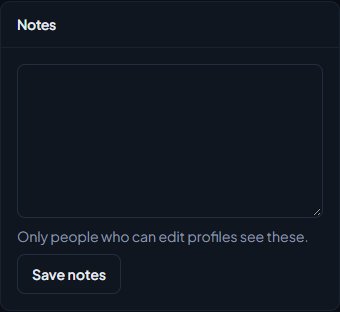
To remove the notes, clear the box and click Save notes.
Only people with the Edit profiles, notes and game identifiers permission can see the notes box. Anyone else who opens the profile won't see it at all. The person themselves never sees their notes.
There's one notes box per person, shared by your whole staff team, so edit it rather than replacing what's there. The activity log records who changed someone's notes and when, but not what was written. See See who changed what in the activity log.
Add a game identifier#
- Open the person's profile.
- In the Game identifiers box on the right, pick the type of identifier.
- Paste the identifier into the box below it. You can paste it the way the server console shows it, for example license:1a2b3c, or without the part before the colon.
- Click Add identifier.
You'll see a message like Added Rockstar license identifier.
These are the types you can add:
| Type | Prefix the server shows |
|---|---|
| Rockstar license | license: |
| Rockstar license 2 | license2: |
| Steam | steam: |
| Cfx.re | fivem: |
| Xbox Live | xbl: |
| Microsoft | live: |
If you paste an identifier with a prefix, the prefix decides the type, even if you picked a different one. That way it's always saved as what the game reported.
Remove a game identifier#
- Open the person's profile.
- In Game identifiers, click Remove next to the identifier.
You'll see Identifier removed.
Game accounts from the Staff Panel#
If your community uses the Staff Panel and your role has See the player database: profiles, playtime, past names and linked accounts, the Game identifiers box also lists the game accounts seen on your servers with this person's Discord.
Each account shows its in-game name, when it was last seen in game, and the identifiers the game reported for it. Click the account name to open the player in the Staff Panel. See Look up a player's history.
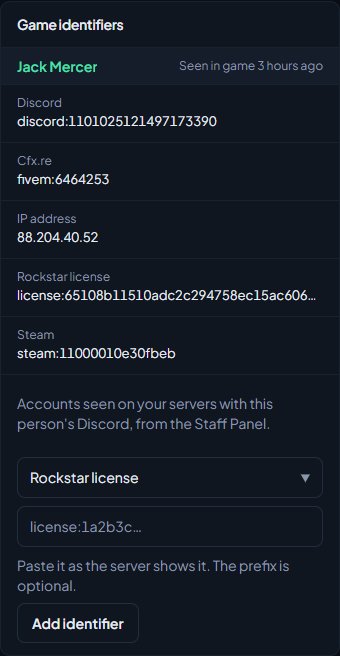
These accounts come from your game servers automatically, so you can't remove them here. IP addresses and hardware tokens are only shown if your role also has See players' IP addresses and hardware tokens. An identifier you've already added by hand isn't listed twice.
Game accounts are matched to people by the Discord account they have connected in FiveM. The identifiers you add by hand are a record for your staff. They don't change which game accounts are matched.
Rules and limits#
- Anyone who can open someone's profile can see their game identifiers. Only people with Edit profiles, notes and game identifiers can add or remove them.
- An identifier can only belong to one person in your community.
- Identifiers are saved in lower case, and can only be letters and numbers after the prefix.
- You can search the People page by an identifier you've added. Type the whole identifier, with or without its prefix.
Something not working?#
It says "Already on this profile." That identifier is already saved for this person. You don't need to add it again.
It says someone else "already has this identifier". The message names the person who has it, for example Jake Hale (@jakehale) already has this identifier. An identifier can only be on one profile. Open that person's profile and check which one it really belongs to, then remove it from the wrong one.
It says "Identifiers are letters and numbers only, like license:1a2b3c." There's something in the value that isn't a letter or number, like a space or a dash, or it's empty. Copy it again from the server console. If it has a prefix, make sure there's only one, for example steam:110000112345678.
I can't see the Notes box or the Add identifier form. Your role doesn't have Edit profiles, notes and game identifiers. Ask your community owner to add it under Roles & permissions.
I can't see the game accounts from the Staff Panel. Check the Staff Panel is installed and your role has See the player database: profiles, playtime, past names and linked accounts. The person also needs to have played on one of your servers with their Discord connected in FiveM.
See also
Find anyone on the People page
Search everyone in your community by name, username, badge, Discord ID or game identifier, filter by department and status, and open a profile to see their departments, certifications and history.
Set a member's badge number
How badge numbers are handed out automatically, how to change or remove one, and where badge numbers show up, from Discord nicknames to the public roster.
Look up a player's history
Find any player who has joined your servers, and read their profile: playtime, past names, linked accounts, warnings and bans, sits and the event log of kills, damage and chat.
Can't find what you need?
Open a ticket in our Discord and someone from the team will help. Found a bug, or missing a feature? Tell us on the feedback board.