Make short links like yoursite.com/discord
Create short addresses on your community site that send people to your Discord, your server, your store or anywhere else, and see how often each one is used.
Short links are easy-to-remember addresses on your own site that send people somewhere else. Instead of pasting a long Discord invite in game or on a stream, you can tell people to go to yourcommunity.lonexone.com/discord. If the invite ever changes, you update the short link once and every place you've shared it keeps working.
Each short link counts its clicks, so you can also see which ones people actually use.
Before you start#
You need to be the owner, or have a role with the Edit the community site: pages, navigation and branding permission.
Your starter links#
The first time you open the Short links tab, LonexOne makes a few for you from what you've already set up:
| Link | Goes to |
|---|---|
| /discord | Your Discord invite from Branding & content. |
| /connect | Your main server's connect link from Status & servers. |
| /go/store | Your store link from Branding & content, if you haven't connected Tebex. |
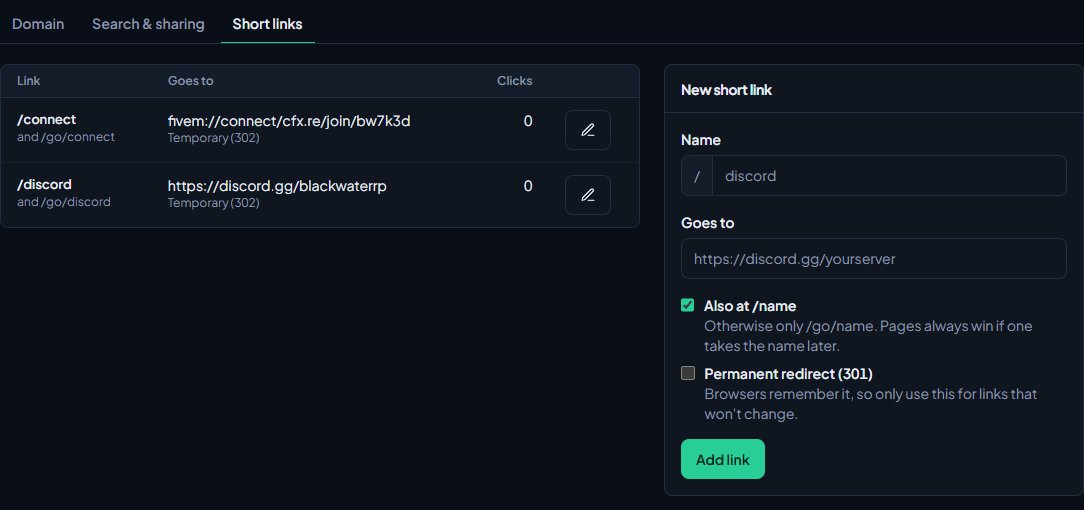
A starter is only made if you had that thing set up, and they're only made once. You can edit or delete them like any other link.
Add a short link#
- Open your control panel.
- In the sidebar, under Modules, click Community Site, then Domain, SEO & links.
- Click the Short links tab.
- Under New short link, type a Name, such as wiki or apply-ems. Use lower-case letters, numbers and dashes, up to 60 characters.
- In Goes to, paste the full address it should send people to. It has to start with https://, http:// or fivem://.
- Choose the options you want (see below).
- Click Add link.
You'll see Short link added. It works straight away.
The options#
| Option | What it does |
|---|---|
| Also at /name | The link works at /wiki as well as /go/wiki. Untick it to use /go/wiki only. |
| Permanent redirect (301) | Tells browsers the link will never change, so they remember where it goes. Only tick this for links you're sure about, because browsers that remember it won't pick up a later change. |
Every short link always works at /go/ followed by its name, whichever options you pick.
Edit or delete a short link#
- On the Short links tab, click the pencil next to the link.
- Change the name, the address or the options, then click Save. Or click Delete and confirm to remove it.
The table shows each link's address, where it goes, whether it's permanent or temporary, how many times it's been clicked and when it was last used.
Links that clash with your site#
Your site already uses some addresses, such as /news, /store, /support and /cad, and your pages have their own addresses too. A short link can't take one of those at the top level, but it still works at /go/ followed by its name.
If a page is given the same address as a short link later on, the page wins and the short link keeps working at /go/ instead. The table shows a warning under any link this has happened to.
Ideas#
- /connect with a fivem:// link, so players can join your server straight from a browser.
- /staff-app pointing at an outside application form.
- /rules-video or /trailer for a YouTube video.
- One short link per streamer or partner, so you can see who sends you the most players.
Something not working?#
It says "Use lower-case letters, numbers and dashes." Names can only have a to z, 0 to 9 and dashes, and can't start or end with a dash. Spaces aren't allowed.
It says "You already have a link with that name." Each name can only be used once. Edit the existing link instead, or pick another name.
It says "Links start with https://, http:// or fivem://." Paste the full address, including the part at the start.
It says the address "is already part of your site" or "A page already uses" it. That address is taken by a built-in part of your site or one of your pages. Untick Also at /name to use the /go/ address, or choose a different name.
I changed where a link goes but people still end up at the old place. The link was set as a Permanent redirect (301), so their browsers remembered it. Untick it for links you might change. People who already visited may need to clear their browser's history to see the new place.
See also
Set up SEO and social links
Control how your site looks in Google and in link previews on Discord and X, hide it from search engines if you're private, and add your social links to the footer.
Use your own domain name
Put your community site on a domain you own, like sunnysiderp.com, by adding two DNS records. Covers making it your main address and removing it again.
Change your site's menu
Choose the links in your community site's header, put them in order, give them icons, move some into the Links menu and turn one into a button.
Brand your site: logo, colours and home page
Set your community's name, logo, favicon and accent colour, choose how your home page looks to visitors, and add your Discord invite and social links.
Can't find what you need?
Open a ticket in our Discord and someone from the team will help. Found a bug, or missing a feature? Tell us on the feedback board.