Request tows and run the impound lot
How police and dispatch request a tow from a call or a plate check, and how tow drivers take the job, impound the vehicle and release it from the lot.
Towing and impound gives your tow drivers a job in the CAD. Police and dispatch request a tow, it appears in the tow queue, a driver takes it, and the vehicle goes into the impound lot until someone releases it. While it's in the lot, the vehicle shows as impounded on its owner's file.
Tow drivers don't need to be in a department or on duty. It's a civilian job, so they work it from the Civilian panel.
Before you start#
- Towing and impound needs to be turned on under Modules on the CAD settings page. It's on to start with.
- Tow drivers need a role with the Work the tow queue and impound lot permission.
- Police units and dispatchers on duty can request tows. No extra permission is needed.
Request a tow#
You can request a tow from a call or from a plate check.
From a call:
- Open the call.
- In the Tows box, click Request tow.
From a plate check:
- Run the plate.
- Click Request tow on the result.
Then fill in the form:
-
Check the Plate. If you started from a plate check, it's filled in for you. From a call, type it in if you know it.
-
Check the Location. It's filled in from the call, or from your unit's location.
-
Write the Reason, for example "Abandoned, no insurance".
-
Click Request tow.
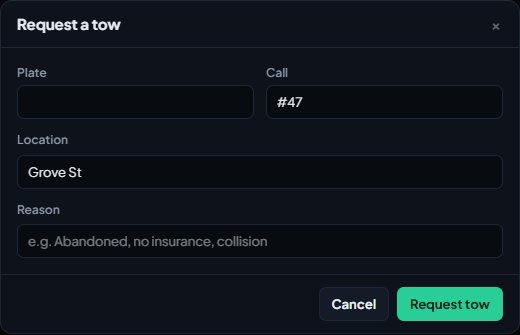
The tow gets a number like T-0007. If it's linked to a call, a note is added to the call and the tow shows in the call's Tows box with its status.
| Status | Means |
|---|---|
| Waiting | Nobody has taken the tow yet. |
| En route | A driver has taken it. |
| Towed | The vehicle is in the impound lot. |
| Cancelled | The tow was cancelled. |
Open the tow queue#
- Open the CAD on the community website.
- On the Select a panel screen, click Tow queue under Desks.
You can also open Tow queue from the sections along the top of the Civilian panel.
Open tows are listed under Tow queue, oldest first, with the plate, the vehicle, the reason, the location, who asked for it and the call it's linked to.
Take a tow and impound the vehicle#
- Click Take it on the tow. It changes to En route and shows your name, so other drivers know it's taken.
- When the vehicle is at the lot, click Impound.
- Fill in the Lot, for example "Davis impound lot".
- Add a Release fee if your community charges one.
- Check the Reason. It's filled in from the tow request.
- Add any Release conditions, for example "Proof of insurance".
- Click Impound vehicle.
The vehicle gets an impound number like IMP-0003, the tow is closed as Towed, and the vehicle is marked impounded on its owner's file.
To cancel a tow that isn't needed any more, click Cancel on it and confirm.
Release a vehicle#
Vehicles in the lot are listed under Impound lot, newest first.
- Find the vehicle.
- Type a Release note if you want one.
- Click Release and confirm.
The vehicle is no longer marked impounded.
With towing turned on, civilians can't mark their own vehicles as impounded or take the mark off. Only the impound lot can. With towing off, civilians have an Impounded box on their vehicle instead.
Something not working?#
There's no Request tow button. You need to be on duty as a police unit or a dispatcher, and Towing and impound has to be on in CAD settings. On a call, the button only shows while the call is open.
It says "Give the plate or pick the call." A tow needs a plate or a call. Type the plate in, or request the tow from the call.
It says "Say why the vehicle needs towing." Fill in the Reason.
It says the plate "already has a tow on the way." There's already an open tow for that vehicle. Check the call's Tows box or the tow queue.
It says "Someone already took that tow." Another driver clicked Take it first. Pick a different tow.
It says "Say which lot it went to." Fill in the Lot before clicking Impound vehicle.
Tow queue doesn't show under Desks. The member's role needs the tow permission, and Towing and impound has to be on in CAD settings.
See also
Create a civilian character
How members make a civilian character in the CAD, add licences, vehicles and firearms, and what staff control, like how many characters each member can have.
Run name, plate and serial lookups
Search people, plates, firearm serials and businesses while on duty, read what comes back, and know which units can search what.
Get licences, registrations and plates from the DMV
Turn on the DMV so civilians apply for licences and registrations, and work the DMV desk: issue or deny applications, renew, suspend, re-plate and transfer vehicles.
Turn CAD features on and off
Switch off the parts of the CAD your community doesn't use, from the DMV and courts to ride-alongs and Signal 100, and set the options that go with them, like quiet call closing, warrant approval and alert tones.
Can't find what you need?
Open a ticket in our Discord and someone from the team will help. Found a bug, or missing a feature? Tell us on the feedback board.