Use the CAD in game on the tablet
Open the CAD inside FiveM with /tablet or your community's tablet key, already signed in, and fix the messages that stop it opening.
The tablet is the CAD on a screen inside the game. You don't need to alt-tab to a browser or sign in again: the game server signs you in for you, so you can take calls and run plates without leaving FiveM.
It's the same CAD you use on the website, in the same design, so everything in the other articles works on the tablet too.
Before you start#
- Your community needs the LonexOne FiveM resource running on its game server.
- Your FiveM needs to be linked to Discord, and you need to have signed in to your community's website with that same Discord account at least once. That's how the CAD knows who you are.
Open the tablet#
- In game, type /tablet in chat, or press your community's tablet key if they've set one.
- The tablet opens with Opening the CAD… while it signs you in.
- The CAD loads. If you're on duty, you go straight to your duty screen. If not, you'll see the panel list to sign on.
Your community can rename the command, so ask your staff if /tablet doesn't work.
Close and reopen it#
- Click Close at the top of the tablet, press Escape, or press the tablet key again.
- Opening it again takes you back to where you were, without signing in again.
- If the CAD stops responding, click Reload at the top of the tablet. That gets a fresh sign-in and loads the CAD again.
What the tablet can open#
The tablet only opens the CAD. If you click a link to another part of your community's website, like the home page or your account, it brings you back to the CAD. Use a normal browser for everything else.
The tablet key#
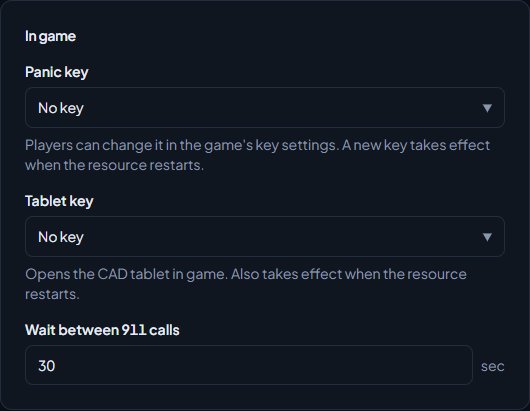
Your community chooses one of these in the control panel:
| Setting | What it means for you |
|---|---|
| No key | Use /tablet to open it |
| Players pick their own in the game's key settings | Set a key yourself in the game's settings, under Key Bindings then FiveM. Look for "LonexOne CAD tablet" |
| A key, like F10 | Press that key. You can still change it in the game's key bindings |
For staff: the tablet key is set on Status & servers, on the Game resource tab, under Tablet key. A new key takes effect when the resource restarts.
Something not working?#
It says "Link Discord to FiveM to use the CAD". The game server can't see your Discord account. FiveM only picks it up when the Discord app is open on the same computer, so open Discord, then rejoin the server.
It says your Discord isn't linked to the community on LonexOne. The message reads like "Your Discord isn't linked to Blackwater on LonexOne. Sign in on the community website with Discord first." Go to the community's website and sign in with Discord, using the same Discord account you use in FiveM. Then open the tablet again.
It says "That tablet link has expired. Open the tablet again in game." Sign-in links from the game work once and only for two minutes. Click Reload on the tablet, or close it and open it again.
It says "Wait a few seconds and try again". You opened the tablet several times in quick succession. Wait a moment, then click Retry.
It says "The CAD isn't switched on for this community." Your community hasn't installed the CAD module. Ask your staff.
/tablet does nothing. Your community may have renamed or switched off the command. Ask your staff for the current name, or see Every in-game command.
See also
Go on duty in the CAD
Sign on with your department and callsign, skip the panel screen with a default, go off duty, and fix the messages that stop you signing on.
Every in-game command
Every command the LonexOne resource adds, who can use it and what it does, plus how to rename commands, set the panic and tablet keys and change how messages look.
Install the LonexOne FiveM resource
Claim the free resource through Tebex, download it from Keymaster, add it to your server with screenshot-basic and the optional camera prop, and start it.
Sign in with Discord, Google or email
Discord is your main login. Link Google or a verified email as backup ways into the same account, and remove them when you need to.
Can't find what you need?
Open a ticket in our Discord and someone from the team will help. Found a bug, or missing a feature? Tell us on the feedback board.