Change a member's status
What Active, In training, Leave of absence, Suspended and Inactive each mean, how to change someone's status, and which statuses LonexOne changes for you.
Everyone on a department's roster has a status. It shows next to their name on the roster and their profile, and it decides whether they can go on duty and whether they keep the department's Discord roles.
Most status changes happen on their own: approved leave puts someone on leave of absence, a suspension sets them to suspended, and your activity rules can mark people inactive. You can also change it yourself at any time.
Before you start#
You need the Add members, change ranks, callsigns and status permission. If it's limited to one department, you can only change the status of people ranked below you there.
What each status means#
| Status | Can go on duty and clock in | Keeps Discord roles and rank permissions | Can request leave |
|---|---|---|---|
| Active | Yes | Yes | Yes |
| In training | Yes | Yes | Yes |
| Leave of absence | No | Yes | No |
| Suspended | No | No | No |
| Inactive | No | No | No, unless your inactivity rule set it |
| Left | No | No | No |
Losing Discord roles means the roles for that department, its ranks and divisions, and its certifications. They come back when the status changes back. Suspended and inactive members keep their Discord nickname, and roles from community roles or other departments aren't touched.
Left is the status of someone who's been removed from the department or transferred out. You can't pick it from the status list. To set it, remove them from the department, see Add someone to the roster and set their callsign.
"Can go on duty" covers signing on in the CAD, the clock on the community website, in-game duty and logging past shifts. Someone who's on leave, suspended or inactive sees a message saying they can't go on duty while they're in that status. The one exception is someone your inactivity rule set to inactive: they can still go on duty, and doing so puts them back to the status they had before.
Change someone's status#
-
Open People in the left sidebar and click the person's name.
-
Under Departments, find the department and click Manage.
-
Pick the new status under Status.
-
Optionally type a reason. It's saved in their history.
-
Click Change status.
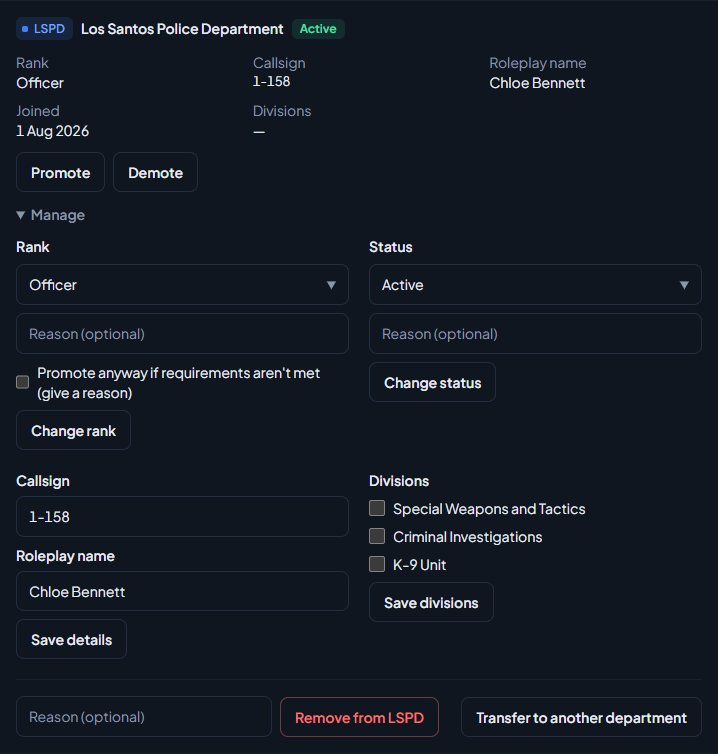
You'll see Status set to Suspended., or whichever status you picked. Their Discord roles update straight away. The change shows in their History as, for example, LSPD status changed from Active to Suspended, with your reason and your name.
Statuses LonexOne changes for you#
| What happens | Status change |
|---|---|
| Leave you approved starts | Active or In training becomes Leave of absence. |
| That leave ends, or you end it early | Back to the status they had before the leave. |
| You issue a suspension | Suspended until the date you set. |
| The suspension ends or you revoke it | Back to the status they had before. |
| You issue a termination | Removed from the department (Left). |
| An automatic discipline rule with Set inactive is reached | Inactive. |
| Your inactivity rule is set to Set inactive and they go too long without a shift | Inactive. |
Leave and suspension dates are checked every hour, so a change can take up to an hour to happen after the date passes.
Leave never overrides a suspension. If someone is suspended when their approved leave starts, they stay suspended.
Things to watch for#
- Inactive set by hand or by a discipline rule isn't undone on its own. They stay that way until you change them back, and they can't go on duty. Someone set inactive by your inactivity rule goes back to their old status as soon as they go on duty or have a shift approved.
- Leave of absence set by hand doesn't end on its own. Only leave that comes from an approved leave request ends automatically. If you pick Leave of absence from the list yourself, remember to change it back.
- Changing status while leave or a suspension is running. If you change their status by hand during leave or a suspension, LonexOne won't move them back when it ends, because they're no longer on leave or suspended.
Something not working?#
"Status unchanged." You picked the status they already have.
I can't see Manage on their profile. You don't have the permission over that person. With department-level access you can only manage people ranked below you.
They still have their Discord roles after being suspended. Role changes go through the LonexOne bot. Check the bot is still in your server and its role sits above the roles it hands out. See Fix Discord roles that aren't syncing.
Their status went back to Active by itself. Their leave or suspension ended. Check their History on their profile to see what changed and when.
See also
Add someone to the roster and set their callsign
Put a member into a department at a rank, give them a callsign and roleplay name, change those details later, and remove them from the department.
Approve leave requests
How members ask for leave of absence, how to approve or deny it, how leave starts and ends on its own, ending leave early, and seeing who's away on the leave calendar.
Issue and revoke discipline
Give warnings, strikes, suspensions and terminations, choose when they expire and whether the member sees them, revoke them, and set up automatic actions like suspending at three strikes.
Set activity rules and catch inactive members
Choose whether hours can be added by hand, cap how long a shift can run, set weekly hour quotas for each rank, and flag or set inactive anyone who goes too long without a shift.
Go on duty in the CAD
Sign on with your department and callsign, skip the panel screen with a default, go off duty, and fix the messages that stop you signing on.
Can't find what you need?
Open a ticket in our Discord and someone from the team will help. Found a bug, or missing a feature? Tell us on the feedback board.