Take letters of interest for a rank
Let members already in a department write a letter asking to be considered for a rank, then accept or decline each letter and change their rank when you're ready.
A letter of interest is how a member who's already in a department puts themselves forward for a rank, like Sergeant or a command position. They write a short letter on the community website, and your command team reads it in the control panel.
Letters are different from application forms. Applications bring new people into a department. Letters are only for people who are already in it, and accepting one doesn't change anyone's rank: you promote them separately when you're ready.
Before you start#
- The Department Panel module needs to be installed.
- To open a rank for letters, you need the Edit departments, ranks, divisions and certifications permission.
- To read and decide letters, you need the Review letters of interest permission. If it's limited to one department, you'll only see letters for that department, and only from people ranked below you.
Open a rank for letters#
-
Click Departments & ranks in the left sidebar and open the department.
-
Click Edit next to the rank.
-
Scroll down to Public roster.
-
Under Open positions, pick Letter of interest, for people already in the department.
-
Click Save roster settings.
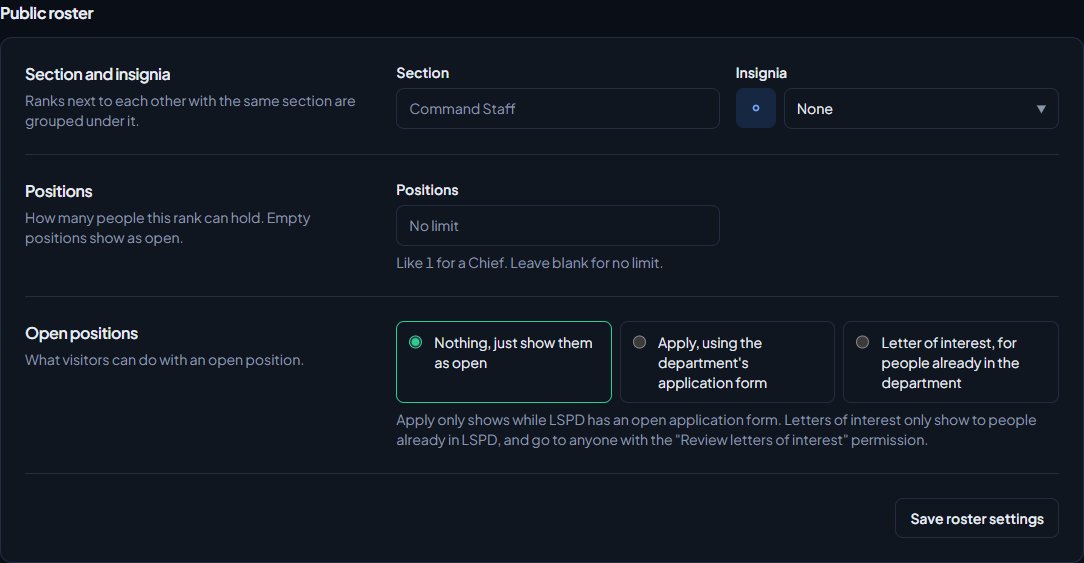
You'll see Saved roster settings for Sergeant. To stop taking letters, set Open positions back to Nothing, just show them as open.
Set Positions in the same section if the rank has a limited number of places, like 4 sergeants. Empty places then show as open positions on your public roster, each with a Letter of interest link.
Where members write their letter#
Members in the department can write a letter from two places on your community website:
- My departments, in their member area. The department's card lists the ranks under Taking letters of interest for.
- Your public roster, where open positions on the rank show a Letter of interest link. This shows to signed-in members of the department.
Only members who are Active, In training or on Leave of absence in the department can write one. The letter has to be between 30 and 5,000 characters. The page also shows them what's Needed for the rank, based on its promotion requirements.
Letters are only for ranks above the one they hold, so a Sergeant can't write one for Officer. A member can only have one letter in review for each rank. They can withdraw it until it's been reviewed.
Review letters#
- In the left sidebar, under Department Panel, click Letters of interest.
- The Pending tab shows letters waiting for review, oldest first. Decided shows ones you've accepted or declined.
- If you review more than one department, use the list at the top to show one.
Each letter shows who wrote it, their department and current rank, the rank they're asking for, when they sent it and the letter itself. Click their name to open their profile and check their history before you decide.
Accept or decline a letter#
- Optionally type a note in Note to them (optional). They'll see it.
- Click Accept or Decline.
The member is told the outcome along with your note, on the site, by email or by Discord DM, depending on the Letters of interest notification setting they've chosen.
Promote them after accepting#
Accepting a letter doesn't promote anyone. It tells the member you've chosen them, so you can promote them when the time is right.
- On the Decided tab, find the accepted letter.
- Click Change rank. It opens their profile at the right department.
- Click Manage, pick the rank under Rank, and click Change rank.
The Change rank button only shows if you have the Add members, change ranks, callsigns and status permission over them, and they're not already at that rank. The rank's promotion requirements still apply. See Promote, demote or transfer a member.
Something not working?#
"That letter has already been reviewed." Someone else accepted or declined it first, or the member withdrew it.
"They're no longer active in LSPD." The member has been suspended, set to inactive or has left since they wrote the letter, so it can't be accepted. You can still decline it.
Members say they can't find where to write a letter. Check the rank's Open positions is set to Letter of interest, for people already in the department. People who aren't in the department, or are suspended or inactive there, can't write one.
I'm not told when a new letter comes in. Everyone who can review a letter gets a Letters to review notification when it's sent. Check you haven't turned it off in your notification settings, and that you're ranked above the person who wrote it if your access is limited to one department. The Pending count on the Letters of interest page always shows what's waiting. If you post logs to Discord, you can send letters of interest to a channel, see Post logs to Discord channels.
See also
Promote, demote or transfer a member
Move someone up or down one rank from the roster, jump them straight to any rank, promote anyway when they miss a requirement, and transfer them to another department.
See who's ready for promotion
Use the Promotions page to find everyone who meets the requirements for their next rank, and everyone one requirement away, then promote them from the list.
Set up ranks and their order
Add a department's ranks, put them in order from highest to lowest, give each rank its own callsigns, promotion requirements and permissions, and choose how it shows on the public roster.
Build an application form
Create an application form for a department or the whole community, add questions, set requirements like Discord account age and a wait after denial, and open it for applications.
Can't find what you need?
Open a ticket in our Discord and someone from the team will help. Found a bug, or missing a feature? Tell us on the feedback board.